
Create pipeline
Create pipelines for reusable libraries
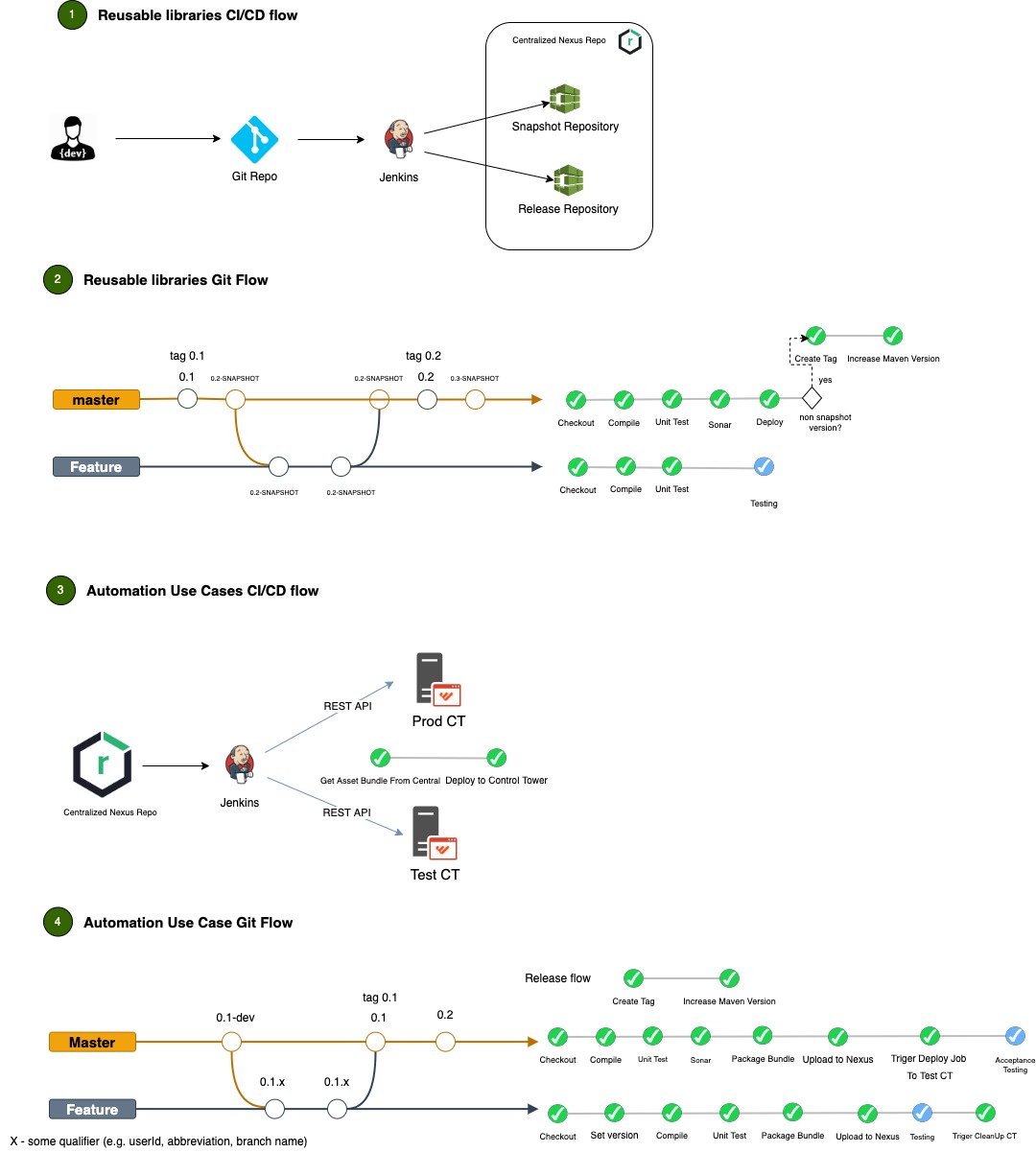
Add Maven settings
To add the required Maven settings, do the following:
In the root
pom.xmlfile, add distribution management settings.<distributionManagement> <repository> <id>nexus</id> <url>https://YOUR_HOST/repository/REPO_NAME</url> </repository> <snapshotRepository> <id>nexus</id> <name>Snapshots</name> <url>https://YOUR_HOST/repository/ANOTHER_REPO_NAME</url> </snapshotRepository> </distributionManagement>Configure Sonar.
note
It's recommended to create a convention for naming projects for Sonar. For example,
SOME_PREFIX.${project.groupId}:${project.artifactId} or ${project.groupId}:${project.artifactId}.Configure Sonar properties in
pom.xml.<!-- sonar preferences --> <sonar.host.url>SONAR_URL</sonar.host.url> <sonar.projectKey>${project.groupId}:${project.artifactId}</sonar.projectKey> <sonar.language>java</sonar.language> <sonar.java.source>8</sonar.java.source> <sonar.issuesReport.html.enable>true</sonar.issuesReport.html.enable> <sonar.issuesReport.console.enable>true</sonar.issuesReport.console.enable> <sonar.sourceEncoding>UTF-8</sonar.sourceEncoding> <sonar.java.coveragePlugin>jacoco</sonar.java.coveragePlugin> <sonar.dynamicAnalysis>reuseReports</sonar.dynamicAnalysis>Add a plugin for code coverage, for example:
<plugin>
    <groupId>org.jacoco</groupId>
    <artifactId>jacoco-maven-plugin</artifactId>
    <version>0.8.5</version>
    <executions>
        <execution>
            <id>prepare-agent</id>
            <goals>
            <goal>prepare-agent</goal>
            </goals>
        </execution>
        <execution>
            <id>report</id>
            <goals>
                <goal>report</goal>
            </goals>
        </execution>
    </executions>
</plugin>
Add a plugin for Sonar, for example:
<plugin>
    <groupId>org.sonarsource.scanner.maven</groupId>
    <artifactId>sonar-maven-plugin</artifactId>
    <version>3.8.0.2131</version>
</plugin>
Check that you’ve configured the Surefire plugin to run your unit tests:
Click to view JUnit 4.7 sample
<plugin>
    <groupId>org.apache.maven.plugins</groupId>
    <artifactId>maven-surefire-plugin</artifactId>
    <version>3.0.0-M5</version>
    <dependencies>
        <dependency>
            <groupId>org.apache.maven.surefire</groupId>
            <artifactId>surefire-junit47</artifactId>
            <version>3.0.0-M5</version>
        </dependency>
    </dependencies>
</plugin>
Click to view JUnit 5.1.1 sample
<plugin>
    <groupId>org.apache.maven.plugins</groupId>
    <artifactId>maven-surefire-plugin</artifactId>
    <version>3.0.0-M5</version>
    <dependencies>
        <dependency>
            <groupId>org.junit.jupiter</groupId>
            <artifactId>junit-jupiter-engine</artifactId>
            <version>5.1.1</version>
        </dependency>
    </dependencies>
</plugin>
Add build pipeline script to project
To add a script for the build pipeline to your project, do the following:
Create a file for the build pipeline. For example, in your root directory, create the
/jenkinsdirectory, and inside it, add thebuild.groovyfile.In the created
build.groovyfile, add the following content.Remember to replace
TODOplaceholders and change the script implementation in theenvironmentsection.Click to view sample Jenkins file
pipeline {
    agent any

    environment {
        CONFIGURED_JDK = "java8"        //name for JDK configured in Jenkins
        CONFIGURED_JDK_FOR_SONAR = "java11"
        //name for JDK configured in Jenkins, can be different if Sonar failed when using jdk8 for result submission
        CONFIGURED_MAVEN = "maven3"     //name for Maven configured in Jenkins
        CONFIGURED_MAVEN_SETTINGS = "my-maven-settings"     //id for the file in Jenkins with settings.xml for maven

        EMAIL_TO = "TODO"

        EMAIL_FROM = "TODO"

        GIT_USER_NAME = "TODO"
        GIT_USER_EMAIL = "TODO"

        MAIN_GIT_BRANCH = "master"
    }

    options {
        buildDiscarder(logRotator(numToKeepStr: '10', daysToKeepStr: '60'))
        skipDefaultCheckout true
    }

    stages {
        stage('prepare and checkout') {
            steps {
                // these changes for Git config are required only if your Git URL uses https://
                sh 'git config --global credential.helper cache'
                sh 'git config --global push.default simple'
                sh 'git config --global user.name "${GIT_USER_NAME}"'
                sh 'git config --global user.email "${GIT_USER_EMAIL}"'
                checkout scm
            }
        }

        stage('Build') {
            steps {
                withMaven(
                        jdk: env.CONFIGURED_JDK,
                        maven: env.CONFIGURED_MAVEN,
                        mavenSettingsConfig: env.CONFIGURED_MAVEN_SETTINGS,
                        options: [
                                openTasksPublisher(disabled: true),
                        ]
                ) {
                    script {
                        def pomFile = readMavenPom file: 'pom.xml'
                        env.MAVEN_VERSION = pomFile.getVersion()

                        String command = env.BRANCH_NAME ==~ /(${env.MAIN_GIT_BRANCH}$)/ ? "deploy" : "install"
                        sh "mvn -T 1C clean ${command}"
                    }
                }
            }
        }

        stage('Release') {
            when {
                branch env.MAIN_GIT_BRANCH
                expression { return !env.MAVEN_VERSION.contains("-SNAPSHOT") }
            }
            steps {
                script {
                    echo env.MAVEN_VERSION
                    sh "git tag ${env.MAVEN_VERSION}"
                    sh "git push --tags"

                    String[] versions = env.MAVEN_VERSION.split('\\.')
                    int lastVersion = Integer.valueOf(versions[versions.length - 1])
                    versions[versions.length - 1] = ++lastVersion
                    String newVersion = versions.join('.') + "-SNAPSHOT"

                    withMaven(
                            jdk: env.CONFIGURED_JDK,
                            maven: env.CONFIGURED_MAVEN,
                            mavenSettingsConfig: env.CONFIGURED_MAVEN_SETTINGS,
                            options: [
                                    openTasksPublisher(disabled: true),
                            ]
                    ) {
                        script {
                            sh "mvn versions:set -DnewVersion=${newVersion} versions:update-child-modules versions:commit"
                        }
                    }
                    sh "git add -A && git commit -am 'Change pom version to next SNAPSHOT'"
                    sh "git push origin ${env.BRANCH_NAME}"
                }
            }
        }
        stage('Sonar') {
            when {
                branch env.MAIN_GIT_BRANCH
            }
            steps {
                withMaven(
                        jdk: env.CONFIGURED_JDK_FOR_SONAR,
                        maven: env.CONFIGURED_MAVEN,
                        mavenSettingsConfig: env.CONFIGURED_MAVEN_SETTINGS,
                        options: [
                                openTasksPublisher(disabled: true),
                        ]
                ) {
                    script {
                        sh "mvn sonar:sonar"
                    }
                }
            }
        }
    }

    post {
        always {
            notifyEmail()
        }
    }
}

def notifyEmail() {
    mail body: "Build result: ${currentBuild.currentResult}. Job '${env.JOB_NAME}' build #${env.BUILD_NUMBER}. Branch: '${env.BRANCH_NAME}'\n More info at: ${env.BUILD_URL}",
            from: env.EMAIL_FROM,
            subject: "Jenkins build: ${currentBuild.currentResult}. Job '${env.JOB_NAME}'",
            to: env.EMAIL_TO
}
Create multibranch pipeline
To create a multibranch pipeline, see the instruction.
Create pipeline for use cases
Set up Git project
Create a Git project to store pipelines common to all scenarios (deploy and release) and the related meta-information. It helps you to avoid duplicate jobs for each case.
Create a Git project.
Create the components configuration file. For example, create
components.yamlin the root directory. Use this path in the variableUSE_CASES_CONFIG_YAML_PATHin use case Jenkins pipelines.Add meta information for the use cases to configure for CI/CD.
See the following example for
https://Git links:useCases: uc_code1: git: "https://GIT_HOST/OWNER/USE_CASE.git" mainBranch: "master" owner: "owner_email@text.com" uc_code2: git: "https://GIT_HOST/OWNER/USE_CASE.git" mainBranch: "master" owner: "another_owner_email@text.com"Add a standard pipeline script for the deploy scenario. For example, create the
/jenkinsdirectory, and inside it, place thedeploy.groovyfile.Remember to replace
TODOplaceholders and change the script implementation in theenvironmentsection.Click to view sample Jenkins file
pipeline {
    agent any

    environment {
        EMAIL_FROM = "TODO"

        GIT_CREDENTIALS_ID = "gitlab-id"

        USE_CASES_CONFIG_GIT_URL = "TODO"
        USE_CASES_CONFIG_MAIN_BRANCH = "main"
        USE_CASES_CONFIG_YAML_PATH = "components.yaml"
        USE_CASES_CONGIF_DEPLOY_SCRIPT_PATH = "scripts/deploy.sh"

        NEXUS_REPO_URL = "TODO"
        ASSET_BUNDLE_MODULE_SUFFIX = "bundle"

        CT_TEST_URL = "TODO"
        CT_USER_USER_ID = "TODO"
        CT_PROD_URL = "TODO"
        CT_PROD_USER_ID = "TODO"
    }

    options {
        buildDiscarder(logRotator(numToKeepStr: '10', daysToKeepStr: '60'))
        disableConcurrentBuilds()
    }

    stages {
        stage('Check out use-cases config') {
            steps {
                dir('use-case-config') {
                    checkout scm: [
                            $class           : 'GitSCM',
                            branches         : [[name: env.USE_CASES_CONFIG_MAIN_BRANCH]],
                            extensions       : [[$class: 'CloneOption', depth: 1, noTags: false, reference: '', shallow: false, timeout: 30],
                                                [$class: 'LocalBranch', localBranch: "**"]],
                            userRemoteConfigs: [[
                                                        credentialsId: env.GIT_CREDENTIALS_ID,
                                                        url          : env.USE_CASES_CONFIG_GIT_URL
                                                ]]
                    ]
                }
            }
        }

        stage('Update job parameters') {
            when {
                expression { return params.SKIP_RUN == null || params.SKIP_RUN }
            }
            steps {
                script {
                    currentBuild.displayName = "Update job params"
                    List<String> componentsList = new ArrayList<String>()

                    def componentsYAML = readYaml(file: "use-case-config/$USE_CASES_CONFIG_YAML_PATH")
                    componentsYAML.useCases.each { componentId, componentInfo -> componentsList.push(componentId) }

                    properties([
                            parameters([
                                    booleanParam(name: 'SKIP_RUN', description: 'Skips all stages. Used to update parameters in case of changes.', defaultValue: false),
                                    choice(name: 'USE_CASE', choices: componentsList.sort().join('\n')),
                                    choice(name: 'CT_ENVIRONMENT', choices: ['TEST', 'PROD'], description: 'Choose what CT to use'),
                                    stringParam(name: 'VERSION', description: 'What use case version to deploy')
                            ])
                    ])
                }
            }
        }

        stage('prepare and checkout') {
            when {
                expression { return !params.SKIP_RUN }
            }
            steps {

                script {
                    def componentsYAML = readYaml(file: "use-case-config/$USE_CASES_CONFIG_YAML_PATH")
                    componentsYAML.useCases.each { u, uInfo ->
                        if (u == params.USE_CASE) {
                            env.EMAIL_TO = uInfo.owner
                            env.USE_CASE_GIT_URL = uInfo.git
                            env.RELEASE_BRANCH = uInfo.mainBranch
                        }
                    }
                    echo "$env.EMAIL_TO"
                    echo "$env.USE_CASE_GIT_URL"
                    echo "$env.RELEASE_BRANCH"
                }

                checkout scm: [
                        $class           : 'GitSCM',
                        branches         : [[name: env.RELEASE_BRANCH]],
                        extensions       : [[$class: 'CloneOption', depth: 1, noTags: false, reference: '', shallow: false, timeout: 30],
                                            [$class: 'LocalBranch', localBranch: "**"]],
                        userRemoteConfigs: [[
                                                    credentialsId: env.GIT_CREDENTIALS_ID,
                                                    url          : env.USE_CASE_GIT_URL
                                            ]]
                ]
            }
        }

        stage('Deploy to CT') {
            when {
                expression { return !params.SKIP_RUN }
            }
            steps {
                script {
                    currentBuild.displayName = "${params.USE_CASE} v.${env.VERSION} to ${CT_ENVIRONMENT}"

                    env.CT_ENVIRONMENT_URL = params.CT_ENVIRONMENT == "PROD" ? env.CT_PROD_URL : env.CT_TEST_URL
                    env.CT_USER_ID = params.CT_ENVIRONMENT == "PROD" ? env.CT_PROD_USER_ID : env.CT_TEST_USER_ID

                    def pomFile = readMavenPom file: 'pom.xml'
                    String groupId = pomFile.getGroupId()
                    String module = pomFile.getModules().find { it.contains(env.ASSET_BUNDLE_MODULE_SUFFIX) }
                    String version = env.VERSION
                    String finalUrl = env.NEXUS_REPO_URL + groupId.replaceAll('\\.', '\\/') + "/" + module + "/" + version + "/" + module + "-" + version + ".zip"

                    echo "downloading $finalUrl"
                    sh " wget -O package.zip $finalUrl"

                    sh "chmod 0750 ./use-case-config/$USE_CASES_CONGIF_DEPLOY_SCRIPT_PATH"

                    withCredentials([usernamePassword(credentialsId: CT_USER_ID, usernameVariable: 'USERNAME', passwordVariable: 'PASSWORD')]) {
                        sh './use-case-config/$USE_CASES_CONGIF_DEPLOY_SCRIPT_PATH package.zip $CT_ENVIRONMENT_URL $USERNAME $PASSWORD'
                    }
                }
            }
        }
    }

    post {
        always {
            script {
                if (!params.SKIP_RUN) {
                    notifyEmail()
                }
            }
        }
    }
}

def notifyEmail() {
    mail body: "Deploy result for ${params.USE_CASE} v.${env.VERSION} to ${CT_ENVIRONMENT} : ${currentBuild.currentResult}. Job '${env.JOB_NAME}' build #${env.BUILD_NUMBER}. \n More info at: ${env.BUILD_URL}",
            from: env.EMAIL_FROM,
            subject: "Deploy ${params.USE_CASE} v.${env.VERSION} to ${CT_ENVIRONMENT}: ${currentBuild.currentResult}",
            to: env.EMAIL_TO
}
Add a standard pipeline script for the release scenario. For example, create the
/jenkinsdirectory, and inside it, place therelease.groovyfile.In the
environmentsection, replaceTODOplaceholders and change the script implementation.Click to view sample Jenkins file
pipeline {
    agent any

    environment {
        CONFIGURED_JDK = "java8"        //name for JDK configured in Jenkins
        //name for JDK configured in Jenkins, can be different if Sonar failed when using jdk8 for result submission
        CONFIGURED_MAVEN = "maven3"     //name for Maven configured in Jenkins
        CONFIGURED_MAVEN_SETTINGS = "my-maven-settings"     //id for the file in Jenkins with settings.xml for Maven

        EMAIL_FROM = "TODO"

        GIT_USER_NAME = "TODO"
        GIT_USER_EMAIL = "TODO"
        GIT_CREDENTIALS_ID="gitlab-id"

        USE_CASES_CONFIG_GIT_URL = "TODO"
        USE_CASES_CONFIG_MAIN_BRANCH = "main"
        USE_CASES_CONFIG_YAML_PATH = "components.yaml"
    }

    options {
        buildDiscarder(logRotator(numToKeepStr: '10', daysToKeepStr: '60'))
        disableConcurrentBuilds()
    }

    stages {
        stage('Check out use-cases config') {
            steps {
                dir('use-case-config') {
                    checkout scm: [
                            $class           : 'GitSCM',
                            branches         : [[name: env.USE_CASES_CONFIG_MAIN_BRANCH]],
                            extensions       : [[$class: 'CloneOption', depth: 1, noTags: false, reference: '', shallow: false, timeout: 30],
                                                [$class: 'LocalBranch', localBranch: "**"]],
                            userRemoteConfigs: [[
                                                        credentialsId: env.GIT_CREDENTIALS_ID,
                                                        url          : env.USE_CASES_CONFIG_GIT_URL
                                                ]]
                    ]
                }
            }
        }

        stage('Update job parameters') {
            when {
                expression { return params.SKIP_RUN == null || params.SKIP_RUN }
            }
            steps {
                script {
                    currentBuild.displayName = "Update job params"
                    List<String> componentsList = new ArrayList<String>()

                    def componentsYAML = readYaml(file: "use-case-config/$USE_CASES_CONFIG_YAML_PATH")
                    componentsYAML.useCases.each { componentId, componentInfo -> componentsList.push(componentId) }

                    properties([
                            parameters([
                                    booleanParam(name: 'SKIP_RUN', description: 'Skips all stages. Used to update parameters in case of changes.', defaultValue: false),
                                    choice(name: 'USE_CASE', choices: componentsList.sort().join('\n'))

                            ])
                    ])
                }
            }
        }

        stage('prepare and checkout') {
            when {
                expression { return !params.SKIP_RUN }
            }
            steps {

                sh 'git config --global credential.helper cache'
                sh 'git config --global push.default simple'
                sh 'git config --global user.name "${GIT_USER_NAME}"'
                sh 'git config --global user.email "${GIT_USER_EMAIL}"'

                script {
                    def componentsYAML = readYaml(file: "use-case-config/$USE_CASES_CONFIG_YAML_PATH")
                    componentsYAML.useCases.each { u, uInfo ->
                        if (u == params.USE_CASE) {
                            env.EMAIL_TO = uInfo.owner
                            env.USE_CASE_GIT_URL = uInfo.git
                            env.RELEASE_BRANCH = uInfo.mainBranch
                        }
                    }
                    echo "$env.EMAIL_TO"
                    echo "$env.USE_CASE_GIT_URL"
                    echo "$env.RELEASE_BRANCH"

                    sh "rm -r use-case-config"
                }

                checkout scm: [
                        $class           : 'GitSCM',
                        branches         : [[name: env.RELEASE_BRANCH]],
                        extensions       : [[$class: 'CloneOption', depth: 1, noTags: false, reference: '', shallow: false, timeout: 30],
                                            [$class: 'LocalBranch', localBranch: "**"]],
                        userRemoteConfigs: [[
                                                    credentialsId: env.GIT_CREDENTIALS_ID,
                                                    url          : env.USE_CASE_GIT_URL
                                            ]]
                ]
            }
        }

        stage('Release') {
            when {
                expression { return !params.SKIP_RUN }
            }
            steps {
                script {
                    def pomFile = readMavenPom file: 'pom.xml'
                    env.RELEASE_VERSION = pomFile.getVersion()

                    currentBuild.displayName = "${params.USE_CASE} v. ${env.RELEASE_VERSION}"

                    echo "$env.RELEASE_VERSION"
                    sh "git tag ${env.RELEASE_VERSION}"
                    sh "git push --tags"

                    String[] versions = env.RELEASE_VERSION.split('\\.')
                    int lastVersion = Integer.valueOf(versions[versions.length - 1])
                    versions[versions.length - 1] = ++lastVersion
                    String newVersion = versions.join('.')

                    withMaven(
                            jdk: env.CONFIGURED_JDK,
                            maven: env.CONFIGURED_MAVEN,
                            mavenSettingsConfig: env.CONFIGURED_MAVEN_SETTINGS,
                            options: [
                                    openTasksPublisher(disabled: true),
                            ]
                    ) {
                        script {
                            sh "mvn versions:set -DnewVersion=${newVersion} versions:update-child-modules versions:commit"
                        }
                    }
                    sh "git add -A && git commit -am 'Change pom version to the next'"
                    sh "git push origin ${env.RELEASE_BRANCH}"
                }
            }
        }
    }

    post {
        always {
            script {
                if (!params.SKIP_RUN) {
                    notifyEmail()
                }
            }
        }
    }
}


def notifyEmail() {
    mail body: "Release result for ${params.USE_CASE} v${env.RELEASE_VERSION}: ${currentBuild.currentResult}. Job '${env.JOB_NAME}' build #${env.BUILD_NUMBER}. \n More info at: ${env.BUILD_URL}",
            from: env.EMAIL_FROM,
            subject: "Release for ${params.USE_CASE} v ${env.RELEASE_VERSION}: ${currentBuild.currentResult}",
            to: env.EMAIL_TO
}
Add a shell script for Asset Bundle deployment. For example, create the
/scriptsdirectory and place thedeploy.shfile inside it.
In the deploy Jenkins pipeline, use this path in USE_CASES_CONGIF_DEPLOY_SCRIPT_PATH.
No need to make any changes to this file.

```sh
#!/usr/bin/env bash

bundleFile=$1
resolutionStrategy=REPLACE
statusAttemptLimit=300
#delay is in seconds
statusDelay=1

hostname=$2
username=$3
password=$4

timestamp() {
date +%Y-%m-%d_%H-%M-%S-%3N
}

writeOutputToFile() {
echo $1 >bundle-import-$2.json
}

if [[ -z "$bundleFile" ]]; then
echo 'Please pass path to bundle as first parameter'
exit 1
fi

if [[ -z "$hostname" ]]; then
echo 'Please pass hostname as second parameter'
exit 1
fi

if [[ -z "$username" ]]; then
echo 'Please pass username as third parameter'
exit 1
fi

if [[ -z "$password" ]]; then
echo 'Please pass password as fourth parameter'
exit 1
fi

if [ ! -f "$bundleFile" ]; then
echo 'The given bundle file does not seem to exist (possible typo?)'
exit 1
fi

#calculate checksum
checksum=$(md5sum "$bundleFile" | cut -d ' ' -f1)
#if absolute path with escaping (\\) is passed, need to cut '\'
if [[ $checksum == \\* ]]; then
checksum="${checksum:1}"
fi

cookie_file=$(mktemp --suffix=_bunle_import_cookie)

#login
loginResponse=$(
curl -s --request POST \
    --url $hostname/workfusion/api/dologin \
    --header 'Accept: */*' \
    --header 'Cache-Control: no-cache' \
    --header 'Connection: keep-alive' \
    --header 'Content-Type: application/x-www-form-urlencoded' \
    --header 'accept-encoding: gzip, deflate' \
    --data "j_username=$username&j_password=$password" \
    --cookie-jar $cookie_file \
    --insecure
)

#extract token
token=$(echo $loginResponse | grep -Po '"csrfToken":.*?[^\\]",' | grep -Po ':".*"' | sed 's/:"//g' | sed 's/"//g')
if [[ -z "$token" ]]; then
echo "Login failed"
writeOutputToFile "$loginResponse" "$(timestamp)"
exit 1
fi
echo 'Login successful'

#call bundle import
importResponse=$(
curl --request POST \
    --url $hostname/workfusion/api/v1/bundle-import/ \
    --header 'Accept: */*' \
    --header 'Cache-Control: no-cache' \
    --header 'Connection: keep-alive' \
    --header "X-CSRF-TOKEN: $token" \
    --header 'accept-encoding: gzip, deflate' \
    --header 'cache-control: no-cache' \
    --form "bundleFile=@$bundleFile" \
    --form "checksum=$checksum;type=text/plain" \
    --form "conflictResolutions={\"conflictResolutionStrategy\": \"$resolutionStrategy\"};type=application/json" \
    --cookie $cookie_file \
    --insecure
)

#if verification failed, the script is stopped
uuid=$(echo $importResponse | grep -Po '"uuid":.*?[^\\]",' | grep -Po ':".*"' | sed 's/:"//g' | sed 's/"//g')
validationStatus=$(echo $importResponse | grep -Po '"importStatus":.*?[^\\]",' | grep -Po ':".*"' | sed 's/:"//g' | sed 's/"//g')
if [[ (-z "$uuid") || ("$validationStatus" != 'ACCEPTED') ]]; then
currTimestamp=$(timestamp)
echo "Import failed, see bundle-import-$currTimestamp.json for details"
writeOutputToFile "$importResponse" "$currTimestamp"
exit 1
fi
echo 'Asset Package accepted'

#checking status in a cycle
isFinished=0
attempt=1
while [ $isFinished -eq 0 ]; do
#stop script if number of retries exceeded
if [[ $attempt -ge $statusAttemptLimit ]]; then
    echo "Attempt limit ($statusAttemptLimit) is exceeded"
    writeOutputToFile "Attempt limit ($statusAttemptLimit) is exceeded" "$(timestamp)"
    exit 1
fi
sleep $statusDelay

statusResponse=$(
    curl -s --request GET \
    --url $hostname/workfusion/api/v1/bundle-import/$uuid \
    --header 'Accept: */*' \
    --header 'Cache-Control: no-cache' \
    --header 'Connection: keep-alive' \
    --header "X-CSRF-TOKEN: $token" \
    --header 'accept-encoding: gzip, deflate' \
    --header 'cache-control: no-cache' \
    --cookie $cookie_file \
    --insecure
)

status=$(echo $statusResponse | grep -Po -m1 '{"status":.*?[^\\]",' | head -1 | grep -Po ':".*"' | sed 's/:"//g' | sed 's/"//g')
if [ -z "$status" ]; then
    currTimestamp=$(timestamp)
    echo "Import failed, see bundle-import-$currTimestamp.json for details"
    writeOutputToFile "$status" "$currTimestamp"
    exit 1
fi

echo "Import in progress, attempt $attempt"
((attempt++))

if [[ "$status" == 'SUCCEEDED' ]]; then
    isFinished=1
    echo "Import succeeded"
fi
if [[ "$status" == 'FAILED' ]]; then
    isFinished=1
    currTimestamp=$(timestamp)
    echo "Import failed, see bundle-import-$currTimestamp.json for details"
    writeOutputToFile "$statusResponse" "$currTimestamp"
fi
done
exit
```
Add new use case to Git project
To add a new use case to the Git project, open the file components.yaml for editing and add your use case data:
Add the use case code to be displayed on Jenkins UI and used in the build pipeline.
In the
Gitsection, provide the URL to your Git project.In
owner, specify the email of the person who receives notifications about build results.In
mainBranch, specify the branch name where the job adds the tag. This is required for the release pipeline and optional for deploy.
Create build pipeline
Add Maven settings
To add the required Maven settings, do the following:
In the root
pom.xmlfile, add the<maven.deploy.skip>true</maven.deploy.skip>property.Add the
<maven.deploy.skip>false</maven.deploy.skip>property topom.xmlfor the module with Asset Bundle.Add the following setting to
pom.xmlfor the module with Asset Bundle. Also, removedistributionManagementin all otherpom.xmlfiles.<distributionManagement> <repository> <id>nexus</id> <url>https://YOUR_HOST/repository/REPO_NAME</url> </repository> </distributionManagement>Configure Sonar.
note
It's recommended to create a convention for naming projects for Sonar. For example,
SOME_PREFIX.${project.groupId}:${project.artifactId} or ${project.groupId}:${project.artifactId}.In
pom.xml, configure the Sonar properties.<!-- sonar preferences --> <sonar.host.url>SONAR_URL</sonar.host.url> <sonar.projectKey>${project.groupId}:${project.artifactId}</sonar.projectKey> <sonar.language>java</sonar.language> <sonar.java.source>8</sonar.java.source> <sonar.issuesReport.html.enable>true</sonar.issuesReport.html.enable> <sonar.issuesReport.console.enable>true</sonar.issuesReport.console.enable> <sonar.sourceEncoding>UTF-8</sonar.sourceEncoding> <sonar.java.coveragePlugin>jacoco</sonar.java.coveragePlugin> <sonar.dynamicAnalysis>reuseReports</sonar.dynamicAnalysis>Add a plugin for code coverage, for example:
<plugin>
    <groupId>org.jacoco</groupId>
    <artifactId>jacoco-maven-plugin</artifactId>
    <version>0.8.5</version>
    <executions>
        <execution>
            <id>prepare-agent</id>
            <goals>
                <goal>prepare-agent</goal>
            </goals>
        </execution>
        <execution>
        <id>report</id>
        <goals>
            <goal>report</goal>
        </goals>
        </execution>
    </executions>
</plugin>
Add a plugin for Sonar, for example:
<plugin>
    <groupId>org.sonarsource.scanner.maven</groupId>
    <artifactId>sonar-maven-plugin</artifactId>
    <version>3.8.0.2131</version>
</plugin>
Check that you’ve configured the Surefire plugin to run your unit tests:
Click to view JUnit 4.7 sample
<plugin>
    <groupId>org.apache.maven.plugins</groupId>
    <artifactId>maven-surefire-plugin</artifactId>
    <version>3.0.0-M5</version>
    <dependencies>
        <dependency>
            <groupId>org.apache.maven.surefire</groupId>
            <artifactId>surefire-junit47</artifactId>
            <version>3.0.0-M5</version>
        </dependency>
    </dependencies>
</plugin>
Click to view JUnit 5.1.1 sample
<plugin>
    <groupId>org.apache.maven.plugins</groupId>
    <artifactId>maven-surefire-plugin</artifactId>
    <version>3.0.0-M5</version>
    <dependencies>
        <dependency>
            <groupId>org.junit.jupiter</groupId>
            <artifactId>junit-jupiter-engine</artifactId>
            <version>5.1.1</version>
        </dependency>
    </dependencies>
</plugin>
Add the
<sonar.skip>true</sonar.skip>property topom.xmlof the Asset Bundle module to skip the Sonar scan for the module.
Add build script to your project
To add the Build Pipeline script to your project, do the following:
Create a file for the build pipeline. For example, in your root directory, create the
/jenkinsdirectory and create thebuild.groovyfile inside it.In the created file, add the following content.
In the
environmentsection, replaceTODOplaceholders and change the script implementation.pipeline { agent any environment { CONFIGURED_JDK = "java8" //name for JDK configured in Jenkins CONFIGURED_JDK_FOR_SONAR = "java11" //name for JDK configured in Jenkins, can be different if new Sonar failed when using jdk8 for result submission CONFIGURED_MAVEN = "maven3" //name for Maven configured in Jenkins CONFIGURED_MAVEN_SETTINGS = "my-maven-settings" //id for the file in Jenkins with settings.xml for Maven EMAIL_FROM = "TODO" GIT_USER_NAME = "TODO" GIT_USER_EMAIL = "TODO" GIT_CREDENTIALS_ID = "TODO" USE_CASES_CONFIG_GIT_URL = "TODO" USE_CASES_CONFIG_MAIN_BRANCH = "main" USE_CASES_CONFIG_YAML_PATH = "components.yaml" USE_CASE_CODE = "TODO" // must be the same as in code from env.USE_CASES_CONFIG_YAML_PATH file JOB_NAME_TO_DEPLOY_TO_CT = "use-cases/deploy-use-case" CT_ENVIRONMENT_CODE = "TEST" } options { buildDiscarder(logRotator(numToKeepStr: '10', daysToKeepStr: '60')) skipDefaultCheckout true } stages { stage('prepare and checkout') { steps { // these changes for Git config are required only if your Git URL uses https:// sh 'git config --global credential.helper cache' sh 'git config --global push.default simple' sh 'git config --global user.name "${GIT_USER_NAME}"' sh 'git config --global user.email "${GIT_USER_EMAIL}"' checkout scm } } stage('Read use case config') { steps { dir('use-case-config') { checkout scm: [ $class : 'GitSCM', branches : [[name: env.USE_CASES_CONFIG_MAIN_BRANCH]], extensions : [[$class: 'CloneOption', depth: 1, noTags: false, reference: '', shallow: false, timeout: 30], [$class: 'LocalBranch', localBranch: "**"]], userRemoteConfigs: [[ credentialsId: env.GIT_CREDENTIALS_ID, url : env.USE_CASES_CONFIG_GIT_URL ]] ] } script { def componentsYAML = readYaml(file: "use-case-config/$USE_CASES_CONFIG_YAML_PATH") componentsYAML.useCases.each { u, uInfo -> if (u == env.USE_CASE_CODE) { env.EMAIL_TO = uInfo.owner env.MAIN_GIT_BRANCH = uInfo.mainBranch } } echo "$env.EMAIL_TO" echo "$env.MAIN_GIT_BRANCH" sh "rm -r use-case-config" } } } stage('Set custom version') { when { not { branch env.MAIN_GIT_BRANCH } } steps { withMaven( jdk: env.CONFIGURED_JDK, maven: env.CONFIGURED_MAVEN, mavenSettingsConfig: env.CONFIGURED_MAVEN_SETTINGS, options: [ openTasksPublisher(disabled: true), ] ) { script { def pomFile = readMavenPom file: 'pom.xml' env.MAVEN_VERSION = pomFile.getVersion() String newVersion = env.MAVEN_VERSION + "-" + env.BRANCH_NAME.substring(0, Math.min(10, env.BRANCH_NAME.length())) echo "setting version ${newVersion}" sh "mvn versions:set -DnewVersion=${newVersion} versions:update-child-modules versions:commit" } } } } stage('Build') { steps { withMaven( jdk: env.CONFIGURED_JDK, maven: env.CONFIGURED_MAVEN, mavenSettingsConfig: env.CONFIGURED_MAVEN_SETTINGS, options: [ openTasksPublisher(disabled: true), ] ) { script { def pomFile = readMavenPom file: 'pom.xml' env.CURRENT_VERSION = pomFile.getVersion() sh "mvn -T 1C clean deploy" } } } } stage('Sonar') { when { branch env.MAIN_GIT_BRANCH } steps { withMaven( jdk: env.CONFIGURED_JDK_FOR_SONAR, maven: env.CONFIGURED_MAVEN, mavenSettingsConfig: env.CONFIGURED_MAVEN_SETTINGS, options: [ openTasksPublisher(disabled: true), ] ) { script { sh "mvn sonar:sonar" } } } } stage('Deploy to CT') { when { branch env.MAIN_GIT_BRANCH } steps { build job: env.JOB_NAME_TO_DEPLOY_TO_CT, parameters: [booleanParam(name: 'SKIP_RUN', value: false), string(name: 'USE_CASE', value: env.USE_CASE_CODE), string(name: 'CT_ENVIRONMENT', value: env.CT_ENVIRONMENT_CODE), string(name: 'VERSION', value: env.CURRENT_VERSION)], propagate: true, wait: true } } } post { always { notifyEmail() } } } def notifyEmail() { mail body: "Build result: ${currentBuild.currentResult}. Job '${env.JOB_NAME}' build #${env.BUILD_NUMBER}. Branch: '${env.BRANCH_NAME}'\n More info at: ${env.BUILD_URL}", from: env.EMAIL_FROM, subject: "Jenkins build: ${currentBuild.currentResult}. Job '${env.JOB_NAME}'", to: env.EMAIL_TO }
Create multibranch pipeline
To create a multibranch pipeline, see the instruction.
Create deployment pipeline
The created pipeline is standard for all use cases. Choose the use case code and version you want to deploy. So, you need to create this job only once and then update the parameters.
Create Jenkins pipeline
See this instruction to create a simple pipeline. Use a common Git project as a source for the pipeline script.
Add new use case to the existing pipeline
To add a new deploy use case to the existing pipeline, do the following:
Add the new case to the common Git project
Run the deploy job with the selected parameter
SKIP_RUN. It's needed to update the list of use cases in this job and add new use cases to the list of parameters
Create release pipeline
The created pipeline is standard for all use cases. Choose the use case code that you want to release. So you need to create this job only once and then update the parameters.
Create Jenkins pipeline
See this instruction to create simple pipeline. Use a common Git project as a source for the pipeline script.
Add new use case to the existing pipeline
To add a release use case to the existing pipeline, do the following:
Add the new case to the common Git project.
Run the release job with the selected
SKIP_RUNparameter. It's essential to update the list of use cases in this job and add a new use case to the list of parameters.
Configure simple pipeline
To configure a pipeline in Jenkins, follow the steps below:
Log in to Jenkins.
Go to the folder where you plan to create a job.
On the left menu bar, click New Item.
Define the pipeline name and choose
Pipeline. Apply convention for job names. For example, the name must contain mavenartifactId.In the Pipeline section, select the Pipeline script from SCM option.
Configure SCM:
- Choose Git.
- Insert Repository URL.
- Choose Credentials with access to the selected Git project.
- Specify the branch to use for the pipeline, for example,
mainormaster.
In the Script Path group, provide the path to the GROOVY file from your project, for example,
jenkins/deploy.groovy.Click Save.
Configure multibranch pipeline
To configure a multibranch pipeline in Jenkins, do the following:
Log in to Jenkins.
Go to the folder where you plan to create a job.
On the left menu bar, click New Item.
Specify the pipeline name and choose Multibranch Pipeline. Apply convention for job names (for example, the name must contain maven artifactId).
In the Branch Sources section, click Add Source and choose a Git server type, for example, GitLab project.
Configure the Branch Source section:
Specify Checkout Credentials.
Specify Owner. The field is required to set up the other project's parameters.
In the menu, choose your project. If there are no options, check that you have correctly configured fields Owner, Checkout Credentials, or Branch Source.
In the Discover Branches Strategy box, set All branches.
Click Add and select Check out to matching local branch.
In the Build Configuration group, provide the path to the GROOVY file from your project, for example,
jenkins/build.groovy.In the Pipeline Maven Configuration group, specify the settings:
- Turn on the option Override global maven configuration.
- Choose Provided settings.xml.
- Choose your custom maven settings, for example, MySettings.
Click Save.
The job starts scanning all branches and launches the build for all branches that contain the build script in the specified location (Step 7).