
Estimate number of RPA Units
RPA Units to FTE ratio checklist
Summary
Number of RPA Units per process can be estimated as range varying from 30% of current manual FTEs (number of the real full-time equivalent of people busy doing the same Digital Worker manually) up to 300% of FTEs count. RPA bots are faster than people typically, but the process, application, and various technical inefficiencies may require more RPA Units. For example, people do work in multiple apps more efficiently than bots. It's a wide range of 30%—300% because of the below-mentioned long list of key reasons.
tip
After you calculate the number of RPA Units using the explanation below, compare with this simple range. If the formula result is NOT in range, check your calculation and revisit all influenced reasons.
Number of RPA Units is a function of the implementation approach. Imitating 100% of manual actions often overcomplicates the bot, which can be easily made simpler using technical shortcuts.
The Number of RPA Units concept does not translate to cognitive automation (AutoML). What is commonly understood as an RPA Unit—a desktop agent that executes a sequence of commands interacting with the application's UI—is not used in cognitive automation.
Reasons to have more RPA Units in process
- Volume. More RPA Units are needed if the volume is high.
- SLAs. More RPA Units are needed if process latency is under SLA.
- Varying workload. More RPA Units are needed to process spiky workloads in terms of volume or duration. Additional reserve RPA Units are often needed when automatic scale up and down is not available.
- Speed of applications. More RPA Units are needed to process given workload if process applications are slow.
- Stability of applications. More RPA Units are often needed for unstable process systems. Use retries as a workaround.
- Application limitations. More RPA Units are needed when multiple application instances cannot be run on the same desktop because of technical limitations, which is very common for legacy apps.
- Application availability. More RPA Units are needed if process application is only available during part of the day because of maintenance, overnight processing, ETL, and so on.
- Licensing limitations. More RPA Units are needed during the application licensing process or when an OS does not allow multiple apps to be run on the same desktop.
- Access restrictions. More RPA Units are needed if the access is restricted due to access time windows or access rights.
- Work pattern. More RPA Units are needed when implementing a maker-checker or any adjudicated work pattern.
- Process creep. More RPA Units are typically created if the process scope creeps over time, like when new inputs are added, for example, onboarding new customers or regions.
- Data privacy. More RPA Units are needed if location-specific deployments are required for data privacy.
- Business Continuity Plan. More RPA Units are often needed for Disaster Recovery (DR). The default WorkFusion DR approach is to double the whole infrastructure: the DR site is the exact copy of the primary one, including servers' DNS and topology. All the servers on the DR site are running while the components on them are stopped.
- Bot-worker hand-offs. Relevant for the attended automation only: more RPA Units are often needed if human action is required as a part of the process.
- Dedicated fleet per business unit. More RPA Units are needed if the organization decides to dedicate a set of RPA Units into each business unit. Typically, to make sure the business unit's tasks do not interfere with others and have the highest priority.
RPA Units calculator
The number of RPA Units calculation from the key parameters can be performed using the following formula:
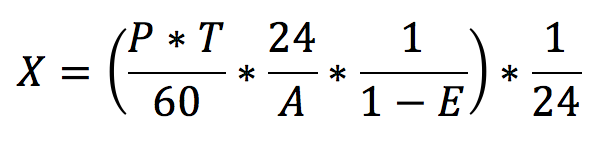
| Parameter | Description |
|---|---|
| P | The number of transactions per day. |
| T | Average time for subprocess execution (in minutes). |
| A | System's availability in hours per day. Reduce this number if SLA to process a transaction is under 24 hours. 0 < A <= 24 |
| E | Fraction of the processing errors that means how often a record processing needs to be retried. For example, due to instability of the automated applications. How many errors 0 <= E < 1 (0: no errors, 1: 100% errors) |
| X | Result: the number of RPA Units. |
See an example of the Excel calculator using the formula.