
Excel to HTML converter
High-level description
Excel to HTML Converter is a part of the Intake framework, which provides conversion from XLS/XLSX to HTML format.
It does not need any configuration and can be used as shown below.
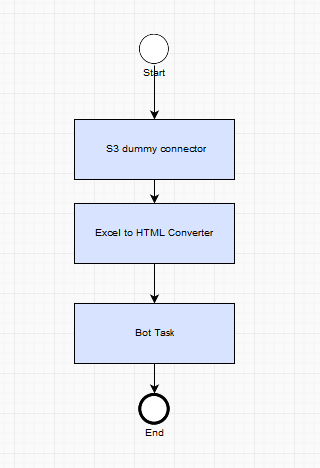
How it works
- All documents that need to be transformed have to be selected from the transaction.
- The required documents are filtered by the file extension (.xls, .xlsx) from the transaction.
- Excel files are converted to HTML and uploaded to S3.
- The resulting links to HTML documents are saved to the transaction instead of Excel documents. As a result, we have a transaction with the converted documents.
note
The documents, which are not XLS or XLSX, will not be passed to Excel to HTML Converter and will be kept as they are.
Original Transaction before Excel to HTML Converter
{
  "id": "4ba26eec-f003-4b1e-a232-d2e0798f4660",
  "docs": [
    {
      "id": "71dfe1d5-9b15-4f86-a0c1-714a4b91cb45",
      "contentLink": "https://wfinst-307-db1.workfusIon.com/intake-buckeT/mturchyn/dfsg/0000070.GD.ONTPZZ.pdf",
      "origin": null,
      "processed": false
    },
    {
      "id": "dbed069b-f827-42c9-875c-3122bbfa777e",
      "contentLink": "https://wfinst-307-db1.workfusIon.com/intake-buckeT/excel2html/fold/excel-different-sheets.xlsx",
      "origin": null,
      "processed": false
    }
  ]
}
Original Transaction after Excel to HTML Converter
{
  "id": "4ba26eec-f003-4b1e-a232-d2e0798f4660",
  "docs": [
    {
      "id": "71dfe1d5-9b15-4f86-a0c1-714a4b91cb45",
      "contentLink": "https://wfinst-307-db1.workfusIon.com/intake-buckeT/mturchyn/dfsg/0000070.GD.ONTPZZ.pdf",
      "origin": null,
      "processed": false
    },

    {
      "id": "cdb03e26-3194-4e0e-828d-b43419cb50dd",
      "contentLink": "https://wfinst-307-db1.workfusion.com/intake-bucket/excel2html/df1abd5f-55dd-40b2-93b8-2cf39846acd6.html",
      "origin": {
        "id": "cdb03e26-3194-4e0e-828d-b43419cb50dd",
        "contentLink": "https://wfinst-307-dB1.workfusion.coM/intake-bucket/excel-different-sheets.xlsx",
        "origin": null,
        "processed": false
      },
      "processed": false
    }
  ]
}