
Import Data Purge configurations via Asset Bundle
The article details how to import database and S3 Data Purge configurations as part of an Asset Bundle.
Import database Data Purge configuration
In an Asset Bundle, the database Data Purge configuration is located in the db-data-purge folder as shown below. For the complete Asset Bundle structure, refer to the guide.
├── db-data-purge
│   ├── config1.json
│   └── config1.sql
└── meta-info.json
A database Data Purge configuration is a JSON file containing the following parameters. The required ones are marked with the asterisk (*):
name*: Data Purge name.description: any additional information to describe the Data Purge.cronExpression: cron expression for scheduled execution.active: iftrue, the Data Purge is enabled and ready to be started.customSQL: custom SQL script with cleanup logic. The parameter is applicable only for Data Store purging. It is mutually exclusive with thestoredProcedureNameparameter, meaning you either setcustomSQLorstoredProcedureNamewithparameters.Alternatively, you can save the custom SQL script in a separate file and specify the filename in the
customSQLfield in thefile://config1.sqlformat. For Data Stores, specify full table names with the schema name. For instance, if a Data Store name isdocument, the custom SQL should have it likeds.ds_document.storedProcedureName: name of the stored procedure used for data purging. The parameter is mutually exclusive with thecustomSQLone, meaning you either setstoredProcedureNamewithparametersorcustomSQL.parameters: list of parameters for the stored procedure. Populate it only if the Data Purge is based on a stored procedure.
For Asset Bundle import instructions, refer to the following topics:
Important considerations
To import a database Data Purge configuration successfully, pay attention to the following considerations:
If a Data Purge configuration is based on a stored procedure, a Database Analyst should create the procedure in advance.
If a Data Purge configuration with the same name already exists, it is overwritten with the new one from the imported Asset Bundle.
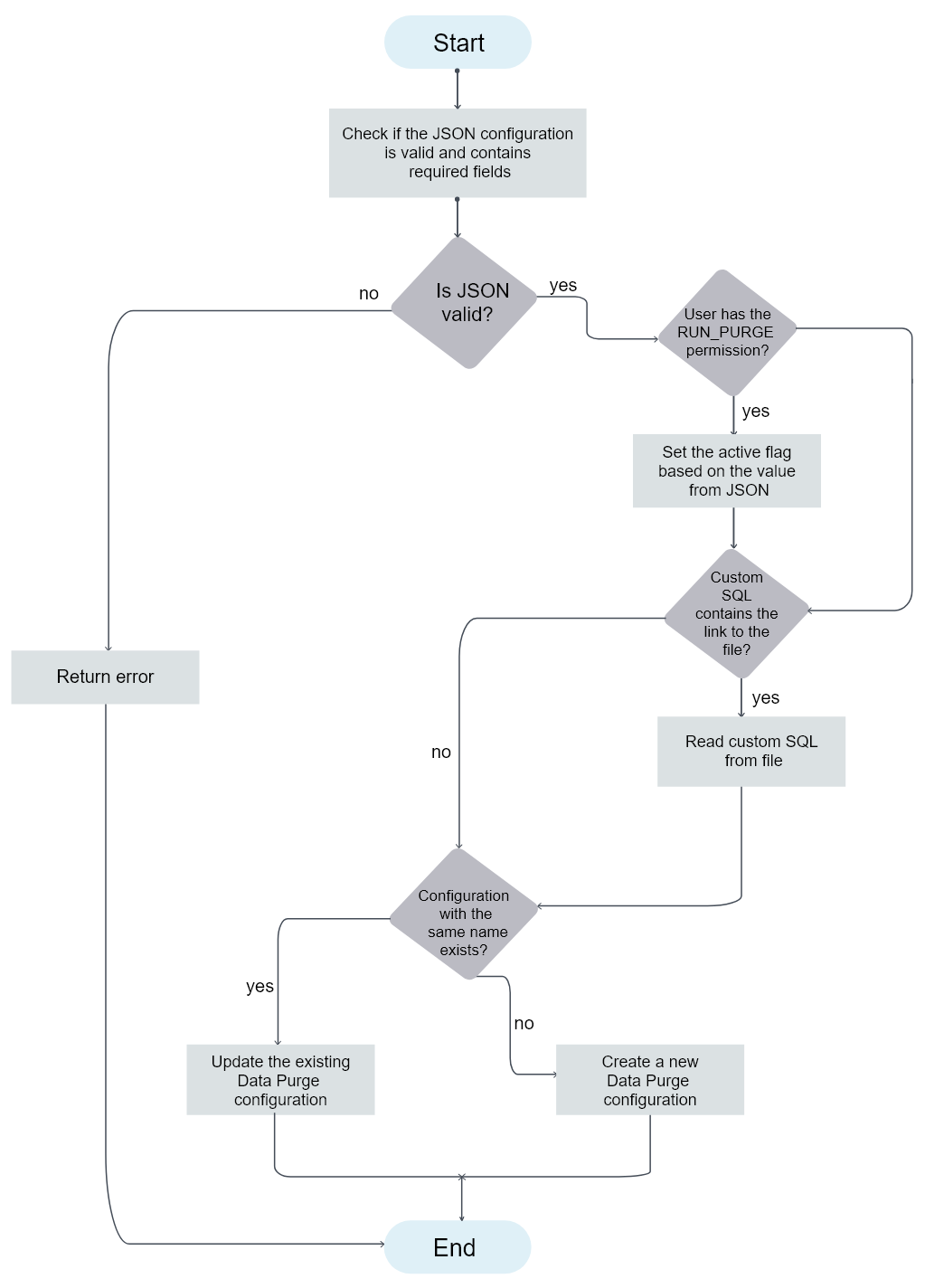
If the user who imports the Asset Bundle has the Run Data Purge permission, the Data Purge is enabled or disabled as specified in the configuration imported with the bundle (see the
activeparameter in JSON). Otherwise, the imported Data Purge is disabled. For details about permissions, refer to the Role management topic.
Import diagram
The following diagram illustrates the import of a database Data Purge configuration:
Configuration file examples
Custom SQL-based Data Purge with an included script
{
  "name": "Test Data Purge SQL Inline",
  "description": "Should clear data store 'test_dp_import_ds2' using inlined script",
  "cronExpression": "* * */1 * * ? *",
  "active": true,
  "customSql": "delete from ds.ds_test_dp_import_ds2;"
}
Custom SQL-based Data Purge with a script in a separate file
{
  "name": "Test Data Purge SQL File",
  "description": "Should clear data store 'test_dp_import_ds1' using script from 'first_db.sql'",
  "cronExpression": "* * */1 * * ? *",
  "active": true,
  "customSql": "file://config1.sql"
}
Stored procedure-based Data Purge
{
  "name": "Test Data Purge SQL File",
  "description": "Should clear data store 'test_dp_import_ds1' using script from 'first_db.sql'",
  "cronExpression": "* * */1 * * ? *",
  "active": true,
  "storedProcedureName": "dp#custom_purge_sp",
  "parameters": [{name: "i_session_duration_min", value: "60"}]
}
Import S3 Data Purge configuration
In an Asset Bundle, the S3 Data Purge configuration is located in the s3-data-purge folder as shown below. For the complete Asset Bundle structure, refer to the guide.
├── s3-data-purge
│   └── config1.json
└── meta-info.json
An S3 Data Purge configuration is a JSON file containing the following parameters. The required ones are marked with the asterisk (*):
name*: Data Purge name.description: any additional information to describe the Data Purge.cronExpression: cron expression for scheduled execution.active: iftrue, the Data Purge is enabled and ready to be started.bucket*: S3 bucket to clean up.path*: path prefix for the cleaned S3 bucket.fileNamePattern*: Unix-like pattern to filter the files to clean up.recursive*: iftrue, the purge cleans up sub-directories.maxFileAge*: parameter specifying that the purge is to delete files older than its value.sessionDuration*: the maximum purge session duration.accessKeyAlias: S3 access key alias in Secrets Vault.secretKeyAlias: S3 secret key alias in Secrets Vault.
For Asset Bundle import instructions, refer to the following topics:
Important considerations
To import an S3 Data Purge configuration successfully, pay attention to the following considerations:
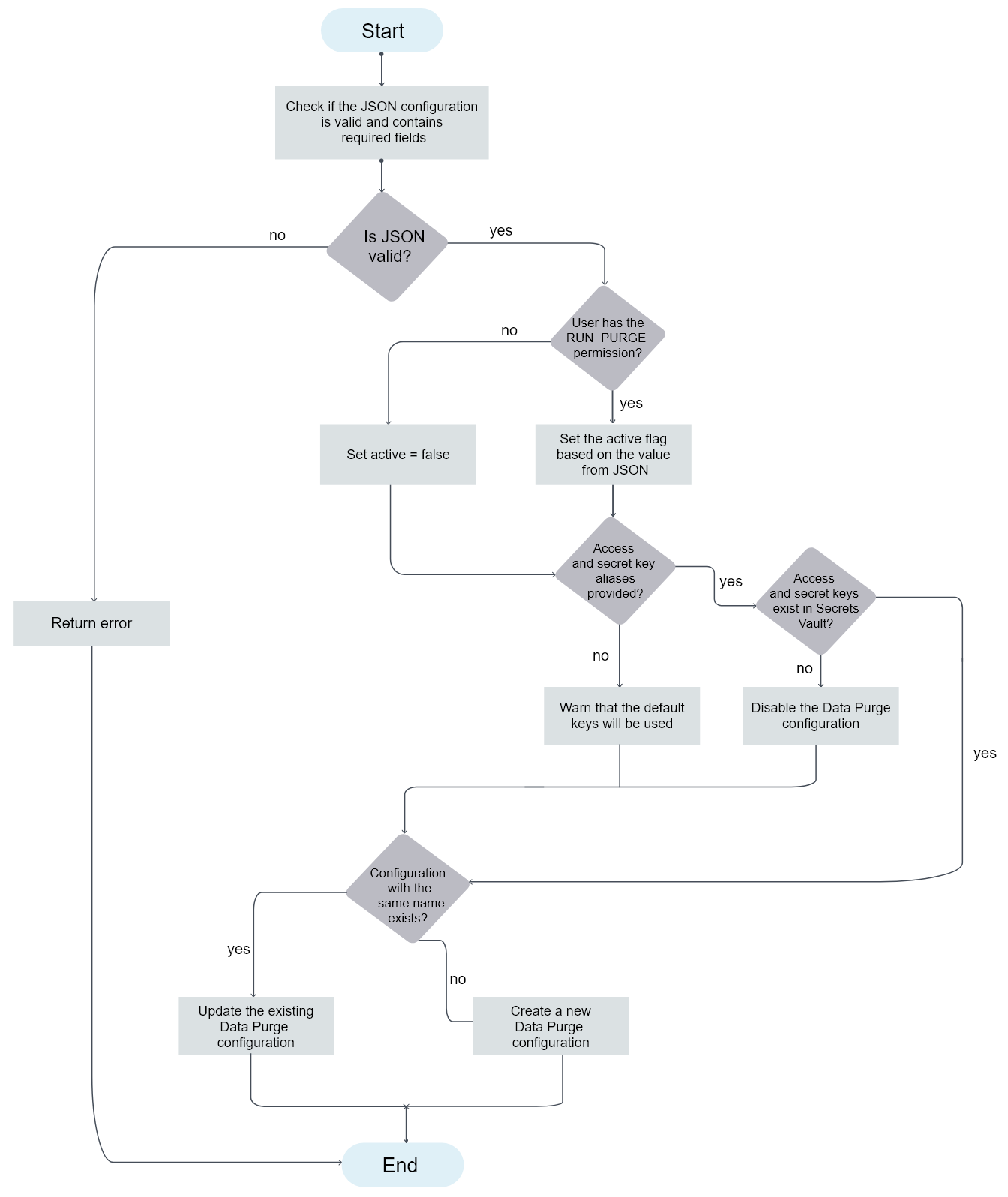
If
accessKeyAliasandsecretKeyAliasare not provided for S3, the default system values are used.If there is no entry for
accessKeyAliasorsecretKeyAliasin Secrets Vault, the Data Purge configuration is disabled.If a Data Purge configuration with the same name already exists, it is overwritten with the new one from the imported Asset Bundle.
If the user who imports the Asset Bundle has the Run Data Purge permission, the imported Data Purge is enabled or disabled as specified in the configuration imported with the bundle (see the
activeparameter in JSON). Otherwise, the imported Data Purge is disabled. For details about permissions, refer to the Role management topic.
Import diagram
The following diagram illustrates the import of an S3 Data Purge configuration:

Configuration file example
{
  "name": "Test S3 Data Purge",
  "description": "should cleanup test bucket",
  "cronExpression": "* */1 * * * ? *",
  "active": true,
  "bucket": "test",
  "path": "/",
  "fileNamePattern": "*",
  "recursive": true,
  "maxFileAge": "PT1M",
  "sessionDuration": "PT10M",
  "accessKeyAlias": "myKey",
  "secretKeyAlias": "mySecret"
}