Business Process step execution
Records and transactions
The atomic element of data flowing through a Business Process is called a record. A record is a collection of named columns with some values inside. A classic Business Process design uses records to pass all required data between Tasks. ODF 2 applies a different approach.
In ODF 2, all business data is kept in Data Stores or user database tables managed by Control Tower. All data to be processed together is tied to a Transaction—a Data Store entity with a unique ID to address all the data. A Control Tower record passes a Transaction ID and some technical information between Tasks. If you use previously designed Tasks, don't worry about read-and-write record operations, as the framework manages all these low-level operations. While designing your Tasks, you can inherit basic Transaction operations from a parent class.
Execution context: work with Task input and output
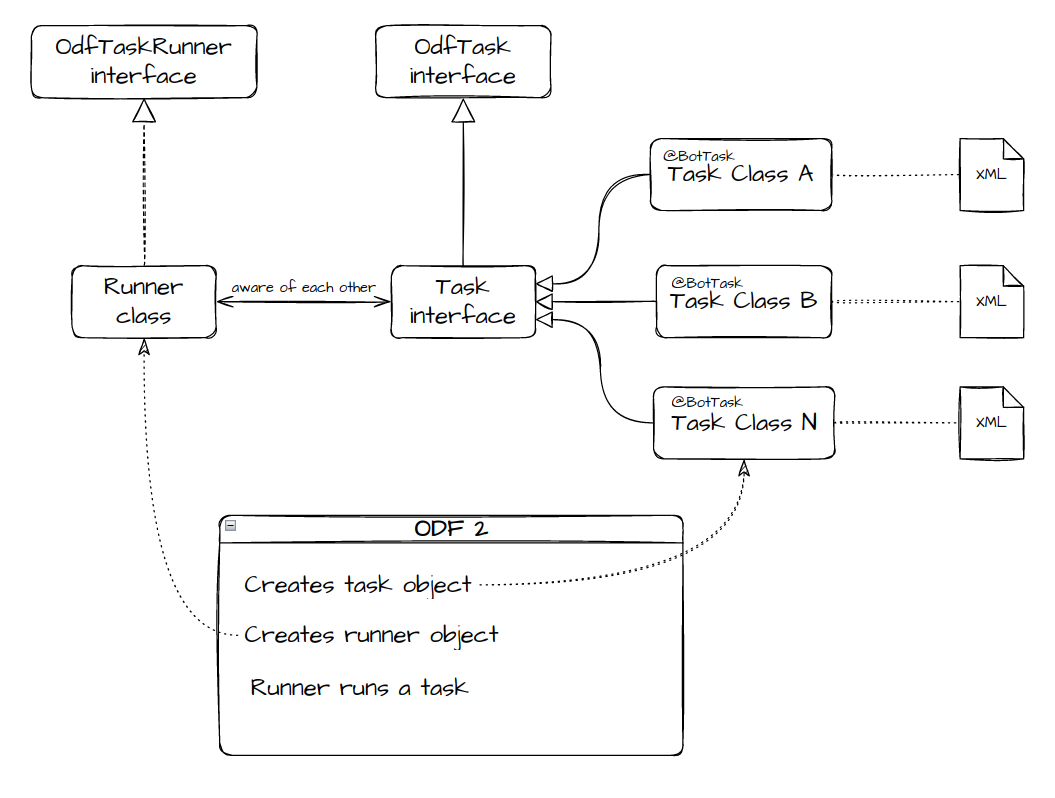
ODF 2 executes every Task inside the Dependency Injection context. This context contains various services and tools you can use. The context is separated into modules. Some modules are loaded by the framework automatically, and some modules are loaded if a Task states that they are required—this is done with the help of the @Requires annotation on a Task class. The ODF 2 context is re-created for every Task execution, and no changes made to it by one Task are visible to another. The only way for Tasks to exchange data is Data Stores and record columns.
To read the columns of the incoming record, the Task injects and uses the TaskInput object. The Task output is controlled by Task Runners that can return TaskRunnerOutput from their run() method. Depending on the design of specific Task implementation, a Task can shape an output record in some way or another. For example, in AdHocTask, the Task implementation fully controls its output.
@BotTask
public class SomeTask implements AdHocTask {

    private final TaskInput taskInput;

    @Inject
    public SomeTask(TaskInput taskInput) {
        this.taskInput = taskInput;
    }

    @Override
    public TaskRunnerOutput run() {
        final String data = taskInput.getRequiredVariable("some_column");

        return taskInput.asResult().withColumn("some_column", data + " modified");
    }
}
TaskRunnerOutput is an abstract class for which the framework provides three descendants for usage in different cases:
MultipleResultis used to return multiple records simultaneously.SingleResultrepresents a single record to be returned.TransactionResultis a special case ofSingleResultthat ensures that Transaction-specific columns are correctly populated and returned.
As shown in the previous example, the TaskInput class has a convenience method that converts it to SingleResult containing the same data as an input record and can be further modified before returning.
Transaction and related entities
You can inject a CurrentTransaction object to check if an input record contains Transaction-specific data and access the corresponding Transaction entity. There is a convenience method to create TransactionResult from it.
@BotTask
public class SomeTask implements AdHocTask {

    private final CurrentTransaction currentTransaction;

    @Inject
    public SomeTask(CurrentTransaction currentTransaction) {
        this.currentTransaction = currentTransaction;
    }

    @Override
    public TaskRunnerOutput run() {
        if (currentTransaction.isPresent()) {

            currentTransaction.get().setStatus("SOME NEW STATUS");
            currentTransaction.updateIfLoaded(); // will save changed status to data store
        }

        return currentTransaction.toTaskOutput();
    }
}
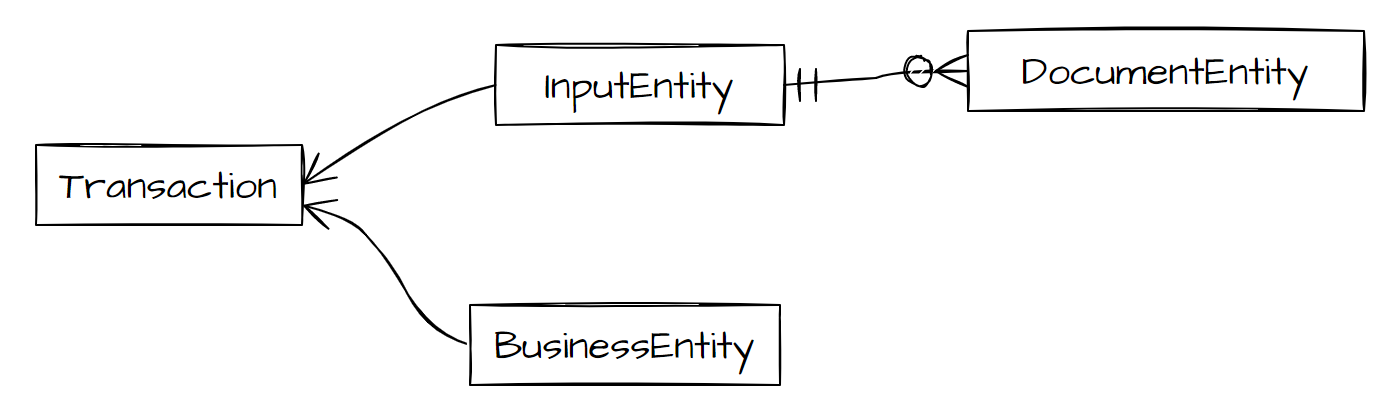
You can define entities to store and process business data. These entities should contain a reference to your Transaction or other entities so that a Task can access them through a known Transaction ID.
ODF 2 multiprocess layer provides a couple of base classes for entities that already take care of this. Any entity that inherits one of these classes can be used with out-of-the-box multiprocess Tasks.
InputEntityis inherited by entities representing some raw data received from external sources.DocumentEntitydescendants are tied toInputEntityto represent individual pieces of data.BusinessEntitydescendants represent data that is validated, sanitized, or converted to some form that is ready to be processed.
Task execution lifecycle
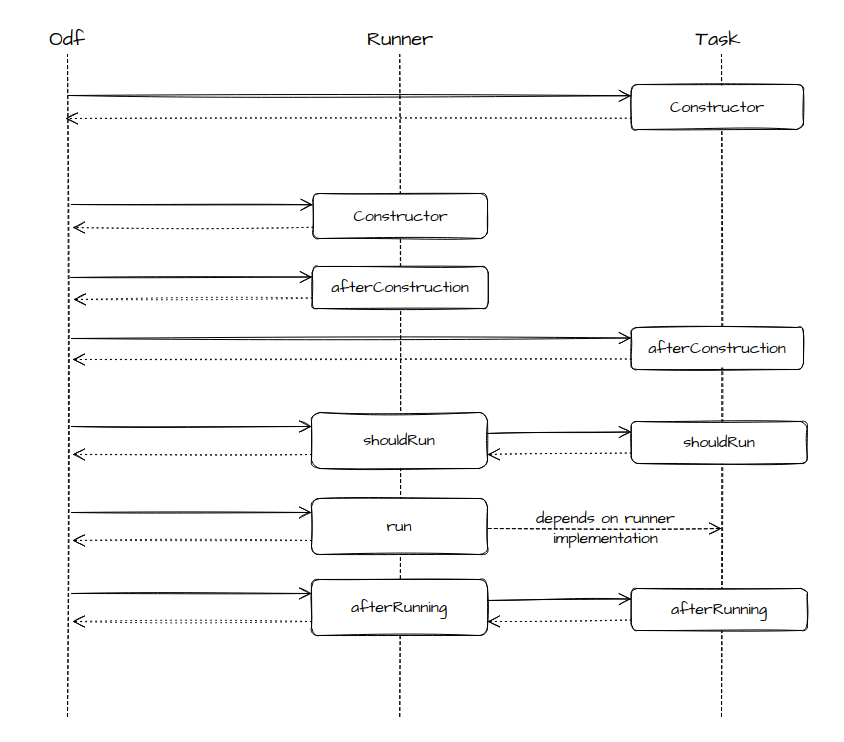
To run a Bot Task, ODF 2 creates the OdfTask and OdfTaskRunner instances and invokes their methods in a special order. You can override all these methods in a specific task and runner implementations to customize their behavior in needed places.
- The
afterConstructionmethods are called after the Task and runner classes are instantiated. These methods can be overriden to add some initialization logic to your Bot Task. No initialization logic should be added to constructors. - The
shouldRunmethods provide a Task with an option to decide if execution is required for the given input data and other circumstances. - The
runmethod runs a Task, ifshouldRunreturnstrue. - The
afterRunningmethod is called after therunmethod is successfully executed. - The
insteadOfRunningmethods are called, ifshouldRunreturnsfalse. - If an exception is raised at any point of this sequence, runner's
handleExceptionis called.