
Grouping models
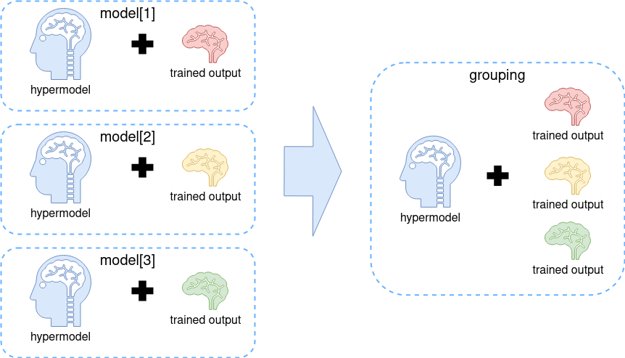
Grouping is a mechanism, enabling developers to combine existing or new models into one artifact. The main goal is to reduce the number of Workers and minimize the start time on the cluster.
note
In the course of executing a grouping model, it is possible to run only one sub-model at a time.
To build a grouping model, perform the following steps:
Put all hyper model code into a single project. Note that you can employ only hyper models implemented with the same AutoML SDK version.
You can use an existing project or generate a new project from an AutoML classification archetype. Put all classes together, structuring them for ease of use and maintenance. For example, split them into packages or specify unique names based on your business logic.
Example 1
example-grouping-classification
├── src
│  └──  main
│      └── java
│         └── com
│            └── wf
│               └── example
│                  ├── grouping
│                  │   └── ExampleGroupingClassificationModel.java
│                  │
│                  ├── config
│                  │   ├── ExampleModel1Configuration.java
│                  │   ├── ExampleModel2Configuration.java
│                  │
│                  ├── model
│                  │   ├── ExampleModel1.java
│                  │   ├── ExampleModel2.java
│                              ...
└── pom.xml
Example 2
example-grouping-classification
├── src
│  └──  main
│      └── java
│         └── com
│            └── wf
│               └── example
│                  ├── grouping
│                  │   └── ExampleGroupingClassificationModel.java
│                  │
│                  ├── config
│                  │   ├── model1
│                  │   │   └── ExampleModelConfiguration.java
│                  │   ├── model2
│                  │   │   └── ExampleModelConfiguration.java
│                  │
│                  ├── model
│                  │   ├── model1
│                  │   │   └── ExampleModel.java
│                  │   ├── model2
│                  │   │   └── ExampleModel.java
│                              ...
└── pom.xml
Create a grouping hyper model class.
Create any class to extend
com.workfusion.automl.hypermodel.classify.grouping.BaseGroupingClassificationHypermodel.Configure standard parameters and map each inner hyper model class to execution ID (trained model id).@ModelDescription( code = "grouping-classification-custom", title = "Multi Class Classification - Grouping", description = "Multi Class Classification - Grouping", version = "1.0", type = ModelType.CLASSIFICATION ) @GroupMapping(groups = { @Group(hypermodel = CustomModel1.class, model = "model1"), @Group(hypermodel = CustomModel2.class, model = "model2") }) @HypermodelConfiguration(GenericMultiClassificationHypermodelConfiguration.class) public class ExampleGroupingClassificationModel extends BaseGroupingClassificationHypermodel { public ExampleGroupingClassificationModel() { } }Collect trained models into a single folder.
If any trained model already exists in S3, download it into a single folder, structuring as shown below. Otherwise, train each model separately and do as instructed in the preceding sentence.
download_folder
│
├── model1
│  └── ouput
│     ├── model
│     ├── statistics
│         ...
│     └── model-info.json
│
└── model2
   └── ouput
      ├── model
      ├── statistics
      ...
      └── model-info.json
      ```
Train the grouping model. Use the folder from Step 3 as the input.
public class ModelTrainingRunner {
    public static void main(String[] args) throws Exception {
        Path inputDirPath = Paths.get("path to the folder with trained models");
        Path outputDirPath = Paths.get("path to the output folder");
        LocalTrainingConfiguration configuration = LocalTrainingConfiguration.builder()
            .inputDir(inputDirPath)
            .outputDir(outputDirPath)
            .id("grouping_model")
            .build();
    ModelRunner.run(ExampleGroupingClassificationModel.class, configuration);
    }
}
After the training, you can execute each model locally, passing an additional parameter (
trained model id).Import assets to Control Tower.
- Change the model's code in
pom.xml.
<configuration>
<mainClass>com.workfusion.nlp.uima.hypermodel.HypermodelArtifactBuilder</mainClass>
<arguments>
    <argument>grouping-classification-custom</argument> <!-- change here -->
    <argument>${hypermodel.output.dir}</argument>
    <argument>${project.groupId}:${project.artifactId}:${project.version}</argument>
</arguments>
</configuration>
Generate an artifact according to the standard procedure.
Assemble an Asset Bundle and import it into Control Tower. For detailed instructions, refer to the guide.
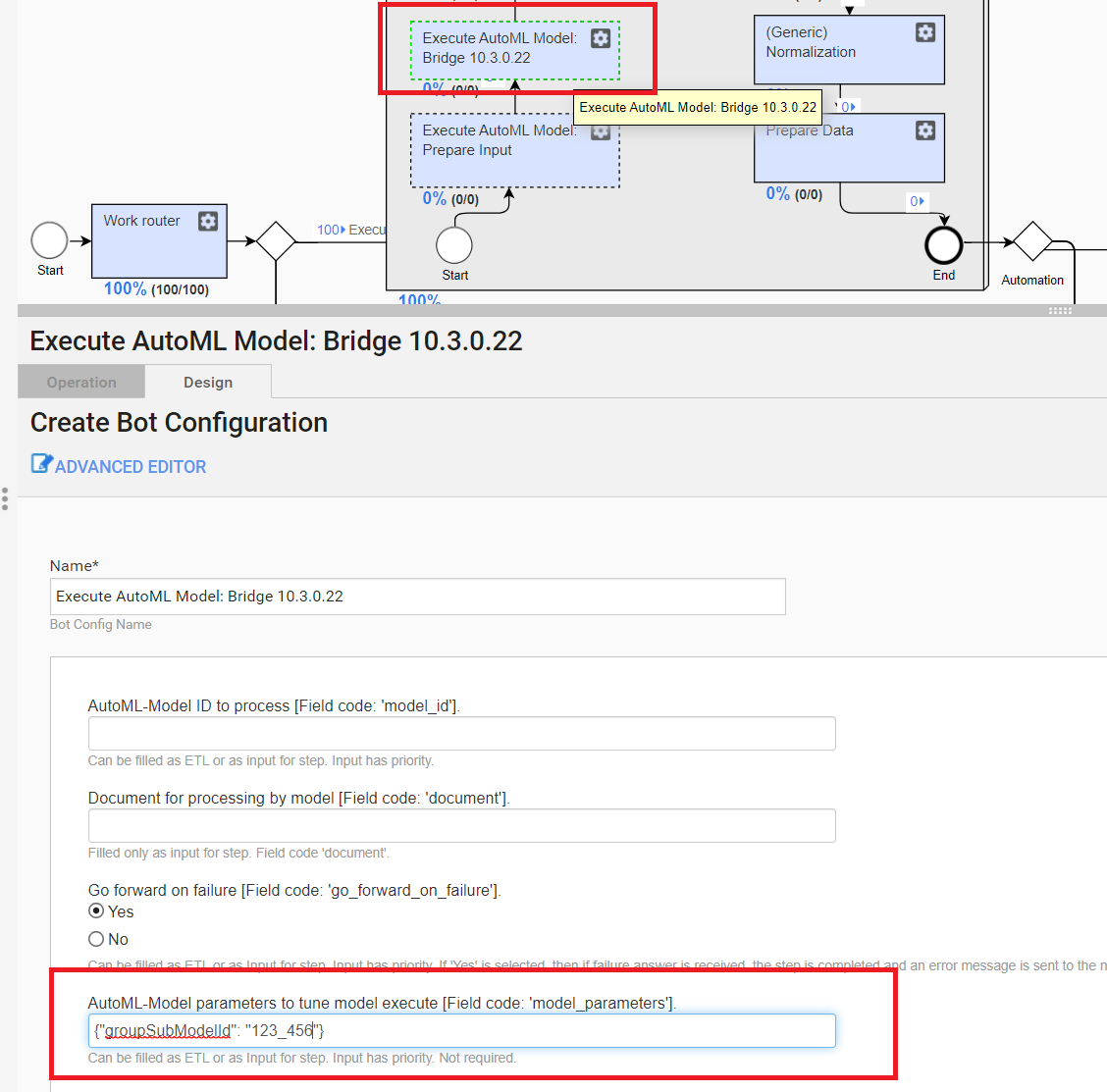
Modify your Business Process to pass the additional
trained sub-model idparameter in each execution request.Below is an illustration pf how you can do it via the user interface in Control Tower.
- Change the model's code in