
Hybrid models
Hybrid models are an ensemble model type containing the routing logic. They serve the following two purposes:
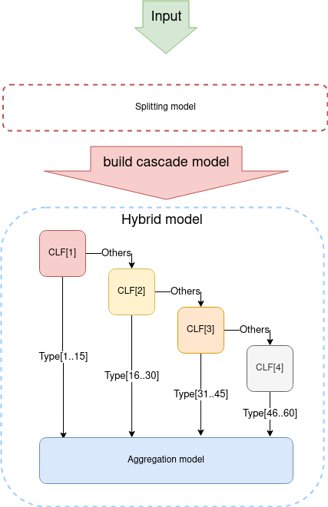
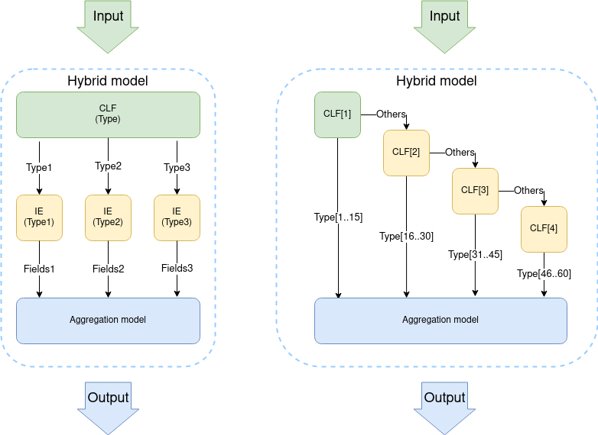
Support classification cascades, enabling engineers to handle multiple classes with a single model.
Support combined classification+information extraction (IE) models, for instance, using a classification model for selecting an IE model.
note
Current limitations are as follows:
- IE cascades are not supported.
- It is impossible to train hybrid models, except for the OOTB classification cascade.
Build hybrid model
To build a hybrid model from a list of already trained models, follow the instruction below:
Create an aggregation root model. Use your custom hyper model to extend
com.workfusion.automl.hypermodel.hybrid.AggregationHybridModelas shown below.@ModelDescription( code = "my_hybrid", title = "hybrid_model", description = "custom hybrid model", version = "1.0" ) @HypermodelConfiguration(HybridExampleModelConfiguration.class) public class HybridExampleModel extends AggregationHybridModelNote that the aggregation model type makes no predictions. Its purpose is to aggregate the results of executed models.
Add
com.workfusion.automl.hypermodel.hybrid.AggregationHybridModelExtractionDocumentProcessorto your configuration. By default, the Processor only returns the results of sub-models as an ordered set ofmodelId, modelResultpairs.However, you can implement any other aggregation logic. For that, use the above Processor with
ExtractionProcessorConfigurationas shown below:@Named("extractionProcessorConfiguration") public ExtractionProcessorConfiguration extractionProcessorConfiguration() { return new ExtractionProcessorConfiguration.Builder() .extractionProcessor(AggregationHybridModelExtractionDocumentProcessor.class) .build(); }Build a model artifact.
Create a directory with the trained_model_id hybrid model. The directory must have with following structure:
trained-hybrid-model
├── output
       ├── model-info.json
       ├── hybrid.yml
where:
model-info.jsonis a standard AutoML file with model information. Below is an example of its content.
{ "modelId": "%your_trained_model_id%", // trained-hybrid-model "code": "%your_hypermodel_code%", // my_hybrid "version": ""%your_hypermodel_version%" // 1.0 }hybrid.ymldefines the routing logic within the hybrid model. It is similar toensemble.yml, but has extensions. AutoML services analyze the file to route requests.
Explore examples
Classification cascade example
In this example, the document is classified by the document_classification_udfr-1234-6789 model. If the resulting class is another document, it is classified by the id_classification_1403b4f0-cd3b-4e1a-8934-c2ac264f4053 model. The results are processed by the trained-hybrid-model hybrid model and returned as a response to the execution request.
id: "root"
code: "my_hybrid"
version: "1.0"
trainedId: "trained-hybrid-model"
models:
    - id: "class1"
      code: "custom_classification"
      version: "2.0"
      trainedId: "document_classification_udfr-1234-6789"
      connections:
        - condition: '${outcome.class} == 'other''
          destination: class2
        - condition: '${outcome.class} != 'other'',
          destination: root
    - id: "class2"
      code: "multi-class-classification-generic-se-20"
      version: "10.1.1.36"
      trainedId: "id_classification_1403b4f0-cd3b-4e1a-8934-c2ac264f4053"
      connections:
        - destination: root
Pay attention to the following:
The cascade's root model must be a hybrid one. For the model data, specify:
id—identifier for the hybrid code or version of the hyper modeltrainedId—the trained model ID
In the
modelssection, specify the models to be executed in terms of the hybrid execution with routing connections (.yamllist). Each connection must have a destination. They define the ID of the model to be executed next.Specifying conditions is optional. Conditions support the standard Spring Expression Language. The
${outcome.class}part is a reserved word for the document label after classification.
Hybrid classification+IE model example
In this example, an IE model is executed based on the classification results.
id: "root"
code: "hybrid-model-code"
version: "1.0"
trainedId: "trained-hybrid-model"
models:
    - id: "class1"
      code: "classification-se-20"
      version: "10.1.1.36"
      trainingId: "document_classification_101136"
      connections:
        - condition: '${outcome.class} == 'drivers_license''
          destination: ie1
        - condition: '${outcome.class} == 'passport'',
          destination: ie2
    - id: "ie1"
      code: "generic-ie-se-20"
      version: "10.1.1.13"
      trainedId: "document_link_c2ac264f4053-cd3b-4e1a-8934-1403b4f0"
      connections:
        - destination : root
    - id: "ie2"
      code: "custom-passport-ie"
      version: "2.3"
      trainedId: "custom_ie_passport_v_2_3_trained"
      connections:
        - destination : root
note
The models mentioned in the trainedId section must already be present on your environment or must be part of an imported Asset Bundle. AutoML services fully support import and export of hybrid models, as well as validation of their structure.
Train OOTB classification cascade
In certain use cases, labels are too numerous for a single AutoML model to handle them all. For instance, email classification use cases can include 50+ labels. To address the problem, you can use the out-of-the-box (OOTB) classification cascade SplittingHybridClassificationHypermodel(code: splitting-hybrid-classification).
The main idea is that the model splits a data set by labels and trains a cascade of models for a subset of labels.
Splitting algorithm
In its current implementation, the OOTB model sorts all documents by the label frequency and splits them by the batch size + 1.
The default settings for the splitting model are:
15—the threshold size of the label batchMultiClassClassificationGenericSe20Hypermodel—the default classification model for sub-models
Advanced tuning
There are some extension points that you can use for tuning SplittingHybridClassificationHypermodel.
You can extend
SplittingHybridClassificationHypermodelwith a custom hyper model and change the batch size parameter.You can select a different default classification model by changing the model configuration as illustrated below:
@Named("pipelineConfiguration")
public PipelineConfiguration pipelineConfiguration() {
    return new PipelineConfiguration.Builder()
            .parameter(ConfigurationConstants.DEFAULT_HYBRID_SUB_MODEL_CLASS, MultiClassClassificationGenericSe20Hypermodel.class)
            .parameter(ConfigurationConstants.DEFAULT_HYBRID_BUCKET_SIZE, 15)
            .build();
}