
Split training and test sets
Goal: Provide appropriate documents for model training and estimation.
Input: Validated tagged documents categorized by groups.
Output: Test set, training set.
Input for the stage
As a result of a finished Data Set Check stage, there should be an Excel file which contains documents with their categories.
Mistakes categorization
Good
Absolutely correct and consistently tagged documents, in which no values are missed and everything tagged correctly; OCR is good.
For test only
Corner cases (Bad OCR, Rare Template) - documents, which are not eligible for training, but which exist in real life documents' flow and can be processed (at least partially).
These are documents for which data-values for ALL THE FIELDS presented in the original document (except handwritten) are correct, but:
- they belong to rare template, there are less than 10 such documents and they significantly differ from the others (so the Model will not be able to be trained well on such a small number of examples).
- or after OCR there are some issues: values with OCR mistakes, broken structure (so field can be tagged only with "Append selected to" option), context of fields has BAD OCR, etc.
For training only
Positions of presented tags are correct and tags are complete, but some tags are missed (usually due to OCR issue).
Also documents with wrong data-values or tag missed due to tagging mistake can be used for training, but only if there is no time or capacity for re-tagging. Normally it is better to re-tag such documents.
Re-tag
Document contains some issues with both data-values and tags, but it still can become "Good", "For training" or "For test" after re-tagging.
Exclude
None of the above mentioned.
Document has some considerable issue, so it is inappropriate neither for training or test sets. Usually it is documents with really bad original quality or with considerable OCR issue.
For example:
- There is some serious OCR problems for all fields, nothing is recognized correctly.
- Totally corrupted structure of document.
- There are only handwritten fields in the document.
Training set
Training Set is a set of documents used for training the ML model. The training set composes 80% of the whole data set. Training set contains gold values for model training. For Information Extraction models, gold values is a set of fields that should be extracted; for Classification, documents are accompanied by target class.
Training set should consist only of Good and For Training documents. The ratio is 80% to 20% correspondingly.
note
Why are missing tags and wrong data-values are acceptable for training?
The model trains each field separately, one-by-one or in parallel depending on resources available — for example, all the documents are trained on tags <company_name>, then <company_address>, etc. It is acceptable to include into training set documents with missing tags because if the document doesn't contain some tagged field, it won't participate in training of this specific field. Each document participates in the training only for the fields it contains.
So missing tags are acceptable in training set, but not recommended, because it decreases number of tags for model training, so if tags are missed due to inattentiveness and not retagged, that will affect tags' distribution.
Training set should include typical cases
Training sets should contain high-quality documents that represent typical cases. That means there should be at least 10 similar tagging cases for each field with one specific context and structure to let the ML Model catch the dependency correctly.
Ideally, there are similar documents across one layout, so all the fields have the same context and structure. Thus 10 documents means 10 similar tagging cases for all the fields. But sometimes, some fields or context have different structures due to OCR even though they are tagged correctly. If there are some rare cases (i.e., there are <10 similar tagging cases), the number should be increased. Otherwise, they should be excluded from the training set so that model doesn't develop improper features and weights. So it's necessary to delete these rare tags from such documents or exclude documents fully if this doesn't seriously affect other fields' representation.
If everything has been done correctly in previous stages, by this stage there should be sufficient documents of every layout.
Tags' distribution check
Before splitting documents, a Data Analyst should make final check of tags' distribution. This step can also be fulfilled after verifying each batch of tagged documents.
There are two bot steps that can be used to check tags distribution:
Bot 1: Save tagged content to S3
This bot step converts tagged text into files and save them on S3 in the same bucket. As an output, it provides a CSV with links on tagged documents. This step is needed, because a bot that counts tags' distribution needs links to tagged documents as input.
Input: CSV that has a column with tagged text (XML, HTML. The column name should be 'tagged_text'.
Output: CSV with a column 'doc_page_xml_link' that contains links to tagged documents on S3.
Bot 2: Counting tags
Input: CSV that has a column with links to tagged documents. The column name should be 'link_to_file'. (Take the output CSV from the previous step and rename the column from 'doc_page_xml_link' to 'link_to_file').
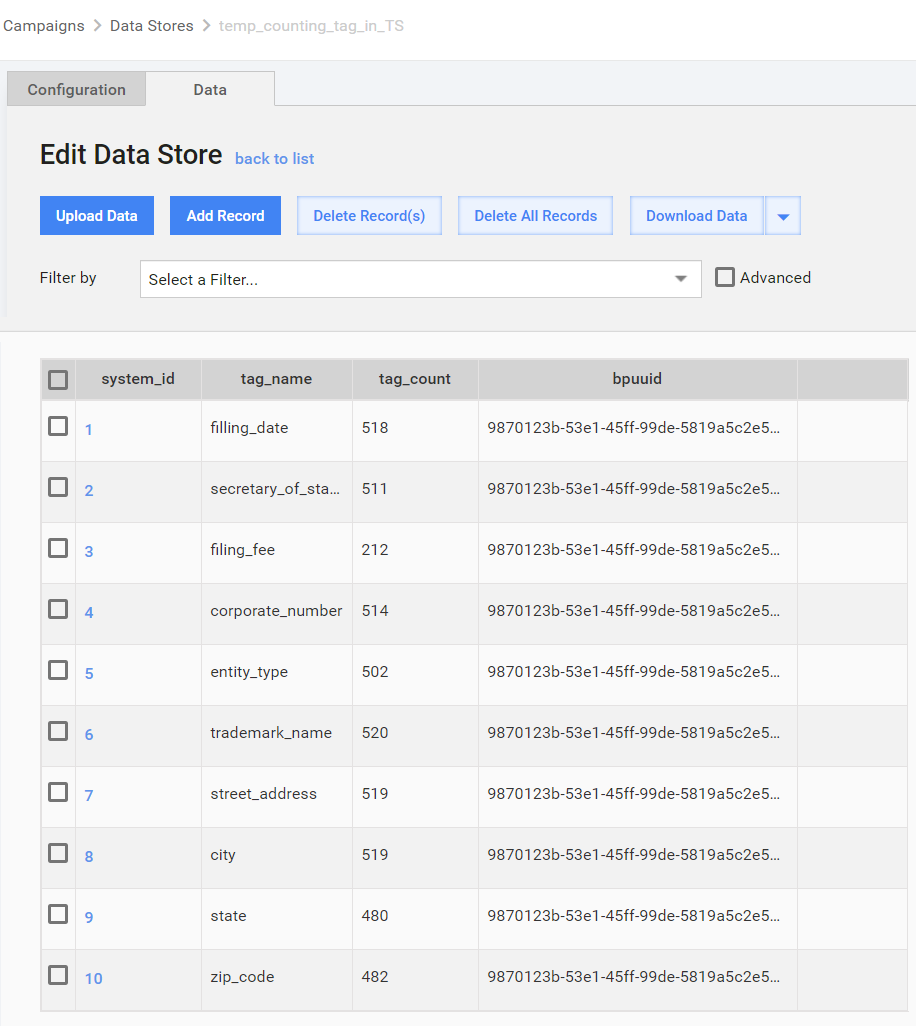
Output: The result will be two columns ('tag_name' and 'tag_count') saved in Data Store. The Data Store name should be 'temp_counting_tag_in_TS' (If there is no such Data Store, it will be created automatically and will be cleaned up in each new run). The snapshot from the Data Store can be downloaded as well.
To see the results, go to Data store > temp_counting_tag_in_TS.
Test set
Test set is a set of unseen documents used for evaluating an ML model. Test set composes 20% of the whole data set not used for model training. The aim will be to run extraction on documents that haven't participated in training, The second aim of the test set is to check the model performance for possible exception cases in production.
Test set should consist of Good (20%) and For Training (same quantity as in production flow) documents.
note
Documents with OCR issues must be obligatory marked (keep marks in the "Category" column and if possible in "Comments" in the input file for test extraction), because you should be able to identify them in the final report on statistics and explain the effect of such documents in final results.
* If it's not possible to count the number of bad documents in the production flow, the results of OCR testing can be used.
Gold values normalization
If it necessary, gold data should be normalized. The following business process can be used to remove extra spaces, tabs and new lines.
Bot: Gold data normalization
This business process normalizes gold data values:
- removes extra spaces
- removes tabs and newlines.
Input: CSV file that has column containing tagged XML/HTML for normalization. Column name by default is tagged_text, but it can be changed in BP on params step.
Output: CSV file with normalized gold values.
Learn more about this here.
How to split
Use Excel file from data set check
- Figure out required quantity of "Good" category documents for both training and test set based on 80% / 20% splitting. Use pivot table for more convenience.
- Copy and paste to separate spreadsheets required number of documents for training and test sets, respectively. Use filtering for more convenient navigation.
- Save spreadsheets for test and for training sets separately in CSV format.
Risks at the stage
- Bad model training results. Unequally distributed layouts in test and training sets or wrong categories of documents in the test or training sets will result in that model training on wrong data or not trained for some fields/layouts at all.
- Unreliable gold data and statistics. The data values from the test set are called "gold values" and they are going to be compared with the results of the ML model extraction. It means that in order to get real and reliable estimation of an ML model performance for each field in every document of the test set, we must have 100% correct data values and all the fields represented. If anything is missed or incorrect, it will cause incorrect evaluation of the model. In other words, in a test set there should be exact values, which we expect the ML model to extract.