
OOTB Feature Extractors
The majority of all Digital Worker implementations apply a number of common Feature Extractors most of which are reusable. AutoML SDK contains most used Feature Extractors optimized and ready out-of-the-box with AutoML SDK API. These Feature Extractors are intended to cover general use cases without any need to write your own from scratch.
This page briefly describes pre-made Feature Extractors providing links to usage documentation and visualizing feature extraction in some cases.
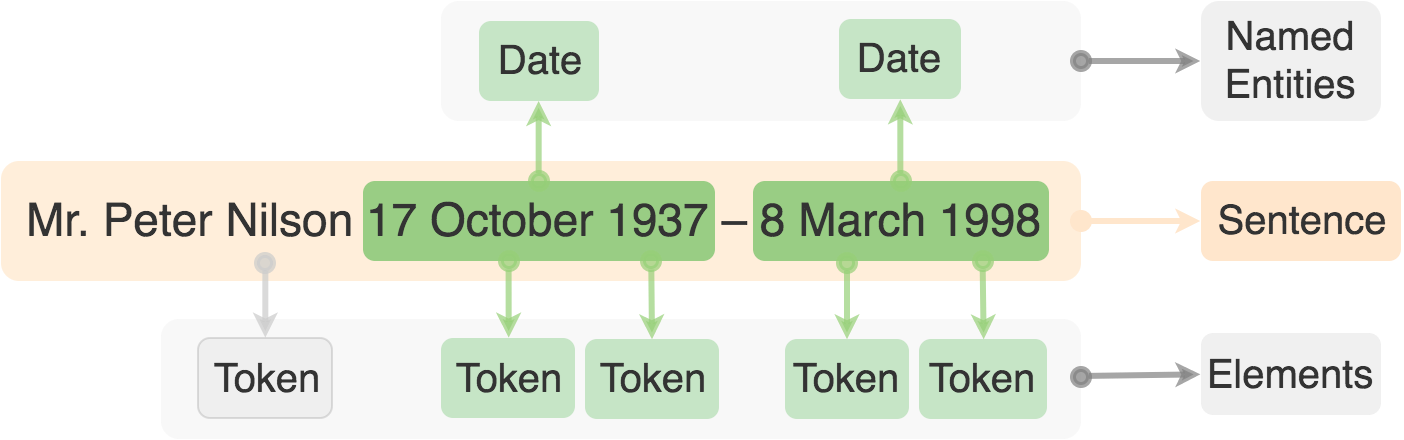
AreAllFollowingTokensCapitalizedBeforeNerTypeFE
AreAllFollowingTokensCapitalizedBeforeNerTypeFE class determines if ALL tokens between the focus Element and the first following Named Entity with the given type are capitalized.
For usage details, refer to AreFollowingTokensCapitalizedBeforeNerFE documentation.
BaseKeywordsInElementFE
BaseKeywordsInElementFE is a base class for extracting features from the search element that covers the target focus element.
It is a base abstract class for FocusElementKeywordsFE and KeywordsFrequencyInElementFE implementations.
For usage details, about the base class refer to BaseKeywordsInElementFE documentation.
FocusElementKeywordsFE
FocusElementKeywordsFE class produces a feature if the search element that covers the current focus element contains at least one of the keywords.
For usage details, refer to FocusElementKeywordsFE documentation.
FocusElementKeywordsFrequencyFE
KeywordsFrequencyInElementFE class counts the amount of keywords inside a search element that covers the current focus element.
For usage details, refer to FocusElementKeywordsFrequencyFE documentation.
BaseNerInFocusElementFE
BaseNerInFocusElementFE is a base abstract class for IsFirstNerInFocusElementFE and IsLastNerInFocusElementFE implementations.
For usage details, refer to BaseNerInFocusElementFE documentation.
The following example shows a typical Sentence in an AutoML SDK Document.

IsFirstNerInFocusElementFE
IsFirstNerInFocusElementFE class produces a feature for a focus element if it contains exactly the first Named Entity marker of the given type in the specified search element. In other words, it determines if the first Named Entity in the search class is in the user defined focus class.
For usage details, refer to IsFirstNerInFocusElementFE documentation.
Example
In the previous figure IsFirstNerInFocusElementFE with a focus element Token and search element Sentence will produce a feature for Token "Pinnacle" because this part of Sentence contains the first Named Entity of type Company. It will also produce features for all Tokens that intersect with the first Named Entities of all types. For Token "Vlasic" it will NOT produce a Feature because it intersects with the second (last) Named Entity of type Company.
IsLastNerInFocusElementFE
IsLastNerInFocusElementFE class produces a feature for a focus element if it contains exactly the last Named Entity marker of the given type in the specified search element. In other words, it determines if the last Named Entity in the search class is in the user defined focus class.
For usage details, refer to IsLastNerInFocusElementFE documentation.
Example
In the previous figure IsLastNerInFocusElementFE with a focus element Token and search element Sentence will produce a feature for Token "Vlasic" because it contains the last Named Entity of type Company for this Sentence. If the search element has only one Named Entity of a certain type then it is considered both the first and the last at the same time.
IsFocusElementExactSameToNerFE
IsFocusElementExactSameToNerFE class determines if the covering focus element (or search class) has the same content as the covered Named Entity. In other words, it produces Features for Tokens that contain exactly the same text as the covered Named Entity. It can also check if the Named Entity is the first in a Document.
For usage details, refer to IsFocusElementExactSameToNerFE documentation.
IsFocusElementWithNerFE
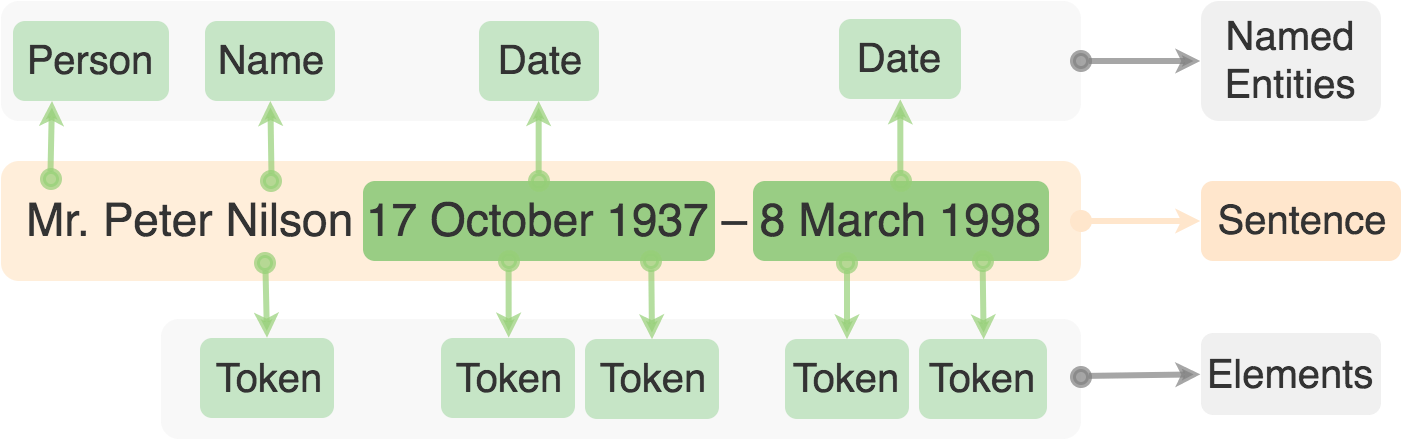
IsFocusElementWithNerFE determines if the search element covering the focus element contains a Named Entity(-ies). It can also check if the Named Entity is the first in a Document. In the following example IsFocusElementWithNerFE produces Features for all Tokens that contain a Named Entity in a given search element Sentence.
For usage details, refer to IsFocusElementWithNerFE documentation.
LowerCaseWordshapeFE
LowerCaseWordshapeFE finds the word shape of the covered text removing leading or trailing whitespaces and making all characters lowercase and digits '1'.
Example
"$,. abc ABC 123" > "$,. abc abc 111"
For usage details, refer to LowerCaseWordshapeFE documentation.
PositionInCoveringFE
PositionInCoveringFE class gets the index (position) of the focus element in the covering search element.
For usage details, refer to PositionInCoveringFE documentation.
PreviousElementSameLineKeywordMatchFE
PreviousElementSameLineKeywordsMatchFE class determines if there are Keyword matches in the same line in a non-empty Element preceding the current Element covered by the focus Line. Search Element (Cell, LayoutBlock, etc.) should be specified in the constructor. The search element is not case sensitive.
Example
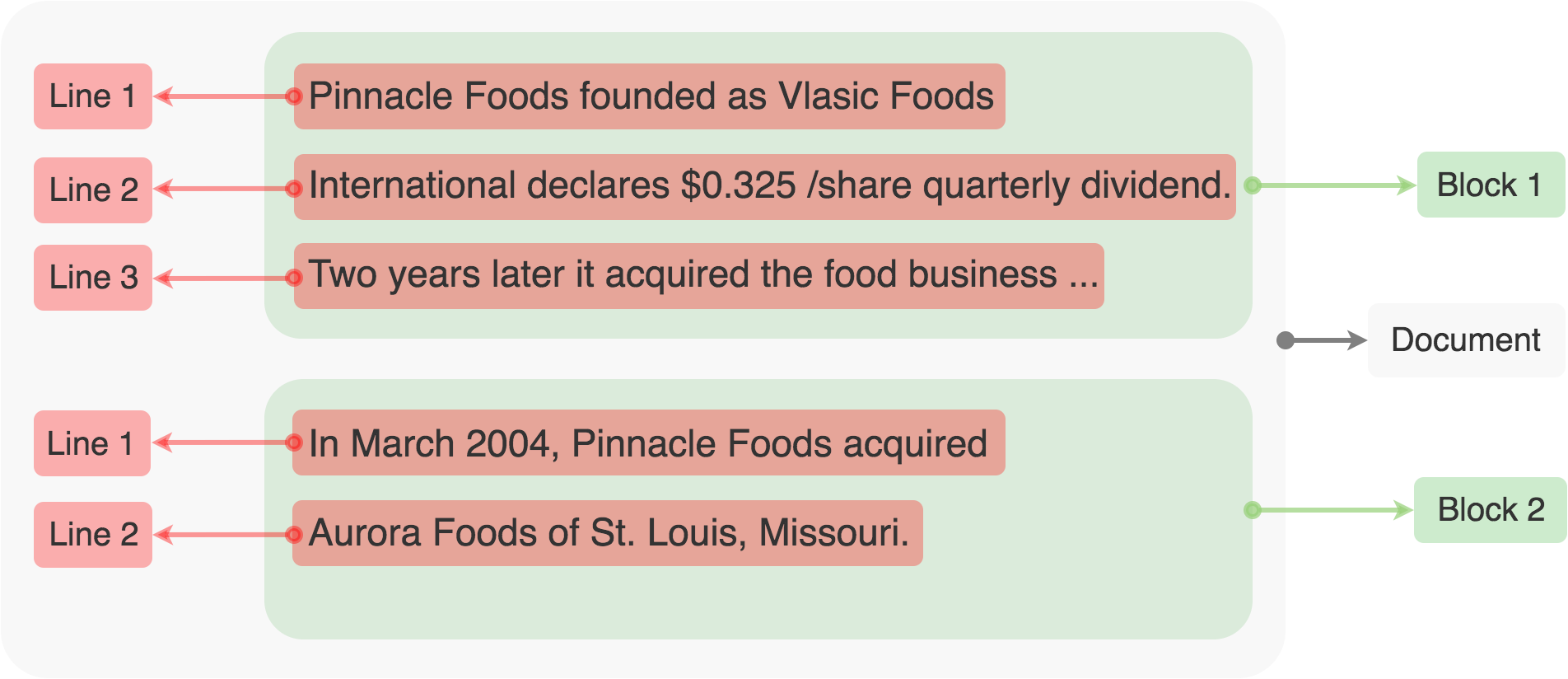
The following figure shows some typical Blocks, Cells, or other Elements in a AutoML SDK Document. PreviousElementSameLineKeywordsMatchFE class with search Element Block and Keywords set "Vlasic Foods" will produce a feature for Line 1 in Block 2 because the same line—Line 1 in the previous Block 1—contains the same text.
For usage details, refer to PreviousElementSameLineKeywordsMatchFE documentation.
SimilarityToKeywordFE
SimilarityToKeywords class gets the similarity of a focus element to provided Keywords.
For usage details, refer to SimilarityToKeywordsFE documentation.