
DA Cut&Dry Business Process overview
Description and general purpose
Cut&Dry Business Process (C&D BP) is a standardized Data Analyst's process which helps to prepare high quality Training Set in effective and fast way without redundant manual effort and with special attention to risks identification before they become problems.
C&D BP consists of three connected and consistent sub-processes:
Splitting into Layouts and OCR Quality Check
Initial Training Set Tagging
Iterative tagging with AutoML enabled
important
The main purpose of the C&D Business Process is TRAINING set collection, not Test set.
So you need to form the test set before start tagging in BP 2 and BP 3. You may do this after BP 1 successful run.
It is expected to use final training set to train the model and label test set using AutoML assistance.
The main principles of the C&D BP are as follows:
- OCR quality control
- Use of splitting for effective organization of the tagging process
- AutoML helps with tagging
- Iterative approach to tagging, i.e. each new iteration means:
- Tagging only the layouts not meeting the success criteria
- Tagging only the fields not meeting the success criteria
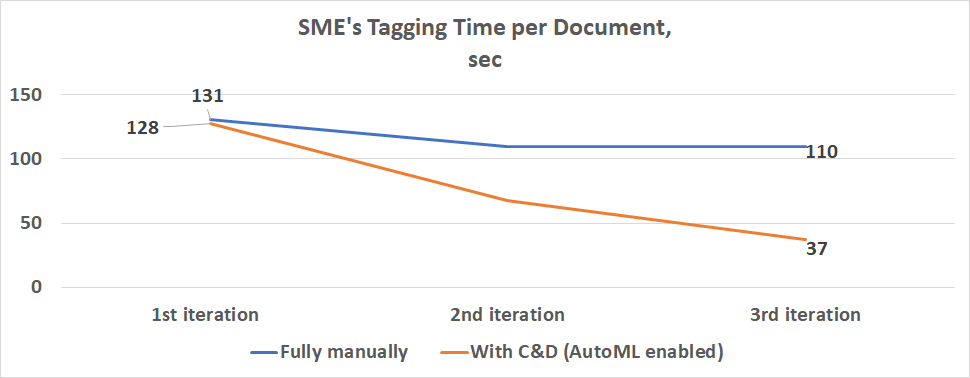
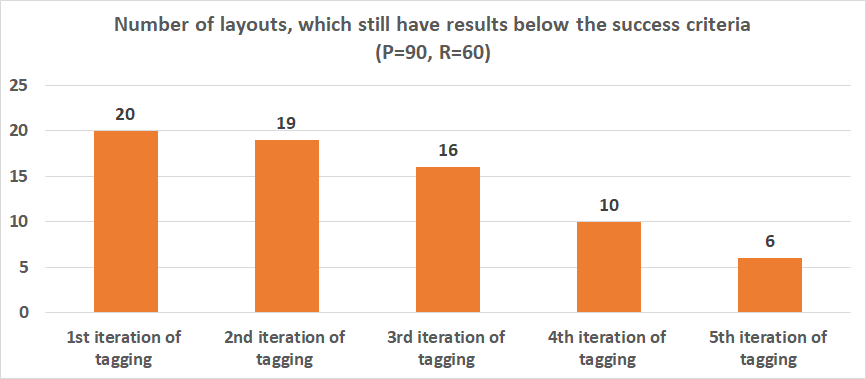
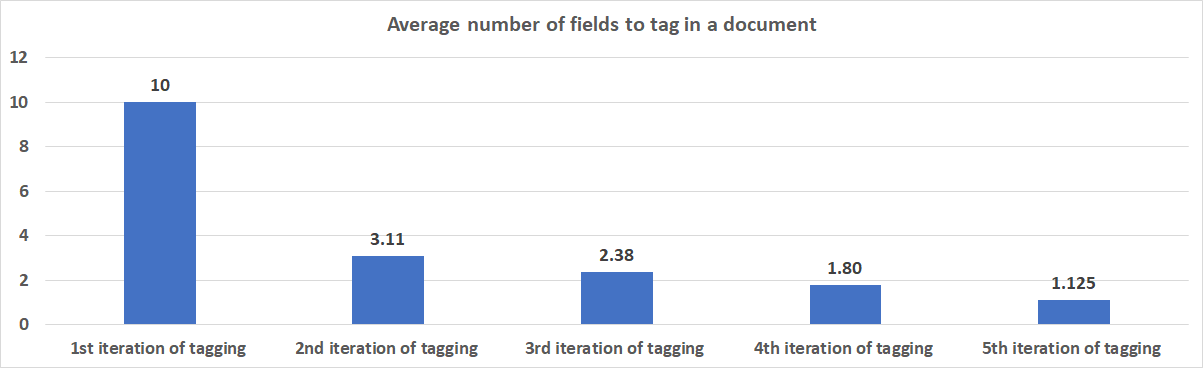
Here is the example, demonstrating effort decrease based on Six Financial (10 fields, 20 layouts):
Speed of tagging:
Number of layouts:
Number of fields to tag in a document based on Success Criteria (P=90, R=60):
Input
As an input for the process, Data Analyst have to provide:
- For all sub-processes: name of the Data Store with parameters (a single Data Store for all sub-processes), for example, da_processes_settings.
- Only for Splitting into Layouts and OCR Quality Check: a CSV file containing links to all original documents in the original_document_url column and (optional) with layout names in the layout column if they are identified.
Output
- Splitting into Layouts and OCR Quality Check > the Data Store with the name you specify in the
documents_infoparameter with:- links to original documents
- links to OCR results
- layout names
- results of OCR quality check
- Initial Training Set Tagging > initial training set (N tagged docs of each layout) with the name you specify in the
da_automation_training_setparameter - Iteration tagging with AutoML enabled (after each iteration) > several Data Stores with:
- position based statistics (AutoML versus DA) for each field in each layout with the names you specify in the
documents_statisticsanddocuments_fields_statisticsparameters - tags distribution statistics with the name you specify in the
documents_distributionparameter - Extended Training Set
- position based statistics (AutoML versus DA) for each field in each layout with the names you specify in the
Implemented logic
Splitting into layouts and OCR quality check
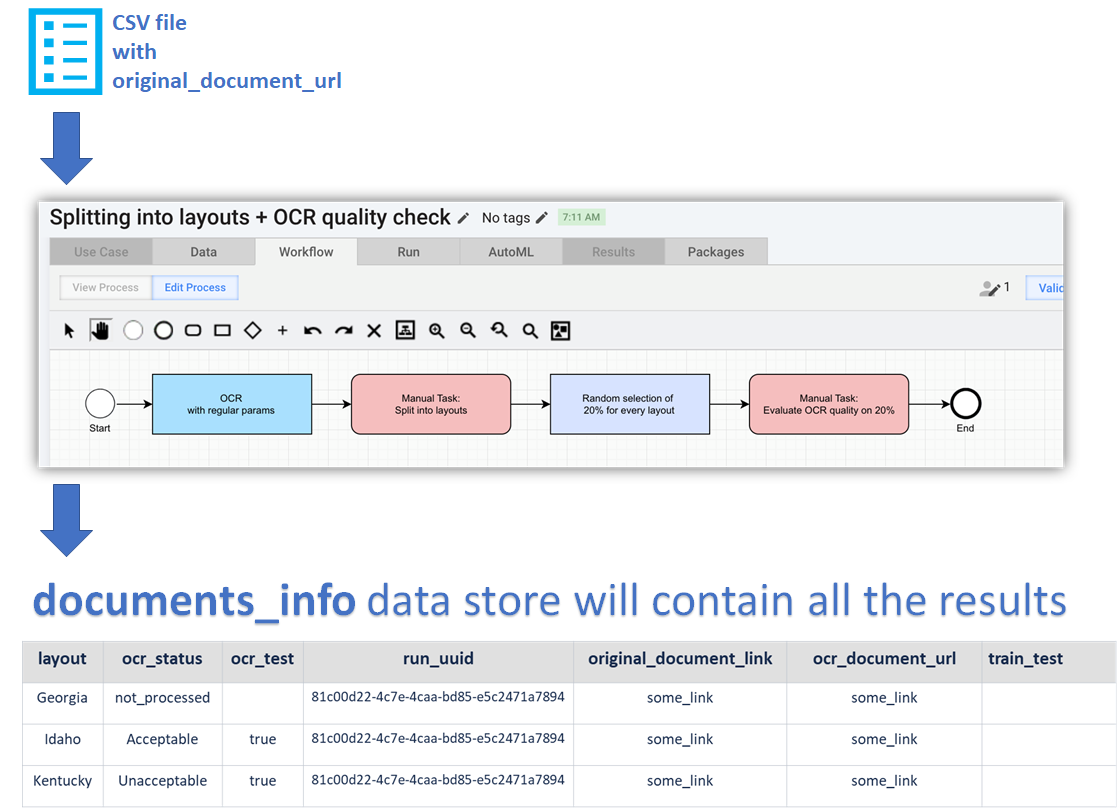
- DA provides input: a CSV file with the original_document_url column and (optional) with layout names in the layout column if they are identified, specifies name of the Data Store with parameters (da_processes_settings), and run the process.
- Original documents goes through OCR.
- FULLY MANUAL: If documents weren't split initially, all documents go through the Manual Task to assign a layout name to each document.
- AUTOMATICALLY: 20% of each layout are selected for check and sent to the Manual Task.
- FULLY MANUAL: DA completes Manual Task to check OCR quality.
- DA checks the documents_info Data Store and makes a decision if OCR should be improved or not.
- If needs to be improved:
- MLE changes OCR configuration.
- The sub-process starts again. There is no need to change anything else, just copy with include input data and run.
- Layouts are assigned automatically.
- The same 20% of each layout go through the Manual Task to check OCR quality.
- DA makes a decision if OCR should be improved again or not.
- If OCR is already has acceptable quality, move further.
- If needs to be improved:
Here is the scheme of the first process:
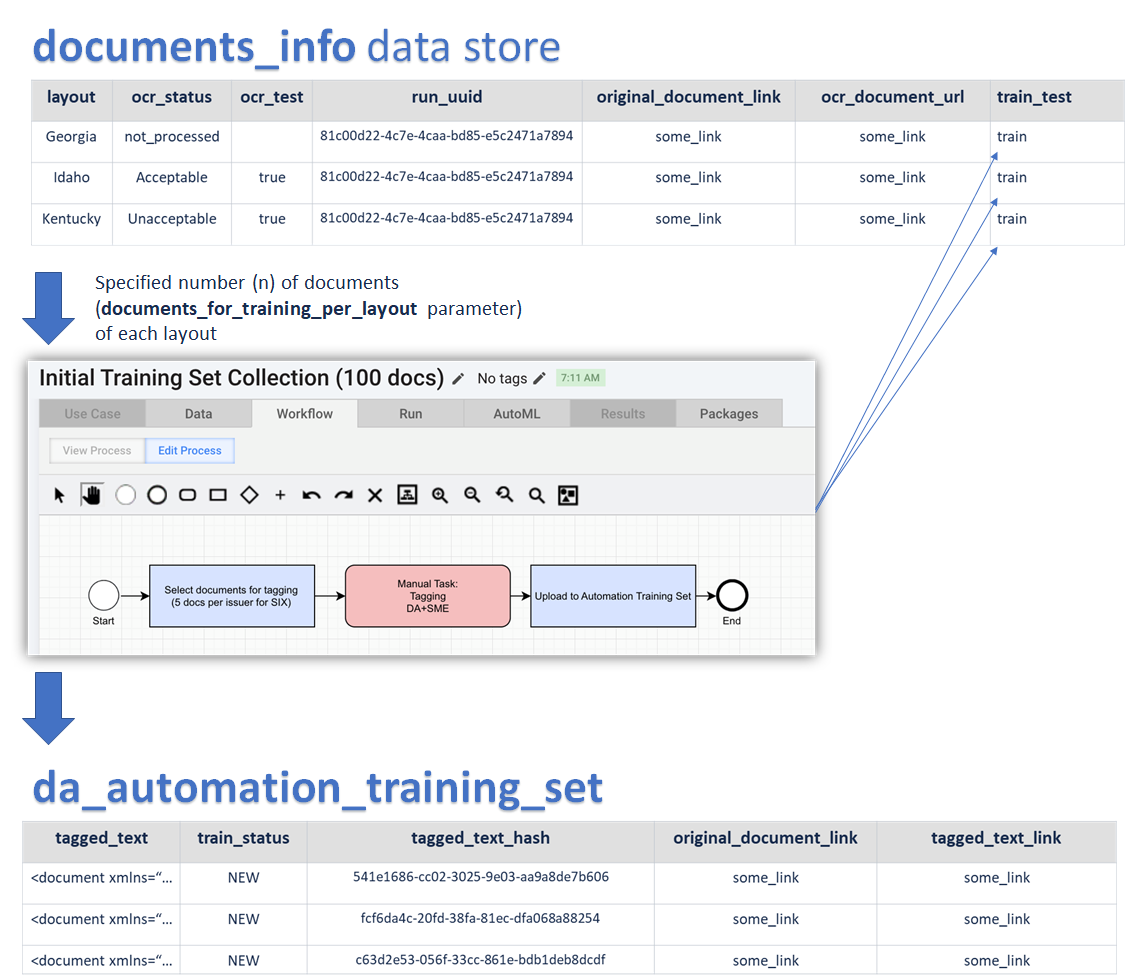
Initial training set tagging
- DA runs the second sub-process. No input file is needed. Specify a name of the Settings Data Store: da_processes_settings. All documents will be taken from the documents_info Data Store specified in the settings.
- AUTOMATICALLY: Specified number (N) of documents (the
documents_for_training_per_layoutparameter) of each layout are selected and sent to the Manual Task for tagging the Initial Training Set. - FULLY MANUAL: DA tags Initial Training Set fully manually with consultations of SME if needed.
- AUTOMATICALLY: da_automation_training_set specified in parameters will be updated. Also train_test statuses will be updated to train in the documents_info Data Store.
Here is the scheme of the second process:
Iteration tagging with AutoML enabled (first iteration)
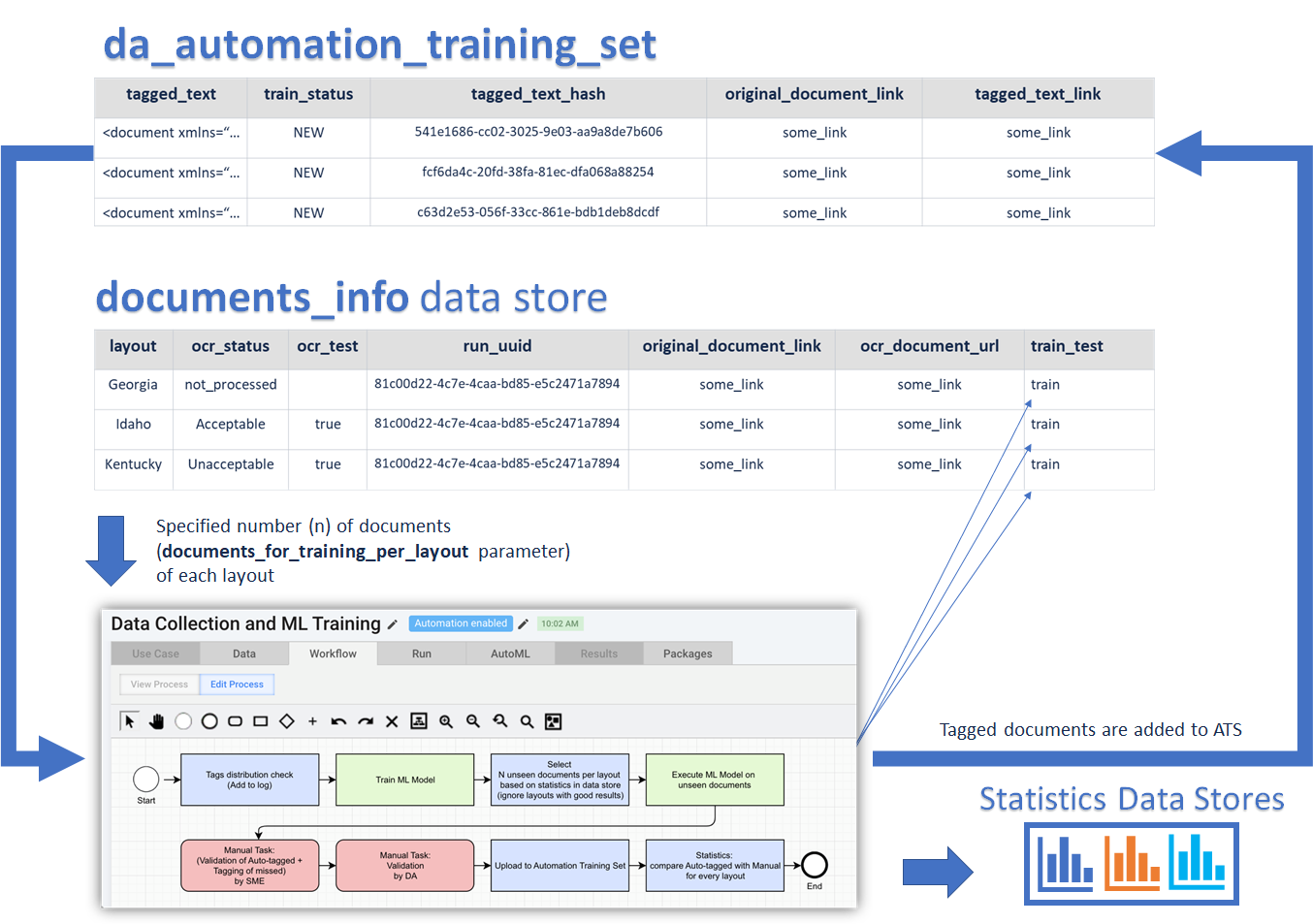
- DA runs the third sub-process. No input file is needed. Specify a name of the Settings Data Store: da_processes_settings. All documents will be taken from the documents_info Data Store specified in the settings.
- AUTOMATICALLY: Model is trained on the existing Training Set: da_automation_training_set.
- AUTOMATICALLY: New N documents of each layout are selected based on the Statistics Data Store: documents_fields_statistics (by this moment, it is empty yet, so documents of all layouts will be taken) and go to extraction.
- AUTOML ASSISTED: SME validates the results of extraction (corrects the mistakes, tags what is missed).
- DA validates the answers of SME.
- AUTOMATICALLY: Position-based statistics (AutoML versus DA) for each field in each layout are calculated and stored with current run_uuid in Data Stores with the names you specify in the
documents_statisticsanddocuments_fields_statisticsparameters. Not data-values are compared, but pieces of text surrounded with corresponding<tags>, so OCR mistakes and normalization won't affect accuracy. - AUTOMATICALLY: DA validation results are added to the existing Training Set in da_automation_training_set.
Here is the scheme of the third process (the first run):
Iteration tagging with AutoML enabled (second and all further iterations)
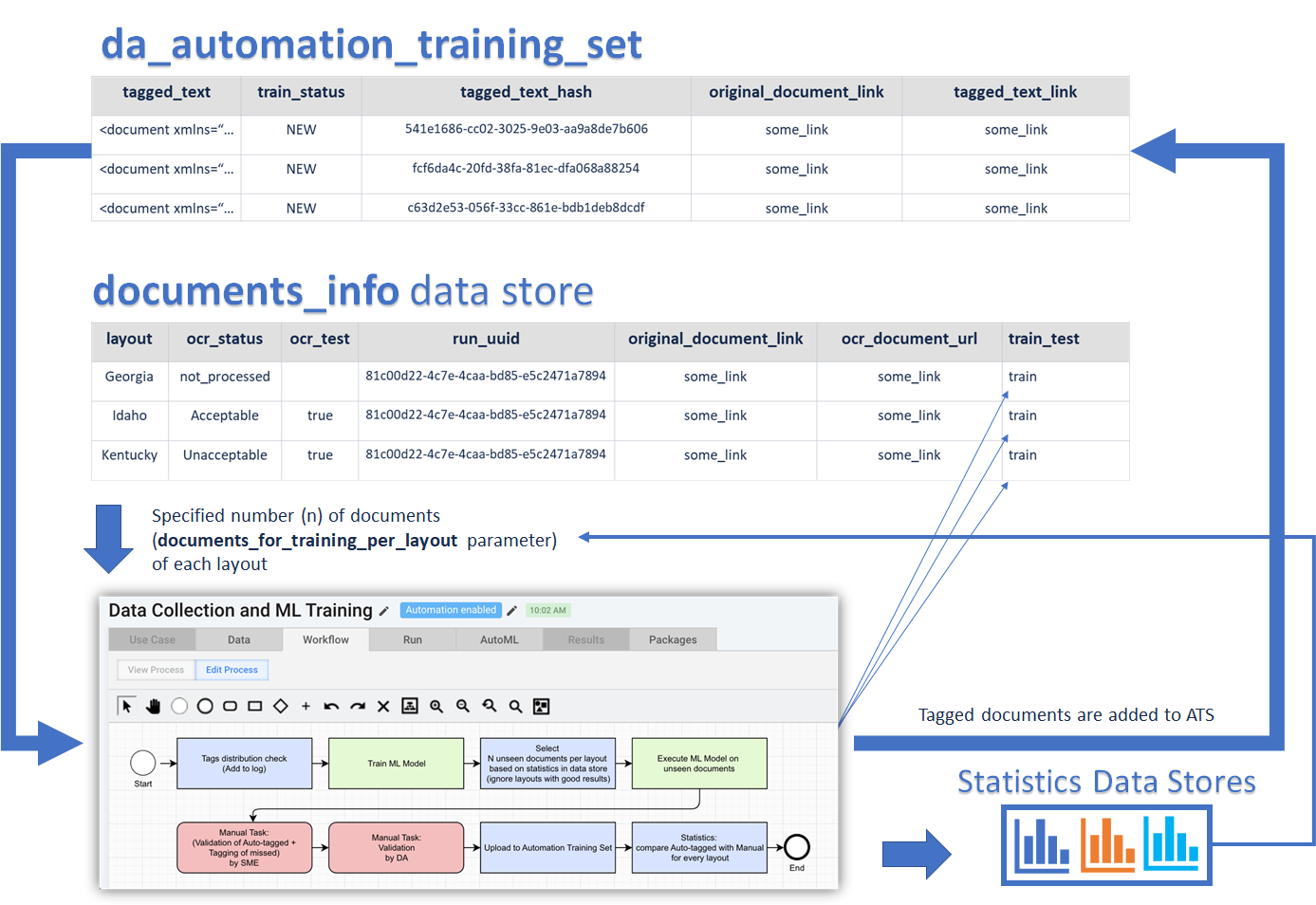
- DA copies and runs the third sub-process. No input file is needed. All documents will be taken from the documents_info Data store.
- AUTOMATICALLY: Model is trained on the existing Training Set.
- AUTOMATICALLY: New N documents of only layouts containing the fields not meeting the success criteria are selected and goes to extraction based on documents_fields_statistics.
- AUTOML ASSISTED: SME validates the results of extraction only for fields not meeting the success criteria, the other fields are hidden using ie_plugins_ie-manage-fields-2.plugin.xml and based on documents_fields_statistics.
- DA validates the answers of SME.
- AUTOMATICALLY: Position-based statistics (AutoML versus DA) for each field in each layout are calculated and stored with the current run_uuid in Data Stores with the names you specify in the
documents_statisticsanddocuments_fields_statisticsparameters. - AUTOMATICALLY: DA validation results are added to the existing Training Set in da_automation_training_set.
- The iteration must be repeated till:
- All layouts meet success criteria fully.
- All available documents for required layouts are tagged.
Here is the scheme of the third process when running for the second time and more often:
After the process is finished, a new model can be trained on the final Training Set. After this it can be executed on an unseen and yet not tagged Test Set.
A new Automation Business Process will be created and it is recommended for DA to enable Analytics in it and to validate the results of extraction on theTest Set.
How to use C&D BP
- Preparation step
- Business Process 1: Splitting into layouts and OCR quality check
- Business Process 2: Initial training set collection
- Business Process 3: ML Model training and data collection
- Information about Data Stores
Mind to clear Data Stores when starting a new training set collection.
If you have already used the processes for other training set collections on the current Control Tower (for other Use Case or unsuccessful try of the current one) and you want to start from scratch, make sure the Data Stores you are going to use meet the following criteria:
- The documents_info Data Store is empty (in case of using OCR step) or filled with your documents providing that for each of them the train_test column is empty and run_uuid is the same as run_uuid1 in the Settings Data Store.
- In the Settings Data Store, run_uuid1, run_uuid2, run_uuid3 are empty or run_uuid1 is the same as in the documents_info Data Store.
- da_automation_training_set is empty or the documents it contains have the train mark in the train_test column of the documents_info Data Store, and run_uuid for them is the same as run_uuid1 in the Settings Data Store.
- The statistics and documents_distribution Data Stores are empty.
Otherwise some things can go wrong, and you won't be able to create a training set correctly.