
Attach ODF sources
caution
Avoid changing ODF Core in your implementation. Doing so, you will not be able to easily upgrade later into a new version of ODF Core.
When you are starting with ODF, it will be extremely useful to have easy access to source code of the ODF Core library.
Having attached sources in WorkFusion Studio, you get a convenient way to quickly navigate to the library source code.
- Download .zip with the ODF Core sources. See the Source code access page for options on how you can get your archive.
- Ctrl+click on any class provided by Core, for example, on the
Appclass incom.wf.odf.odflab.app.AppExample. Make sure you open theAppExampleclass from the separate root level of your Project Navigator view (i.e., not nested to the root project). - On clicking Ctrl+click, you will get the Source not found screen where you have the Attach Source... button available. Once you have the ODF Core archive on your machine, click it.
- Choose the External location radio-button > the External File button, and select the downloaded .zip with the ODF Core sources.
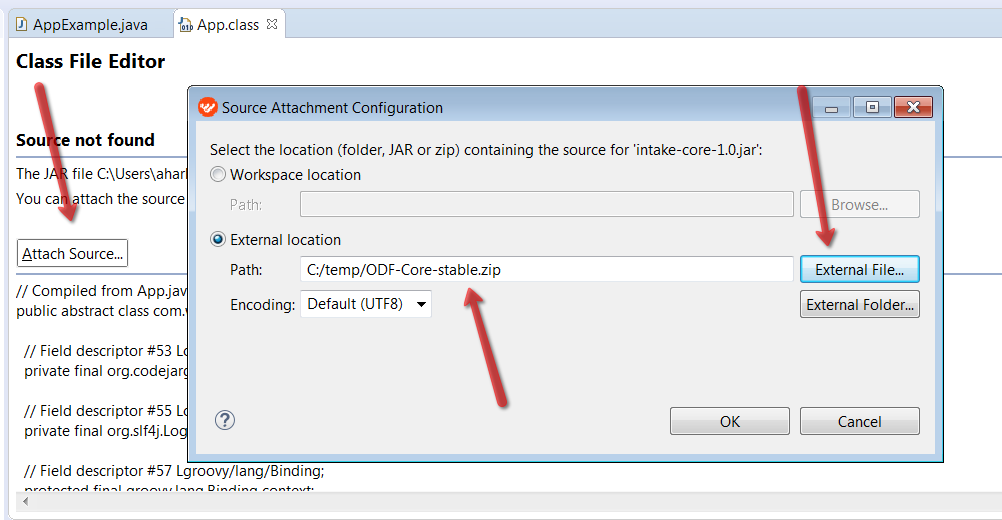
Next time, you click any class from ODF Core, WorkFusion Studio will automatically open its source code.
Similarly, you can attach source code of the ODF Components library.