
View Bot Task samples
Store files in S3 storage
The sample will create a simple text file in RAM and upload it into the S3 storage. Then, the sample reads the same file from S3 storage.
Bot Task export data contains:
- URL to the stored file
- file content
As a preparation step, you are required to have access to AWS S3 or S3 Emulator (depends on the type of instance installation) and create your folder in aharhots.bucket to make your sample work.
For input data, use void_input_data.csv.
Work with S3 storage
<?xml version="1.0" encoding="UTF-8"?>
<config charset="UTF-8">
<script></script>
<var-def name="fileLocation">
<s3 bucket="aharhots.bucket">
<s3-put path="aharhots/s3-sample.txt" content-type="text/html; charset=utf-8" content-disposition="inline" acl="PublicRead">
<script return='pageSource.getBytes()'/>Read data from Data Stores
The sample shows how to run SQL SELECT against WorkFusion Data Store. Bot Task export data contains all SQL SELECT results.
As a preparation step, create Data Store with the website_monitoring name using website_monitoring.csv.
For input data, use input_data.csv.
Work with Data Stores
<?xml version="1.0" encoding="UTF-8"?>
<config>
<var-def name="private_equity_datastore_name">
<template>${private_equity_datastore_name}</template>
</var-def>
<var-def name="priority">
<template>${priority}</template>
</var-def>
<var-def name="datastoreColumns">
name,nation,website,type,deeplink,priority,website_status,first_time_processing,screenshot_hash,last_checked,screenshot_url
</var-def>
<var-def name="statusColumn">
last_checked_status
</var-def>
<var-def name="websiteStatusColumn">
website_status
</var-def>
<var-def name="query">
<template>select @id, ${datastoreColumns} from @this
where
(${websiteStatusColumn}='ACTIVE' or ${websiteStatusColumn}='' or ${websiteStatusColumn} is null)
and (${statusColumn} is null or ${statusColumn} = '')
and priority='${priority.toString()}';
</template>
</var-def>
<script></script>
<loop item="companyRow">
<list>
<datastore name="${private_equity_datastore_name}">
${query}
</datastore>
</list>
<body>
<script></script>
</body>
</loop>
<export include-original-data="false">
<multi-column list="${exportItems}" split-results="true">
<loop item="column">
<list>
<script return="outputColumns" />Crawl website and extract information using XPath
The sample shows a data extraction technique from the real-world goverment website. Using the website search, a script gets companies (by iterating over alphabet as search keywords). For each company found, we are going to REGDEX documents (the Documents button). Then, we look for the first available link to a file with the .txt or .htm extension. The link is provided in the result data.
Use alphabet.csv as input data.
Create a simple business process containing two Bot Tasks and one Rule.
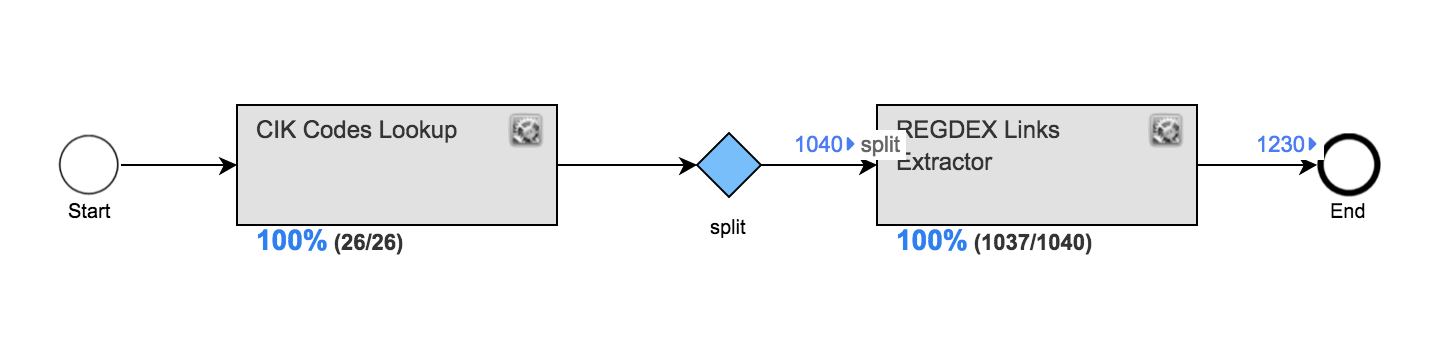

"CIK codes lookup" Bot Task
<?xml version="1.0" encoding="UTF-8"?>
<config>
<var-def name="htmlPage">
<http url="http://www.sec.gov/cgi-bin/browse-edgar?company=${letter}&match=&CIK=&filenum=&State=&Country=&SIC=&owner=exclude&Find=Find+Companies&action=getcompany"></http>
</var-def>
<var-def name="searchPage">
<html-to-xml>
<var name="htmlPage"/>
</html-to-xml>
</var-def>
<var-def name="searchPage">
<script return="res"></script>
</var-def>
<var-def name="cikCodes">
<xpath expression="//*[@id='seriesDiv']/table/tbody/tr/td[1]/a/text()">
<var name="searchPage"/>
</xpath>
</var-def>
<script></script>
<loop item="code">
<list>
<var name="cikCodes"/>
</list>
<body>
<script></script>
</body>
</loop>
<export include-original-data="false">
<multi-column list="${codes}" split-results="true">
<put-to-column-getter name="cik_code" property="cikCode"/>
</multi-column>
</export>
</config>
"REGDEX Links Extractor" Bot Task
<?xml version="1.0" encoding="UTF-8"?>
<config>
<var-def name="type">REGDEX</var-def>
<var-def name="htmlPage">
<http url="http://www.sec.gov/cgi-bin/browse-edgar?action=getcompany&CIK=${cik_code}&type=${type}&dateb=&owner=exclude&count=100"></http>
</var-def>
<var-def name="searchPage">
<html-to-xml>
<var name="htmlPage"/>
</html-to-xml>
</var-def>
<var-def name="searchPage">
<script return="res"></script>
</var-def>
<var-def name="links">
<xpath expression="//*[@id='seriesDiv']/table/tbody/tr/td[2]/a[1]/@href">
<var name="searchPage"/>
</xpath>
</var-def>
<script></script>
<loop item="link">
<list>
<var name="links"/>
</list>
<body>
<var-def name="reportsPage">
<http url="https://www.sec.gov${link}"></http>
</var-def>
<var-def name="reports">
<html-to-xml>
<var name="reportsPage"/>
</html-to-xml>
</var-def>
<var-def name="reports">
<script return="reportsFixDoctype"></script>
</var-def>
<var-def name="reportLink">
<xpath expression="(//*[@id='formDiv']/div/table//tr/td[3]/a[1][contains(@href, 'txt') or contains(@href, 'htm')]/@href)[1]">
<var name="reports"/>
</xpath>
</var-def>
<script></script>
</body>
</loop>
<export include-original-data="false">
<multi-column list="${secLinks}" split-results="true">
<put-to-column-getter name="form_8k_url" property="form8KURL"/>
<put-to-column-getter name="sic_details_url" property="sicDetailsURL"/>
</multi-column>
</export>
</config>
Interaction with web services (SOAP)
WorkFusion can definitely interact with SOAP web services. There is no magic behind the SOAP interaction, as long as you pass correct XML to your WS via the <http-extended> plugin in your machine config.
Interaction with Web services
<var-def name="loginbody">
    <template>
        <![CDATA[
        <soapenv:Envelope xmlns:soapenv="http://www.w3.org/2003/05/soap-envelope" xmlns:tem="http://tempuri.org/">
            <soapenv:Header xmlns:wsa="http://www.w3.org/2005/08/addressing">
                <wsa:Action>http://tempuri.org/ISearchWorksAPIService/Login</wsa:Action>
            </soapenv:Header>
            <soapenv:Body>
                <tem:Login>
                    <tem:Username>${username.toString()}</tem:Username>
                    <tem:Password>${pwd}</tem:Password>
                </tem:Login>
            </soapenv:Body>
        </soapenv:Envelope>
        ]]>
    </template>
</var-def>


<!-- pay attention to the http headers -->
<!-- SOAP 1.2 -->
<var-def name="extractResponse_soap12">
    <http-extended method="post" url="https://uatapi.searchworks.co.za/SearchWorksAPI/SearchWorksAPIService.svc" content-type="text/xml">
        <http-header-extended name="Content-Type">application/soap+xml; charset=utf-8</http-header-extended>
        <http-header-extended name="Action">http://tempuri.org/ISearchWorksAPIService/Login</http-header-extended>
        <var name="loginbody" />
    </http-extended>
</var-def>


<!-- SOAP 1.1 -->
<var-def name="extractResponse">
    <http-extended method="post" url="http://uatapi.searchworks.co.za/SearchWorksAPI/SearchWorksAPIService.svc" content-type="text/xml">
        <http-header-extended name="Content-Type">text/xml;charset=UTF-8</http-header-extended>
        <http-header-extended name="SOAPAction">http://tempuri.org/ISearchWorksAPIService/Login</http-header-extended>
        <!-- you can pass the SOAP message here -->
        <template>
        <![CDATA[
        <soapenv:Envelope xmlns:soapenv="http://schemas.xmlsoap.org/soap/envelope/" xmlns:tem="http://tempuri.org/">
            <soapenv:Header/>
            <soapenv:Body>
                <tem:Login>
                    <tem:Username>${uname}</tem:Username>
                    <tem:Password>${pwd}</tem:Password>
                </tem:Login>
            </soapenv:Body>
        </soapenv:Envelope>
        ]]>
        </template>
    </http-extended>
</var-def>
When integrating with SOAP services, make sure you understand differences between SOAP1.1 and SOAP 1.2 standards. Refer to the following workflow to summarize the most common differences.
- WS SOAP 1.1 protocol:
- Use the http://schemas.xmlsoap.org/soap/envelope/ namespace on the SOAP envelope.
- Pass the text/xml value on the Content-Type header of the HTTP Request.
- Pass the SOAP action definition via the SOAPAction header.
- WS SOAP 1.2 protocol:
- Use the http://www.w3.org/2003/05/soap-envelope namespace on the SOAP envelope.
- Pass the application/soap+xml; charset=utf-8 value for the Content-Type header.
- Specify the SOAP action according to the namespace definition http://www.w3.org/2005/08/addressing.