
Role management
The Role Management lists all the current roles in the system and provides access to all Role Management Functions.
To access, go to the Configuration menu > System Settings > Role Management.
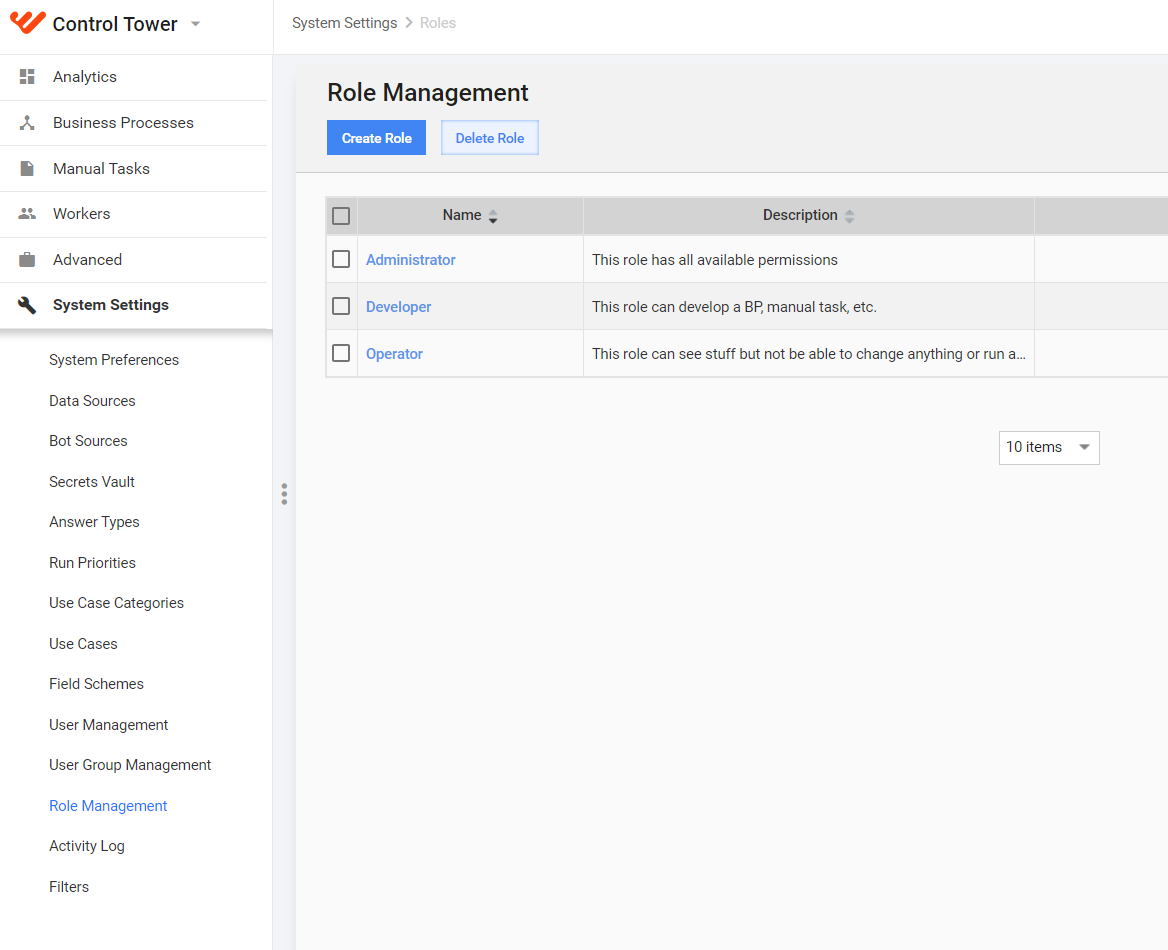
On this page, you can perform the following actions:
- Create a new role.
- Edit an existing role.
- Delete an existing role.
Add or edit role
Click Create Role or the appropriate link in the Name column to edit. The following screen is displayed:
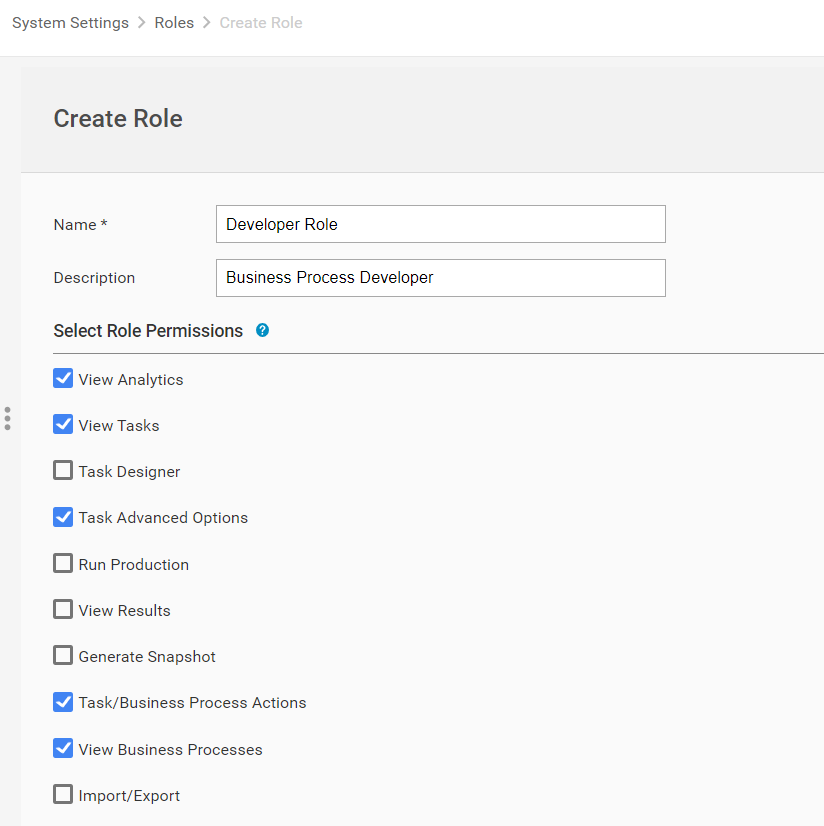
Enter a unique Name for the role.
Provide role Description.
Tick checkboxes with appropriate Permissions.
Click the Save button.
As a result, the created role appears in the Role Management table and can be granted to WorkFusion users on Configuration > User Management.
Permissions and default role setup
| Permissions/Roles | Page | Description | Administrator | Developer | Operator | Relative Path |
|---|---|---|---|---|---|---|
View Analytics |
|
Dashboards is a page that provides a high level overview of all the different components of the WorkFusion platform. It consists of different Widgets (Workload Distribution, Task Activity, Account Monitor, etc.) which visualize statistics and events. By default it is the first screen you see after logging into the WorkFusion platform. |
✓ | ✓ | ✓ | /dashboard |
| View Tasks |
|
This permission allows to view all Tasks created in WorkFusion (Tasks > View All Tasks in main menu). | ✓ | ✓ | ✓ | /tasks |
Task Advanced Options |
This permission allows to view and modify Task Advanced Options on Run Task tab:
This permission also allows to create Qualification Task from Task Actions dropdown but to view dropdown permission Task/BP Actions is necessary |
✓ | ✓ | /task/edit/{UUID} /task/new |
||
| Task Designer |
|
Task Designer permission allows to view, edit, and create:
and run them in a Sandbox environment. |
✓ | ✓ | /task/... /business-process/... /campaign/... /question/... /questions |
|
Run Production |
|
This permission allows to run Tasks and BPs on Production environments. Production operates with real money and does not have the "sandbox" substring in the URL. Users with the Run Production permission can also run Tasks and BPs on Sandbox. |
✓ | ✓ | ✓ | |
| View Results | This permission allows to view Task or BP run results:
|
✓ | ✓ | ✓ | task/edit/{uuid}? actTab=RESULTS... business-process/edit/{uuid}?actTab=RESULTS... |
|
Generate Snapshot |
This permission allows to:
Snapshot is a file containing intermediate or final run results in CSV format. |
✓ | ✓ | ✓ | ||
| Task/Business Process Actions | This permission allows to:
Create Qualification Task action can be done if we have Task/BP Actions and Task Advanced Options permissions. |
✓ | ✓ | ✓ | ||
| View Business Processes |
|
This permission allows to view all Business Processes created in WorkFusion (Business Processes > View All Business Processes in main menu). |
✓ | ✓ | ✓ | /business-processes |
View Campaigns |
|
This permission allows to view Campaigns (Tasks and BPs) and perform the following actions:
Only Sandbox without **Run in Production** permissions |
✓ | ✓ | ✓ | /campaigns |
Manage Campaigns |
This permission allows to manipulate Campaigns:
|
✓ | ✓ | /campaigns | ||
Schedules |
This permission allows to start Tasks and BPs according to a schedule. | ✓ | ✓ | ✓ | /schedules | |
| Manage Templates | This permission allows to create, edit, copy, and delete Templates. Templates provide a way to reuse objects within WorkFusion. Tasks, BPs, and Rules are based on Templates. |
✓ | ✓ | /templates | ||
| Manage Bot Configurations | This permission allows to create, edit, copy, and delete Bot Configs (Tasks). | ✓ | ✓ | /machine-configs | ||
| Manage Rules | This permission allows to manage Rules and Rule Templates (Campaigns > Rules, Campaigns > Rule Templates). With this permission, you can create, edit, delete, and copy Rules and their Templates. |
✓ | ✓ | /rules /rules-templates |
||
| Manage Data Stores |
|
This permission allows to create, edit, delete, and export Data Stores, Field Schemes and Automation Training Sets. Data Stores module is a web interface for managing DB tables in WorkFusion. You can use Data Stores to keep lookup tables for multivalue Answer options, save BP results, and query Data Stores from Bot Configs and Rules. |
✓ | ✓ | /data-stores /training-sets /field-schemes |
|
| View Data Stores | This permission allows to only view, download, and access Data Stores, but not delete and update them in WorkFusion applications or through the API. | ✓ | ✓ | ✓ | /data-stores /training-sets |
|
| Manage Workers |
|
This permission allows to view and manage:
|
✓ | ✓ | ✓ | /workers /workforces /assign-qualification |
| Manage Qualifications | This permission allows to create, edit, delete, and assign Qualifications and Qualification Sets. Qualifications are a means that the WorkFusion platform provides to ensure the quality of Workers. |
✓ | ✓ | ✓ | /qualifications /qualification-sets |
|
| System Preferences |
|
System Preferences page contains all WorkFusion instance parameters:
User Settings tab is available for each user. |
✓ | /account /filters |
||
| Manage Data Purge | The Data Purge job deletes data input data, task and bp results, geenerated snapshots and Event Logs form WorkFusion instance after a defined period of time | ✓ | /account | |||
| Manage Data Sources | Data Source is a mechanism providing input data and configuration for your BPs and Tasks. This input format is best suited for those Use Cases where the data resides on an external source such as SFTP Server. |
✓ | ✓ | ✓ | /data-sources | |
Manage Bot Sources |
This permission allows to define execution setting for Bot configs: on local or remote machine, available time, proxy, etc. | ✓ | ✓ | /machine-sources | ||
| Manage Answer Types | The Answer Types screen allows you to create and manage Answer Types within the WorkFusion platform. These Answer Types are used when creating Tasks, ETL Configs , and Field Schemes and adding Answers to them. |
✓ | ✓ | /answer-types | ||
Run Priorities |
This permission allows to control the order in which Tasks are processed. See the Run Priorities topic. | ✓ | ✓ | ✓ | /run-priorities | |
| Manage Use Case | Use Cases serve as the foundation for both Tasks and Bot Configurations. They describe the workflow of a particular Business Process and thus serve as a template to create Tasks based on that workflow. |
✓ | ✓ | /use-case-categories /use-cases |
||
| Manage Users and Groups | This permission allows to view, create, edit, and delete Users and Roles. This permission does not allow to edit user emails. |
✓ | /users /roles |
|||
| Activity Log | This permission allows to use [9.1] Activity Log module. | ✓ | /activity-log | |||
View Secrets Vault Aliases |
This permission allows to view aliases in Secrets Vault and use them in the Business Processes. | ✓ | ✓ | ✓ | /secure-storage | |
Manage Secrets Vault Aliases |
This permission allows to view aliases, create, update, and delete records in Secrets Vault. | ✓ | /secure-storage | |||
View Secrets Vault Entries |
This permission allows to view secrets entries in Secrets Vault. Accessible only with Manage Secrets Vault Note! This permission is only available with Manage Secrets Vault Aliases permission and give access to see all Secrets Vault Entries if no filters assigned to user. |
/secure-storage | ||||
| Manage E-mails | This permission allows to edit user emails while creating or editing a user profile. | ✓ | /users | |||
Account Balance |
Top menu | This permission allows to view the account balance in the top right corner. | ✓ | |||
| Import/Export | All pages | This permission allows to import and export Campaigns, Runs, Use Cases, Packages, Templates, etc. Without this permission, user cannot see Import/Export buttons on all pages and cannot view Task/BP Packages tabs. |
✓ | ✓ | ✓ | /campaigns /templates /machine-configs /questions /rules /rules-templates /qualification-sets /use-case-categories /use-cases
|
| Advanced Package Import |
|
This permission allows to overwrite process versions having significant differences (steps added, deleted, or substituted with other steps). See Migrate Packages of Tasks and BPs. |
✓ | ✓ | /business-processes |
|
Manage AutoML Settings |
Tasks
|
This permission allows to view tab "Configure AutoML" and configure setting for manual task automation. | ✓ | ✓ |
Permission restrictions
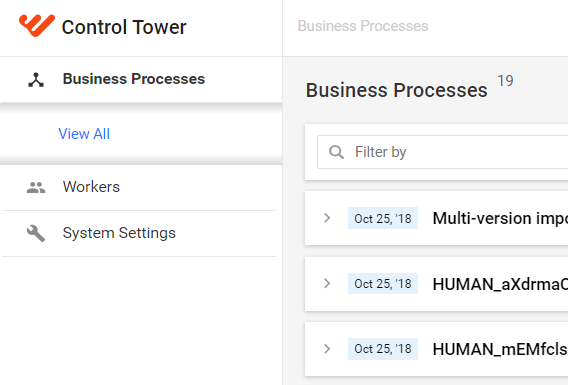
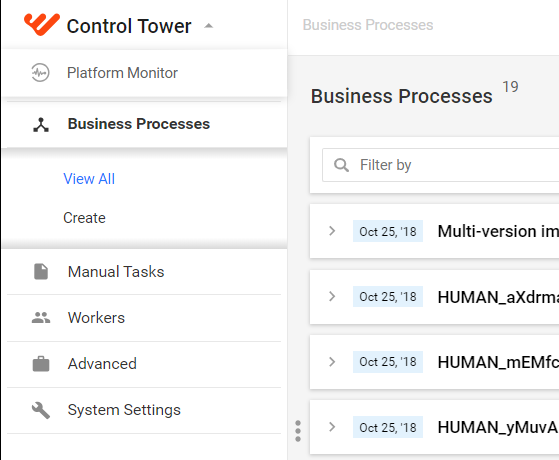
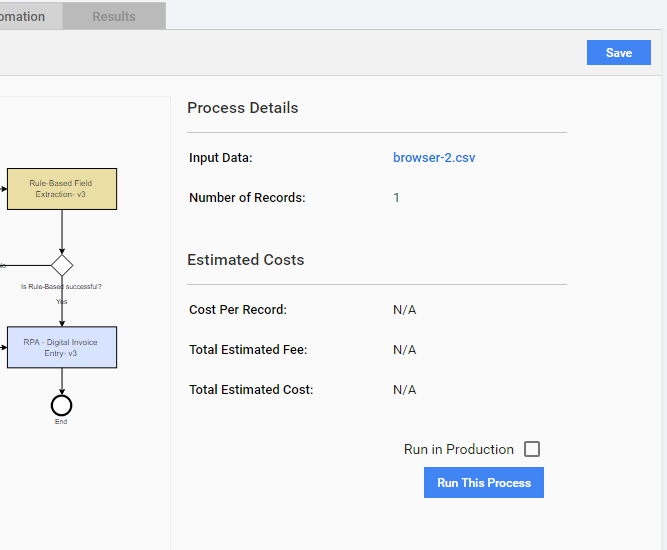
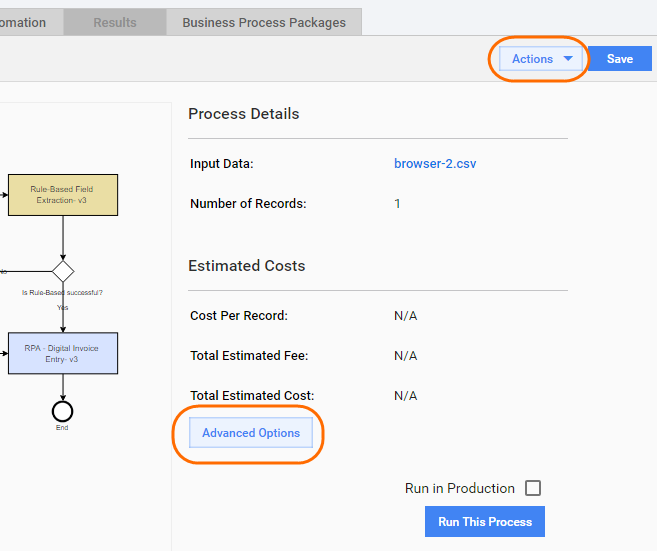
When a user has a Role without appropriate Permissions, the following restrictions can be applied in the user interface:
Main menu items are not displayed
| Restricted permissions | All permissions |
|---|---|
 |  |
Action buttons or links are not displayed
| Restricted permissions | All permissions |
|---|---|
 |  |
Known issues
- Impossible to delete role assigned only to group. No messages appeared after confirmation delete operation.