
Use Data Stores as transactions source
Download sample project
Download ODF input from data stores project
Learn how to input from Data Store
note
To make it easier to understand the important classes and interfaces, we recommend to download and import this example project into your WorkFusion Studio and refer to it as you read this guide.
The downloaded project must have the file structure below.
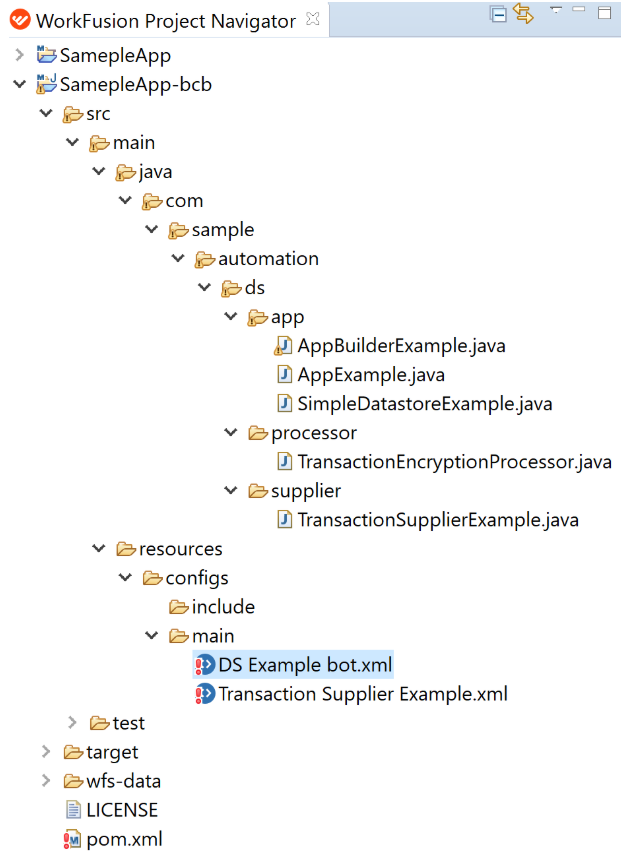
As soon as you have downloaded the project, perform the following actions.
Change the version number in process > pom.xml.
Run
mvn clean installandmvn deployon parent pom.xml. This deployment depends on your Nexus repository configuration.If you have the standard guide, it would point to your local installation:
<bot.repository.url>https://repository.workfusion.com/service/local/repositories/wf-machine-config-bundle/content/</bot.repository.url>If you followed the guide for custom local Nexus installation, it would point to your local Nexus. You will need to add changes in your pom.xml and settings.xml files for this.
<bcb.repository.url>http://localhost:8081/nexus/service/local/repositories/wf-machine-config-bundle/content/</bcb.repository.url>
Once the build is reflected in Nexus, upload the bots into the local Control Tower. Go to Bot Configurations > Import from repository. You can build your business process by selecting a bot task from the list.

Learn TransactionSupplier
Navigate to the below files and open them simultaneously.
src > main > resources > configs > main > Transaction Supplier Example.xmlsrc > main > java > com.sample.automation.ds.supplier.TransactionSupplierExample.java
This is the bot task that executes the code for TransactionSupplierExample.java. The TransactionSupplierExample class creates transactions when the Transaction Supplier Example.xml bot task is executed.
The following code in the bot task initializes the task of creating transactions.
def app = AppExample.init(binding).get();
def transactions = app.loadTransactions(TransactionSupplierExample.class);
TransactionSupplier generates transactions by reading data from the data store (my_datastore that will be explained in the next section). The SimpleDataStoreExample class executes a data store query to retrieve records from the data store. Since the readData() method returns, returns List<Map<String, String>>, this list is converted into ODF transactions by the transformRecordsIntoTransactions() method.
@Override
public Collection<Transaction> get() {
    SimpleDatastoreExample dsExample = new SimpleDatastoreExample(dataStoreQuery);
    return transformRecordsIntoTransactions(dsExample.readData());
}
transformRecordsIntoTransactions() loops through List<Map<String, String>> and creates a transaction per Map<String, String>. Basically, each Map<String, String> is a row in the data store, and the list of maps consists of all the rows in the data store.
private Collection<Transaction> transformRecordsIntoTransactions(List<Map<String, String>> result) {
    Collection<Transaction> transactions = new ArrayList<>();
    for (int index = 0; index < result.size(); index++) {
        Transaction transaction = new Transaction();
        transaction.setId(uuid());
        transaction.setDocs(Arrays.asList(createSampleDocument(result.get(index))));
        transactions.add(transaction);
    }
    return transactions;
}
If you want to populate transaction attributes with column names and corresponding values from the data store, you can do so by iterating through the list of maps and adding the key and value. You can retrieve the column names and values in TransactionProcessor using the transaction.getAttribute() method and do some processing on the value. It can also be retrieved inDs Example Bot.xml using the same method and exported in the bot task results.
private Collection<Transaction> transformRecordsIntoTransactions(List<Map<String, String>> result) {
    Collection<Transaction> transactions = new ArrayList<>();
    for(Map<String, String> map : result) {
        Transaction transaction = new Transaction();

        map.entrySet().stream().forEach(entry -> {
            transaction.putAttribute(entry.getKey(), entry.getValue());
        });

        transaction.setId(uuid());
        transaction.setDocs(Arrays.asList(createSampleDocument(result.get(index))));
        transactions.add(transaction);

    }
    return transactions;
}
Closer look into SimpleDatastoreExample
This class uses DataStoreQuery.class present in the com.workfusion.rpa.core.datastore package for reading data from a data store. DataStoreQuery is injected in this class using constructor injection.
The DataStoreQuery class is deprecated from version 10 onwards. Mind to use DataStorePluginAdapter for higher versions. This example is built using the maven archetype rpa-bundle-quickstart v9.2.2.5.
As explained above, the readData() method returns a list of rows(Map<String, String>) from the data store. The executeQuery() method takes the data store name and the query as input parameters. It is a select query that returns all the records from the data store.
public class SimpleDatastoreExample {

    private static final String DATASTORE_NAME = "my_datastore";

    private static final String READ_QUERY_TEMPLATE = "select * from @this";

    private DataStoreQuery dataStoreQuery;

    @Inject
    public SimpleDatastoreExample(DataStoreQuery dataStoreQuery) {
        this.dataStoreQuery = dataStoreQuery;
    }

    public List<Map<String, String>> readData() {
        DataStoreQuery.QueryResult result = dataStoreQuery.executeQuery(DATASTORE_NAME, String.format(READ_QUERY_TEMPLATE, DATASTORE_NAME));
        List<Map<String, String>> rows = result.getSelectResultAsMapRows().get();
        return rows;
    }
}
Execution flow inside executeQuery() method
The following steps describe the execution flow inside the executeQuery() method. Refer to the code for the DataStoreQuery class.
- This method prepares a data store equivalent query using your query provided as String.
DataStoreUtilssubstitutes correct values for respective placeholders from your query.- An instance of
IRemoteDataStoreServiceis returned that is a service consisting of basic CRUD operations for the data store. The service instance is configured with the required data store properties so that it knows which data store you are going to interact with. - Instance of
DataStoreTransactioncreated. - The instance created in [3] consists of different flags to determine the type of query (select, update, etc.).
- Based on the type of query in [5], either
executeSelectQuery()ORexecuteQuery()ORexecuteUpdateQuery()method ofIDataDatabaseDataStoreServiceinterface is executed. In this example,executeSelectQuery()is executed. - As the result of [6],
executeSelectQuery()returnsList<DbRowDTO>that is finally wrapped to theQueryResultclass type. - The actual row data from
DataStoreQuery.QueryResult.classcan be retrieved using thegetSelectResultAsMapRows()method.
Learn TransactionProcessor
TransactionProcessor is a standard processor that sets List<Document> in a transaction using the transaction.setDocs() method. There is no custom processing logic implemented here. DS Example Bot.xml triggers the execution of the DataStoreTransactionProcessor class.