
Work with emails
Sending Email with HTML Body
To send emails from Bot configs, use the standard Web-Harvest <mail> plugin:
- Do not forget to enter your SMTP server settings (host, port, username, password, security) and email type (text or html).
- To insert a variable value into mail body, use the <var> plugin with a respective name attribute.
- If you want to insert HTML tags into mail body, surround them with CDATA section(s).
Example
<?xml version="1.0" encoding="UTF-8"?>

<config>
    <var-def name="acronym">
        SPA
    </var-def>
    <mail smtp-host="smtp.example.com"
          smtp-port="587"
          type="html"
          from="username@example.com"
          to="username@example2.com"
          subject="Some test subject"
          charset="UTF-8"
          username="username@example.com"
          password="super_secure_password"
          security="ssl">

        Using HTML content in your email:
        <![CDATA[
            <p><a href="https://workfusion.com">WorkFusion Inc.</a> is providing <strong>SPA*</strong></p>
        ]]>

        <![CDATA[<hr><em>]]>
        *<var name="acronym"/> - Smart Process Automation
        <![CDATA[</em>]]>

    </mail>
</config>
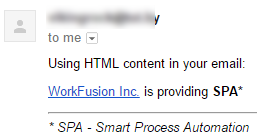
The following email will be sent to the target address:
EML File Handling
Input: path to a EML file
Output: email body and all attachments separately
Getting email body and attachments from a EML file
<?xml version="1.0" encoding="UTF-8"?>

<config>
        <!-- path to eml file -->
    <required name="s3link" />

        <script>
        <![CDATA[
        import java.io.ByteArrayInputStream;
        import java.io.InputStream;
        import java.util.HashMap;
        import java.util.Map;
        import java.util.List;
        import java.util.Hashtable;
        import java.util.ArrayList;
        import java.util.UUID;
        import javax.mail.Message;
        import javax.mail.Multipart;
        import javax.mail.Part;
        import javax.mail.internet.MimeMessage;
        import javax.mail.internet.MimeMultipart;
        import java.net.URL;
        import java.util.Base64;
        import org.apache.commons.io.IOUtils;

        import com.google.gson.Gson;
    import com.google.gson.GsonBuilder;

    Gson gson = new GsonBuilder().disableHtmlEscaping().setPrettyPrinting().create();

    URL u = new URL(s3link.toString());
    String path = u.getPath();
    int index1 = path.indexOf("/", 1);
    String s3bucket = path.substring(1,index1);
    String emlfilename = java.net.URLDecoder.decode(path.substring(index1+1));

        ]]>
        </script>

        <s3 bucket="${s3bucket}">
                <var-def name="emlcontent">
                        <s3-get name="${emlfilename}"/>
                </var-def>
        </s3>

        <script>
                <![CDATA[
          List splitEml = new ArrayList();
                  byte[] byteContent = emlcontent.toBinary();
                  InputStream inputStream = new ByteArrayInputStream(byteContent);
                  Message msg = new MimeMessage(null, inputStream);

            if ( msg.getContent() instanceof Multipart ) {

                Multipart mp = (Multipart) msg.getContent();
                for ( int i = 0; i < mp.getCount(); i++ ) {
                    Part part = mp.getBodyPart(i);
                     Hashtable partAsHt = new Hashtable();
                     boolean isInputStream = false;
                     if (part.getContent() != null && part.getContent() instanceof InputStream) {
                       isInputStream = true;
                     }
                                 boolean disposition = Part.ATTACHMENT.equalsIgnoreCase(part.getDisposition());
                                 if ( disposition && isInputStream ) {
                                    partAsHt.put("filename",part.getFileName());
                                 } else {
                                        partAsHt.put("filename","body.html");
                                 }
                                 partAsHt.put("content", new String( Base64.getEncoder().encode( IOUtils.toByteArray( part.getInputStream() ) ) ) );
                                 splitEml.add(gson.toJson(partAsHt));
                }
            }
            inputStream.close();
                ]]>
                </script>

                <export include-original-data="true">
                        <multi-column list="${splitEml}" split-results="true">
                                <put-to-column name="mimepart"/>
                        </multi-column>
                </export>
</config>