
Deployment overview
This user guide describes Business Process (BP) Bundle Import automation as a part of Open Development Framework (ODF).
Usage recommendation for development teams is to follow publish with the Maven approach.
Introduction
The BP Bundle is designed for the automated import of the BP artifacts (such as Business Process, Data Stores, Rules, Bot Configs, etc.) from one environment to another, for example, from the development environment to the staging environment. Artifacts are passed in a single bundle.
The automation of the BP import leads to almost zero manual efforts and takes a matter of minutes.
The target audience for this user guide is developers and IT Operations as well as Support Engineers who run the BP Import/Export.
For running and maintaining the BP Bundle Import feature, IT OPS uses the Control Tower UI while developer tools are mainly Maven/Jenkins.
The high-level diagram below represents a business flow and key actors of the Bundle Import.
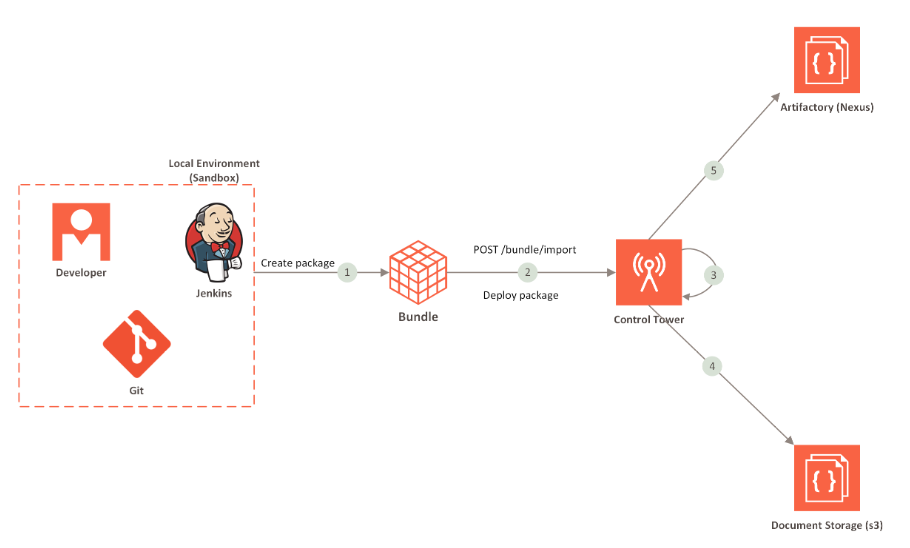
The BP bundle import automation process includes the following steps:
- The Bundle is packaged at the development environment
- The Bundle is submitted to Control Tower via REST API
- Control Tower parses Bundle and imports its components
- Control Tower uploads S3 resources and AutoML artifacts to the Document Storage
- Control Tower uploads Bot Config Bundles (BCBs) and other JAR dependencies to Artifactory (Nexus)
- Control Tower imports Business Process
Bundle components
The BP Bundle currently includes the following components.
- Business Process Packages
- ML Models
- Data Stores
- S3 Resources
- BCBs
- Use Cases
- Templates
- Rules
- Bot Configs
meta-info.jsonfile- Automation Training Sets
Bundle structure
The figure below depicts the extended structure of the BP Bundle.
├── artifactory-dependency
│   ├── bcb
│   │   └── com
│   │       └── workfusion
│   │           ├── intake
│   │           │   └── intake-core
│   │           │       └── 1.0
│   │           │           └── intake-core-1.0.jar
│   │           └── negative-news
│   │               └── 3.0
│   │                   └── negative-news-3.0.jar
│   └── repository-name1
├── automl
│   ├── artifact
│   │   ├── generic-ru-model
│   │   │   ├── 1.0
│   │   │   │   ├── config
│   │   │   │   ├── lib
│   │   │   │   └── model.description.jar
│   │   │   └── 1.1
│   │   │       ├── config
│   │   │       ├── lib
│   │   │       └── model.description.jar
│   │   └── invoice-extraction-model
│   │       └── 2.0
│   │           ├── config
│   │           ├── lib
│   │           └── model.description.jar
│   └── model
│       ├── claim_classification_1_3
│       │   └── output
│       │       ├── hpo-config
│       │       ├── model
│       │       └── model-info.txt
│       └── invoice_xml_4aa8ef30-290c-4a25-8deb-264e27b03068
│           └── output
│               ├── model
│               └── model-info.txt
├── bot-config
│   └── ocr.xml
├── business-process
│   ├── BP+with+BCB+Example+29-3-2019.zip
│   └── Negative+News+AML.zip
├── datastore
│   ├── datastore1.csv
│   └── datastore2.csv
├── meta-info.json
├── rule
│   ├── rule1.xml
│   ├── rule2.xml
│   └── rules-combined.xml
├── s3
│   ├── bucket-name-example
│   └── doc-upload
│       ├── pdf-chrome-printer.jar
│       └── report
│           └── report-template.html
├── template
│   ├── template1.xml
│   ├── template2.xml
│   └── templates-combined.xml
└── use-case
    ├── bot-task
    │   ├── bot-use-case1.xml
    │   ├── bot-use-case2.xml
    │   └── bot-use-cases-combined.xml
    ├── business-process
    │   ├── bp-use-case1.xml
    │   ├── bp-use-case2.xml
    │   └── bp-use-cases-combined.xml
    └── manual-task
        ├── manual-use-case1.xml
        ├── manual-use-case2.xml
        └── manual-use-cases-combined.xml
Bundle sample
For a sample of a typical Bundle, refer to bundle-example.zip.