
Perform advanced configuration
Search Engine workflow
Here's a decomposition of Search Engine into four steps:
Define an initial subset of components.
Run the training and get results of an experiment.
Train a neural network to change or predict components with its parameters.
Repeat steps 2 and 3 until one of the following two conditions is met:
- New experiments don't improve results.
- The time limit is met, for example, 10 hours.
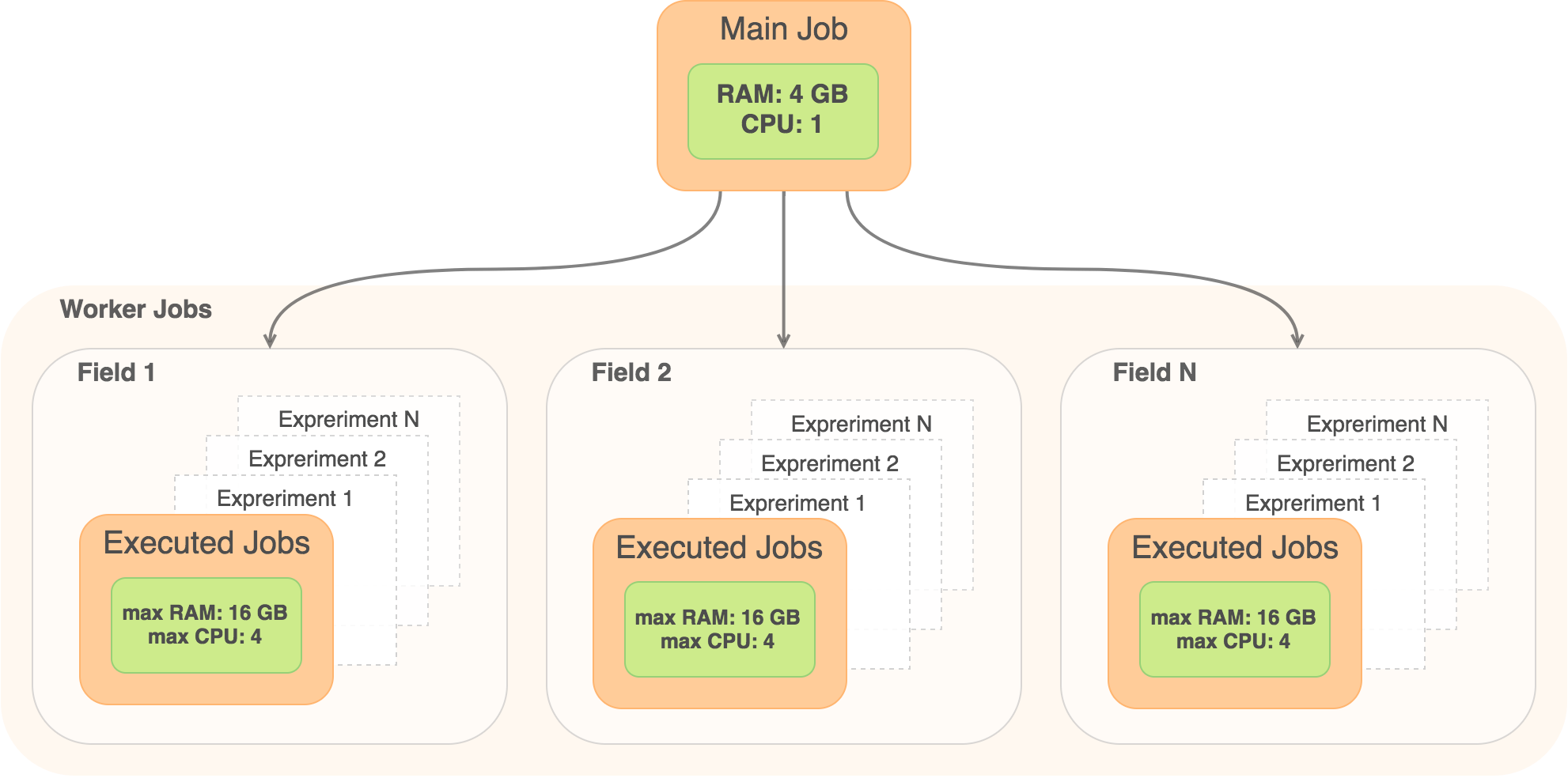
Search Engine Job Hierarchy
System requirements baseline
All the estimations are made for a cluster configuration with a dedicated node for infrastructure (vds-services, mesos-master, Marathon, RabbitMQ, and so on) and a separate node(s) for a Mesos agent(s).
According to the installation configuration, each node with a running agent must have 1 CPU and 4 GB RAM reserved for system processes and an agent. For example, if the node has 8 CPU and 32GB RAM, the agent is configured to use 8 - 1 = 7 CPU and 32 - 4 = 28 GB RAM.
To calculate cluster capacity, use the following formula:
- For RAM: RAMtotal = Nnodes * (RAMnode - 4 Gb)
- For CPU: CPUtotal = Nnodes * (CPUnode - 1)
To calculate resources requirements for 1 Model, use the following formula: MainJob + ParallelFields * (ParallelExperiments * <Experiment ExecutedJob>)
| Memory | CPU |
|---|---|
MainJob = 4 GB Max Memory for executed job in experiment = 16 GB Total Memory = 4 GB + ParallelFields * 16 GB |
MainJob = 1 CPU Experiment = 4 CPU Total CPU = 1 + ParallelFields * 4 |
To configure ParallelFields, use the ZooKeeper's property: /eval/hpo/model/maxParallelModels.
Memory and CPU requirements for training
During the model training, multiple experiments are executed to find the optimal feature combination.
During execution, there is an already trained model. Therefore, execution requires less resources than training.
Model training with Search Engine
When training a model with the enabled Search Engine, the following requirements apply:
- Training process control job (MainJob) requires 4 GB of memory and 1 CPU.
- Each field requires 16 GB of memory and 4 CPU.
To calculate the possible number of fields in parallel for one training, use the following formula:
INT((AgentNodeCapacity - MainJob) / ExecutedJob) + (N -1) * INT(AgentNodeCapacity / ExecutedJob)
- N: Agent nodes count
- INT: Integer part of a number, for example, INT(1.75) = 1
- AgentNodeCapacity = 28 GB and 7 CPU
- MainJob = 4 GB and 1 CPU
- ExecutedJob = 16 GB and 4 CPU
caution
Consider the following restrictions:
- AgentNodeCapacity ≥ MainJob + ExecutedJob
- AgentNodeCapacity = node capacity - system processes (4 GB, 1CPU)
| 1 Nodes (N = 1): | 3 Nodes (N = 3): | 7 Nodes (N = 7): |
|---|---|---|
Memory: INT((28 - 4) / 16) = 1 (fields in parallel) recheck CPU capacity: 4 * 1 + 1 = 5 ≤ 7 |
Memory: INT((28 - 4) / 16) + (3 - 1) * INT(28 / 16) = 3 (fields in parallel) CPU capacity: |
Memory: INT((28 - 4) / 16) + (7 - 1) * INT(28 / 16) = 7 (fields in parallel) CPU capacity: |
tip
To run several trainings with the same fields in parallel, you should proportionally scale the total cluster capacity.
You can configure the Search Engine processing time limit and other parameters.
Model training with fixed configuration
Once the best subset of components is found, the model can be fixed, and Search Engine will not be used during the next re-training. In this case, the training for each field has the following requirements:
- MainJob: 4 GB RAM, 1 CPU + Max Job: 16 GB RAM, 4 CPU
Memory and CPU requirements for execution
There are two configurable parameters at the model execution stage:
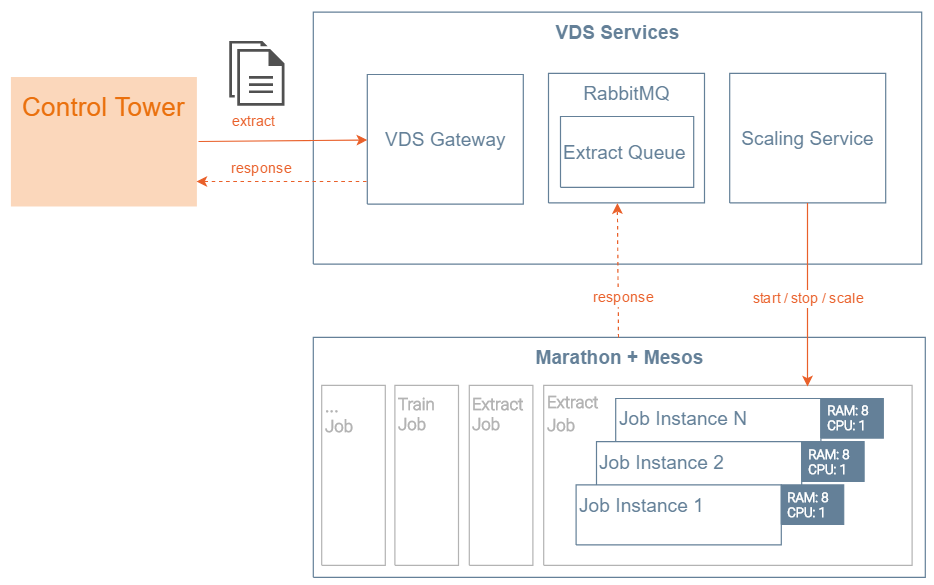
- RAM and CPU per Job (default is 6 GB; less is not recommended).
- Max instances count per Job (default is 20). Can be configured in vds-services.
The actual requirements depend on the following factors:
- Number of executed job instances being executed in parallel.
- ML model size. Models with 20+ fields require additional RAM per Job.
- Number of documents sent for execution per hour or day.
- SLAs for one document execution. SLAs that require high velocity and low latency need more Job Instances.
Model execution
When calculating total parallel jobs for model execution, consider the following requirements:
- ReservedToSystem = 4 GB and 1 CPU
- ExecutionJobRequirements* = 6 GB and 1 CPU
- NodeJobsByMemory = (NodeRAM - 4 GB) / 6 GB
- NodeJobsByCPU = (NodeCPU - 1)
- ParallelJobsOnSingleNode = MIN(NodeJobsByMemory, NodeJobsByCPU)
- TotalParallelJobs = ParallelJobsOnSingleNode * NumberOfNodes
| 1 Nodes * (32 GB, 8 CPU) = 32 GB, 8 CPU |
3 Nodes * (32 GB, 8 CPU) = 96 GB, 24 CPU Cluster |
7 Nodes * (32 GB, 8 CPU) = 224 GB, 56 CPU Cluster |
|---|---|---|
|
|
|
The execution time may vary depending on a document size and model complexity (number of fields) and usually takes from 1 to 60 seconds per document for the most common use cases.
Recommendations
CPU sharing
CPU is shared across all jobs. For example, if 32 CPU is used on a 256 GB environment instead of 64 CPU, it may negatively influence effective time by 30–40%.
Simultaneous training and execution
If an AutoML cluster is used to simultaneously run training and execution jobs, cluster resources are shared between these two kinds of jobs.
Example: AutoML server or cluster capacity is 2 * (28 GB, 7 CPU) = 56 GB, 14 CPU. There are 8 running execution jobs, and you are planning to start a new training.
Assuming that jobs evenly spread across all nodes, each node will have a free RAM of: 28 - (4 * 6) = 4 GB.
This may cause a training process to get stuck because of lack of resources. A training process requires at least 20 GB free RAM.