
Apply console tools
tip
To deploy a DA virtual machine, refer to the instruction.
split_csv_by_line
Allows to get HTML content from a snapshot and save as separate files with the name from the given column and with the given extension in the current working directory.
cd /target/directory/in/which/files/will/be/stored/
split_csv_by_line -r column_with_html_content -f column_with_unique_identifier -e '.html'  /path/to/csv/file.csv
Options:
| Key | Description |
|---|---|
| -r | Column with HTML content |
| -f | Column with unique identifiers for each document. The identifier of each cell will be used as a filename for corresponding HTML content from -r column in the same line of the CSV file. In case of duplicated identifiers, the resulting directory with files will contain one file with this name with the content from the line with the last occurrence of this identifier. The document_link column may be used as identifier |
| -e | Extension of the resulting files. Usually HTML or XML. |
Example:
cd /home/user/Documents/ml_training/results/
split_csv_by_line -r document_html_link_tagged -f document_uuid -e '.html' /home/user/Downloads/snapshot.csv
countGoldTags.py
Allows to see the number of documents in which each tag with the class="extraction-tag" attribute occurs.
Takes the directory with HTML files as an argument.
Provides the table with the following information:
| Column name | Description |
|---|---|
| TAG | Tag name |
| Number of docs | Number of documents in which this tag occurs |
| % docs | % of docs containing the tag/total number of docs in the data set |
| multiple | Boolean flag reflecting, if any document contains multiple occurrences of this tag |
Usage:
countGoldTags.py /path/to/files/with/tags/
Example:
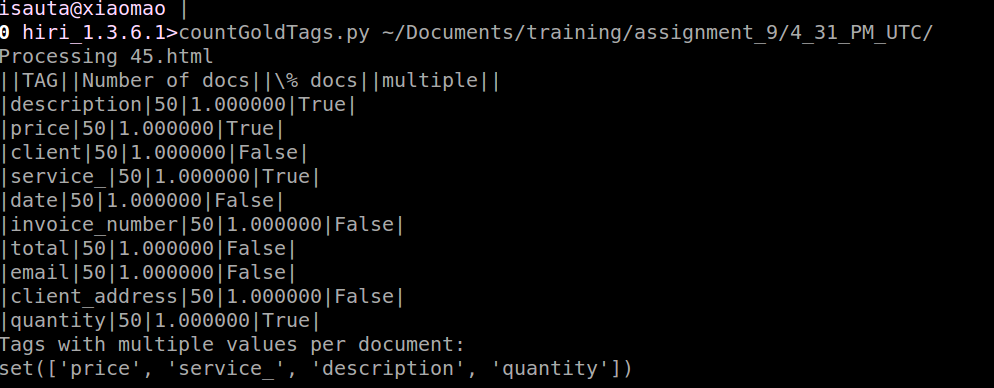
run_extraction_statistics
Compares gold tagged documents with resulting tag documents by a filename and provides statistics to stdout and the full information about comparison gold-extracted values.
Stdout output (can be moved to a separate TSV file):
- Document level statistics
- Record level statistics
- Field level statistics
For each field, the following information is provided:
- TP: True positives (correctly extracted)
- FP: False positives (incorrectly extracted)
- FN: False negatives (missed)
- P: Precision=TP/(TP+FP)
- R: Recall=TP/(TP+FN)
- F1: Harmonic average=2*P*R/(P+R)
Example:
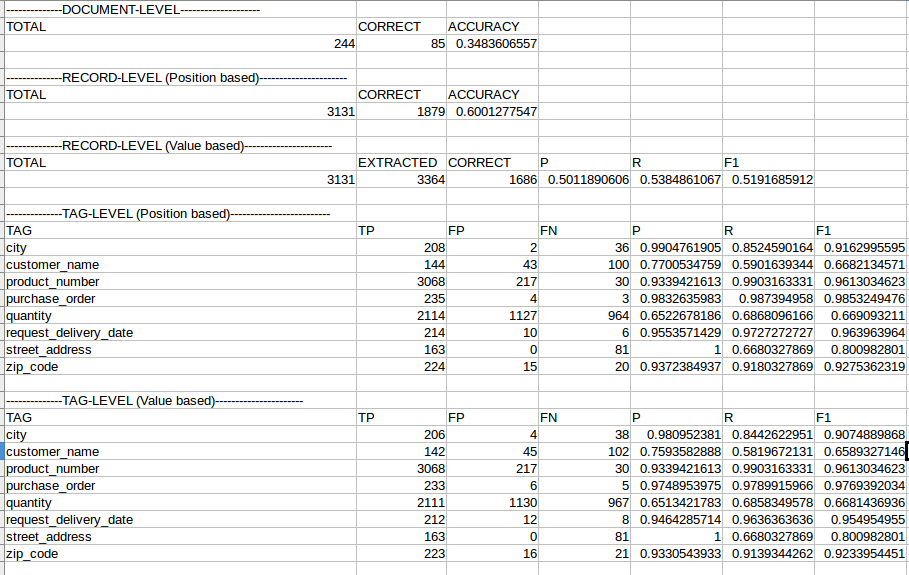
Usage (with redirecting statistics into a separate stats.tsv file:
run_extraction_statistics /path/to/gold/directory/ /path/to/result/directory/ > /path/to/statistics/file.tsv
Can be opened by LibreOffice with a tab separator.
stderr output begins with the filename and contains information about comparison of each pair "gold object - result object":
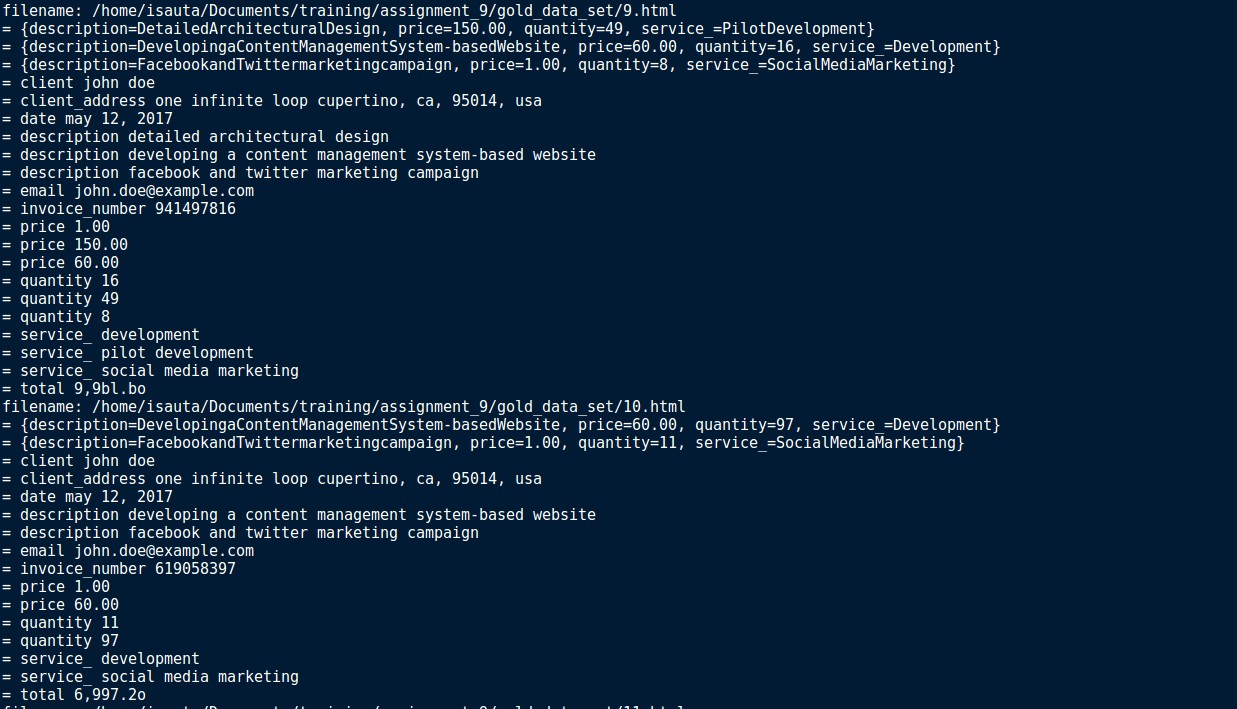
The filename: /home/user/Documents/ml_training/gold/some_gold_file.html
The name of a gold file which is followed by all the comparison results for this file.
Comparison results contain decision (TP "=", FP "+", FN "-" ), field_name, tag data-value. For example:
= product_number 5410076545469
A true positive object of the product_number field with data-value="5410076545469".
- product_number 8001090305442
A false positive object of the product_number field with extracted data-value="8001090305442". A gold file doesn't contain this object.
- product_number 8001090305441
A false negative object of the product_number field with gold data-value="8001090305441". A result file doesn't contain this object.
If a gold file contains some object (for example, invoice_date="01/01/2018") and in a result file another value was extracted for this object (for example, the payment date was extracted instead of invoice date and invoice_date="05/01/2018"), such mistake will be displayed twice (as FN="01/01/2018" and FP="05/01/2018") as below:
- invoice_date 01/01/2018
- invoice_date 05/01/2018
In some cases, this information allows to define that the correct values are extracted, but some post processing is required:
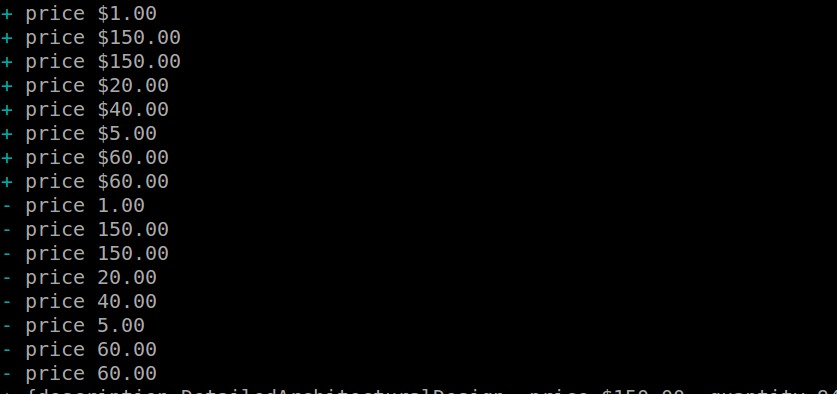
From this picture can be seen that price field is extracted correctly, but with extra $ sign. After applying of post processing this values will become TP and statistics will be improved.
Usage (with redirecting detailed comparison results into a separate errors.txt file):
run_extraction_statistics /path/to/gold/directory/ /path/to/result/directory/ 2> /path/to/file/errors.txt
errors.txt can be used for analyzis of false positives and false negatives and as an input file for the stats-error_statistics script.
stats-error_statistics
Allows to get the number of errors of certain type (FP (+), FN (-)) for each tag in each file. Used on use cases with tables and groups.
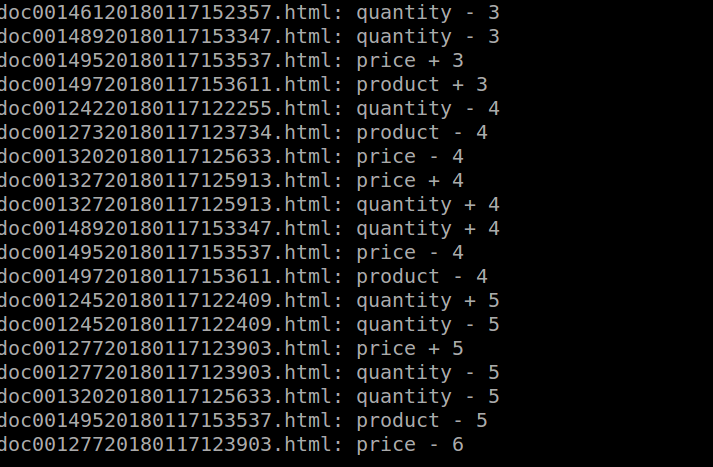
Allows to define the files with big number of mistakes for further review.
Usage:
stats-error_statistics /path/to/file/with/errors.txt
download_urls_from_csv
The script extracts XML/HTML/Text from <url_column> in CSV file <csv_file> and saves content as a separate files in <directory>. Filenames are taken from <url_column>.
Usage:
download_urls_from_csv <url_column> <csv_file> <directory>
jrep
Allows to search for a certain pattern descried by a Java regular expression (java.lang.regex) in a file, selected group of files, or directory.
Example:
jrep -r '<[^/ ]*? [^>]*?data-value' ~/Documents/data_sets/training/100_docs/
/home/isauta/Documents/data_sets/training/100_docs/18*.html: <issuer_name data-toggle="tooltip" style="background-color: rgb(164, 232, 4);" class="extraction-tag" tagorder="1" appendorder="2" data-value="TMSR HOLDING Co Ltd" data-original-title="Issuer name" confidence="1/1">TMSR HOLDING Co Ltd</issuer_name> \ TMSR 1
/home/isauta/Documents/data_sets/training/100_docs/18*.html: <street_address data-toggle="tooltip" style="background-color: rgb(255, 52, 255);" class="extraction-tag" tagorder="4" appendorder="9" data-value="1615 SOUTH CONGRESS AVENUE. SUITE 103" data-original-title="Street address of reporting person" confidence="1/1">1615 SOUTH CONGRESS AVENUE. SUITE 103</street_address>
/home/isauta/Documents/data_sets/training/100_docs/18*.html: <transaction_date data-toggle="tooltip" style="background-color: rgb(28, 230, 255);" class="extraction-tag" tagorder="2" appendorder="5" data-original-title="Date of the earliest transaction" data-value="02/06/18" confidence="1/1">02/06/2018</transaction_date>
/home/isauta/Documents/data_sets/training/100_docs/18*.html:<meta-manual-answer data-code="reporting_name" data-value="ERROR"></meta-manual-answer></document
The output contains all the pairs "filename:string containing the pattern" found in the provided files.
Options:
Being a console application jrep allows to affect its behavior by using options (for example, -r in the example). The most common options are:
| Key | Description | ||
|---|---|---|---|
| -i | Allows to ignore the case of searched patterns. jrep -i 'aaa' will match "aaa", "AAA", "aAa", and so on. | ||
| -r | Recursive search (is used in case of searching in directory). | ||
| -l | Only the names of files containing the given pattern are written to standard output. | ||
| -L | Only the names of files that doesn't contain the given pattern are written to standard output. | ||
| -h | Only found strings are written to standard output, filenames are hidden. | ||
| -o | Only the part of strings covered by the given pattern (object) is written to standard output. | ||
| -O | `'${target_capturing_group_number} | ${another_target_capturing_group_number}'allows writing only the content of the capturing groups given in' 'after$`. |
For example:
0 100_good_tagged>jrep -rO '$1 || $2' '<city_address.*?data-value="(.*?)"[^>]*?>(.*?)<' ~/Documents/data_sets/training/100_docs/
Output:
/home/isauta/Documents/data_sets/training/100_docs/86*.html:WILMERDING || WTLMERDING
/home/isauta/Documents/data_sets/training/100_docs/11*.html:PEMBROKE || PEMBROKE
/home/isauta/Documents/data_sets/training/100_docs/55*.html:CANONSBURG || CANONSBURG
/home/isauta/Documents/data_sets/training/100_docs/87*.html:SAN JOSE || SAN JOSE
/home/isauta/Documents/data_sets/training/100_docs/6*.html:GREEN BAY || GREEN BAY
/home/isauta/Documents/data_sets/training/100_docs/59*.html:BOSTON || BOSTON
tip
- For more options and usage details, refer to
'jrep --help'. - For more details on Java regular expresions, refer to the documentation.