
Bot Manager
caution
Custom Capabilities are not recommended for production usage. Use the quota files in Bot Manager instead.
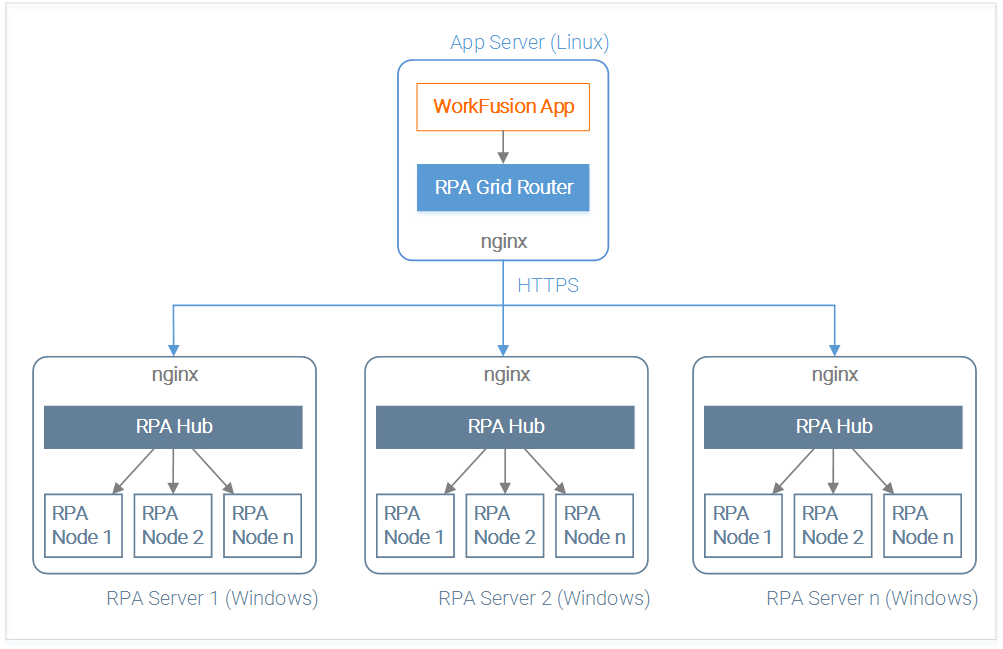
Bot Manager is used for task distribution between Bots in RPA Cluster assigning Control Tower commands to available Bot Relays (Orchestrators/Load Balancers) depending on their capacity and configuration.
The router has the ability to configure a set of Bot Relays for different users.
The basic idea of using Bot Manager is as follows.
Define separate quotas in the robotics-flow plugin for Bot Manager to route tasks depending on the quota.
For each defined user, create a list of available Bot Relays in the XML format.
Define the user in WorkFusion tomcat configuration in
workfusion.properties. It means that by default all WorkFusion robotics configs will be routed only to the Bot Relays assigned to this particular user.The path to the file is
/opt/workfusion/workfusion/conf/workfusion.properties, where/opt/workfusionis a default installation directory, and thus can vary, for example,<INSTALL_DIR>/workfusion/conf/workfusion.properties.(Optional) To execute a WorkFusion robotics config on another set of Bot Relays, you can override the default user in the selenium-flow plugin of the WorkFusion machine configuration.
This routing can be used to separate execution of business processes that are running on the same WorkFusion instance but are intended for different regions, departments, and so on. For example:
- Process-1 is doing RPA for India.
- Process-2 is doing RPA for China.
RPA configs of the Process-1 will have Robot-India a username attribute in the robotics-flow plugin. This Robot-India can only access a defined set of Bot Relays physically located in India.
RPA configs of the Process-2 will have Robot-China a username attribute in the robotics-flow plugin. This Robot-China can only access a defined set of Bot Relays physically located in China.
It is NOT possible to use the same Bot Relay for multiple quotas.
Architecture
Configuration
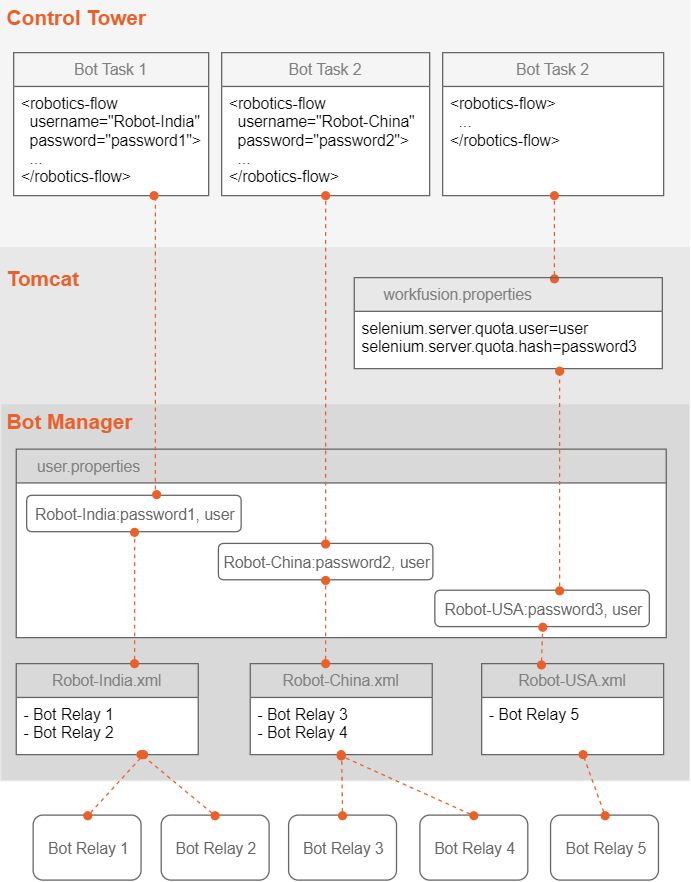
User configuration
User is an alias for a set of available Bot Relays.
List of users is defined in here: <BOT_MANAGER_FOLDER>/grid-router/users.properties, where each line contains username, ":", password, role. Currently, there is only one role, that is user.
users.properties:
Robot-India:password1, user
Robot-China:password2, user
Quota configuration
For each user, you can define quotas, which is a list of available (permitted) Bot Relays.
For each user created in the users.properties file, you need to create a separate XML file in the <BOT_MANAGER_FOLDER>/grid-router/quota/ directory with the following name pattern: <USERNAME>.xml.
For the examples above, there would be two files:
<BOT_MANAGER_FOLDER>/grid-router/quota/Robot-India.xml<BOT_MANAGER_FOLDER>/grid-router/quota/Robot-China.xml
Robot-India.xml:
<qa:browsers xmlns:qa="urn:config.gridrouter.qatools.ru">
    <browser name="chrome" defaultVersion="42.0">
        <version number="42.0">
            <region name="India">
                <host name="<URL_BOTRELAY1>" port="<PORT_BOTRELAY1>" count="5"/>
                <host name="<URL_BOTRELAY2>" port="<PORT_BOTRELAY2>" count="5"/>
            </region>
        </version>
    </browser>
    <browser name="internet explorer" defaultVersion="11">
        <version number="11">
            <region name="India">
                <host name="<URL_BOTRELAY1>" port="<PORT_BOTRELAY1>" count="5"/>
                <host name="<URL_BOTRELAY2>" port="<PORT_BOTRELAY2>" count="5"/>
            </region>
        </version>
    </browser>
    <browser name="firefox" defaultVersion="42">
        <version number="42">
            <region name="India">
                <host name="<URL_BOTRELAY1>" port="<PORT_BOTRELAY1>" count="5"/>
                <host name="<URL_BOTRELAY2>" port="<PORT_BOTRELAY2>" count="5"/>
            </region>
        </version>
    </browser>
</qa:browsers>
In this file, you need to define the URL and PORT for each Bot Relay available to this user.
The count attribute stands for the maximum number of sessions for a particular Bot Relay.
To apply changes in quota files or on adding a new quota, restart your Bot Manager.
Application Properties
The following properties in the application.properties file enable
changing the count of retries and pausing between the retries.
find.node.retry.count: retry count for Bot search (default value: 10).find.node.wait.timeout: wait (in milliseconds) between retries to find a Bot (default value: 10,000).
Use in Control Tower
There are two ways to provide a username to be used by Bot Manager.
Define user and password in the
workfusion.propertiesfile in the WorkFusion Tomcat configuration.selenium.server.protocol=http selenium.server.host=127.0.0.1 selenium.server.port=5555 selenium.server.file=/wd/hub selenium.server.quota.user=user selenium.server.quota.hash=password selenium.server.find.bot.timeout=900000Define user and password in the robotics-flow tag in the Bot config.
<robotics-flow username="Robot-India" password="password1">
    <robot>
    ...
    </robot>
</robotics-flow>