
Complete ML project view
To better understand how the ML project implementation evolves, a Data Analyst should look beyond own duties and tasks.
ML complexity analysis drives roles in projects
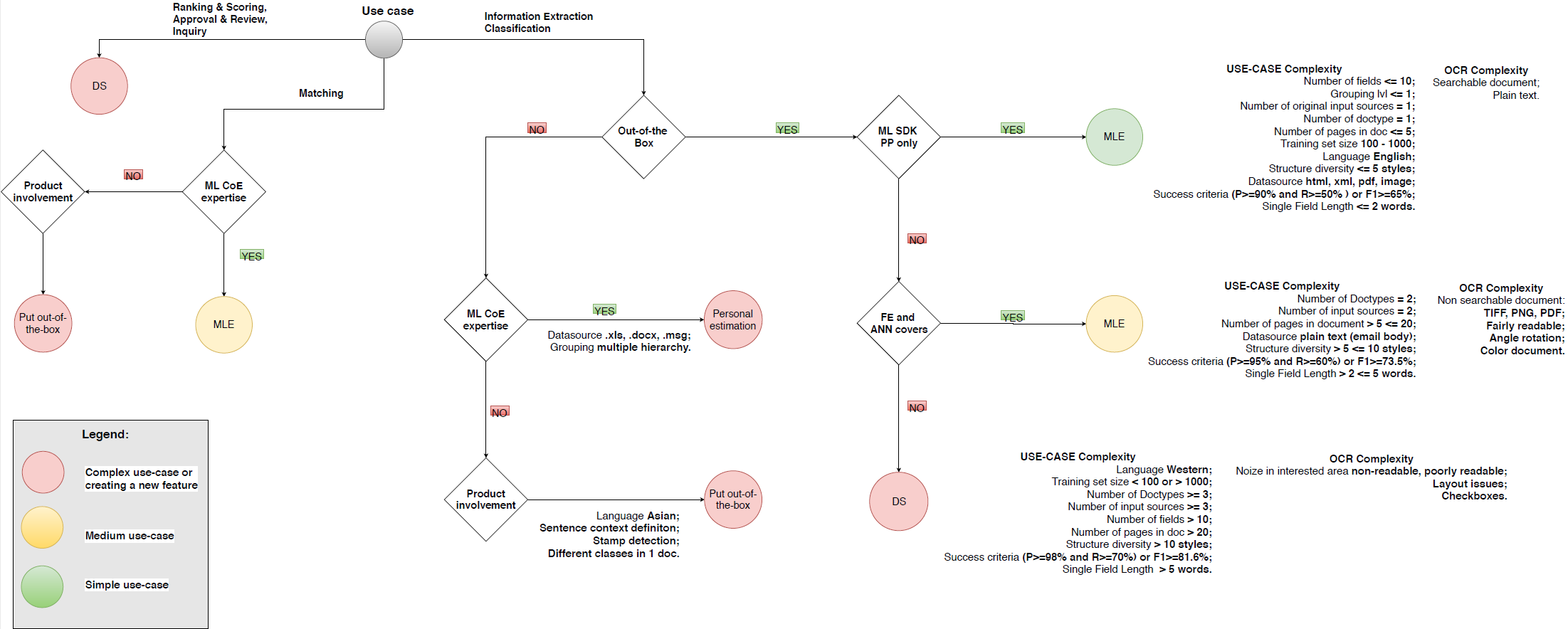
In not all use cases, it is possible to implement with out-of-the-box models or custom models created by ML Engineers. Some require the involvement of WorkFusion Data Scientists. See the complexity decision diagram below:
HPO training
In WorkFusion, training of new ML models is done in two stages:
- Hyper Parameter Optimization (HPO) finds the best parameters or Metamodel for the supplied training set.
- Model training itself uses the Metamodel to train the ultimate model.
tip
See HPO vs Metamodel for more information.
The default HPO time limit configuration is 2 hours per field since SPA v9.0; until SPA 9.0 it was 10 hours per field. It is possible, but highly unlikely, that HPO for a field would finish before this time limit, because the optimization aim is to reach 100% quality (F1 metric), which is unlikely to happen. It is not recommended to lower the time limit, either, as the quality of the resulting features will likely be lower if you do not allow HPO to run enough experiments.
Model training and tuning
Tuning of the model by MLE is done through AutoML SDK. While MLEs can run training from SDK, Control Tower has a set of AutoML components used to:
- Create a data set (Manual Task, Automation training set).
- Manage the data set quality (Adjudication Rules, Qualification Task).
- Run HPO and extraction (Automation Business Process).
- Monitor and troubleshoot training (Marathon and Mesos, the WFML_Job_data Data Store).
- View and analyze results (Automation Chart and Dashboards).
Running (HPO) training from Control Tower
To start model (HPO) training from CT, the following steps are taken:
- Create a Manual Task selecting ML Model, BP Use Case and Training Set (assuming a training set is ready and uploaded as Automation Training Set to Control Tower) in the Automation options.
- Run and stop the task to start model evaluation. To see the training BP, select the Automation Training filter in the Business Processes view. By default, training processes are hidden.
- Once the training is finished, you will see an AUTOMATION AVAILABLE label on the Manual Task. Then, you can click on the label, set the accuracy threshold, and apply recommendation to create a process with the Automation sub-process in it.
- Now, you can run the Automation process with the trained model extracting data.
note
You can automate Manual Tasks that are steps of a Business Process in the same way as you automate standalone Manual Tasks.
Automation Business Process in detail
Automation Business Process is a collection of steps through which training, extraction, automatic quality control, statistics calculation and all the other surrounding activities of automation are executed.
The Automation settings step is where BP parameters are configured, for example, enable or disable Statistical Quality Control and Statistics calculation.
After the Settings step, BP divides into two flows: Training and Production.
Training is launched first through the steps described above. Once a trained model is ready and you apply a recommendation, the Manual Task on which it was started (either within a BP or standalone) is replaced with this Automation (sub)process and the Production flow in it is activated.
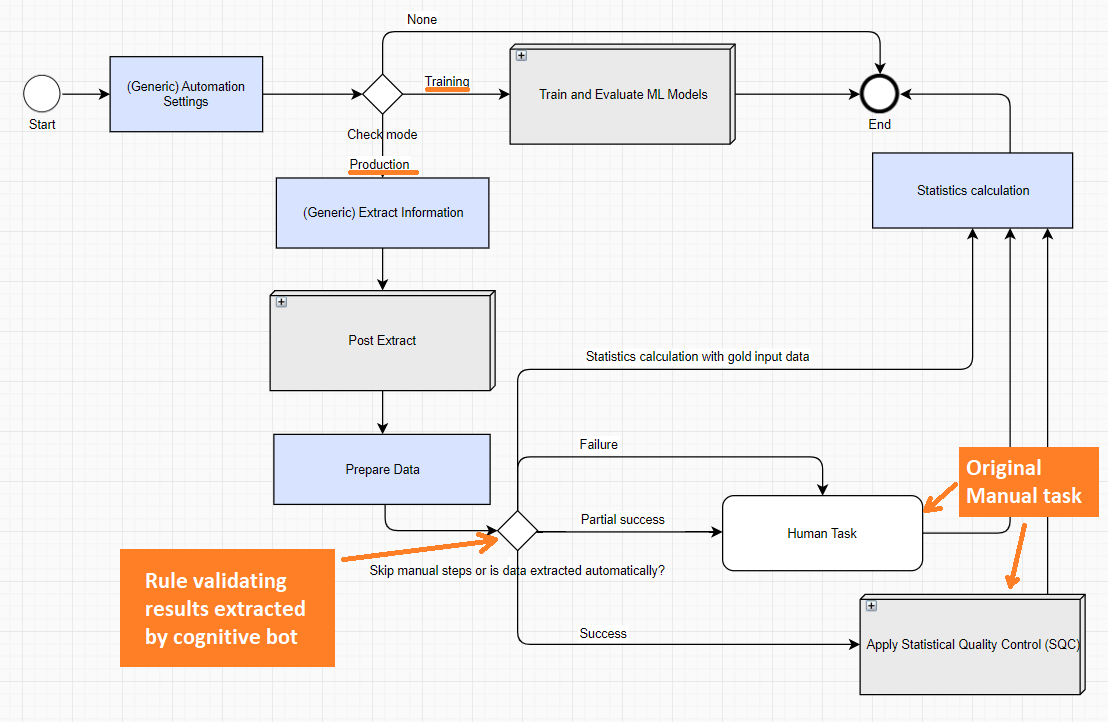
The Production flow of the Automation BP is where the trained model is applied for extracting data. It has the following structure:
- At the Extract Information step, ML algorithms try to extract data automatically
- The Post Extract step does post-processing and normalization of data extracted by the ML model.
- Prepare data, basically, prepares data for the Statistics Calculation step.
- A special Composite Rule (Skip manual steps or is the data extracted automatically?) checks the Extract Information step results:
- In case of a failure or partial success, records are sent to human workers. Note that in case of failure, the data extracted by the model is cleared and humans tag all from scratch; in case of partial success, the data extracted by the model is shown to a human and they complete what was missed.
- In case of a success, apply SQC (Statistical Quality Control) or go to Statistics calculation if SQC is disabled. If SQC is enabled, and inspection is required, send a batch of records to human workers (the same original Manual Task is present inside the SQC subprocess).
- If a BP uses gold data (documents tagged by human SMEs), the execution goes directly to the Statistics Calculation step without SQC.
- The Statistics Calculation step provides calculations for quality statistics and saves results to the Data Store. Enabling Statistics Calculation is required to use Automation dashboards because they use statistics saved in the database at this step.
Common question
Records where the model is not confident are verified by human, but how
do I know if the "success" decisions of the model are, in fact, correct?
SQC or AutoQC uses statistical methods to monitor and maintain the quality of model decisions. The AutoQC subprocess chooses the optimally cost-effective combination of automated machines and cloud workers that always deliver at or above the acceptable quality level. The main concept of AutoQC is to take a Sample from a defined Batch of items (BP records, documents, and so on) and verify each item in that sample, which is done by a human in the manual step inside the AutoQC sub-process. After the sample verification, the whole batch is considered accepted or rejected depending on the Rejection Limit. This way, AutoQC makes conclusions on correctness of what the model considers to be success based on a sample. Read the AutoQC topic to understand this concept and its mechanics in WorkFusion.
Model release and go to production
The trained model can be moved from one environment to another. For guidance on how to do it, refer to Migrate trained model.
When more data is accumulated, Model Retraining can be launched manually or set up to launch automatically. For a production process, the latter case would mean that the model is retrained in a production environment and automatically applied in place of the model that is currently running, therefore it is rarely used. Depending on customer architecture and security requirements, two model (re-)training strategies can be applied: re-training in DEV or in PROD.