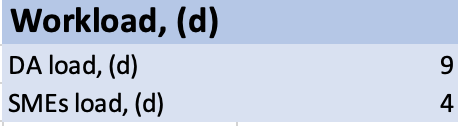
Calculate DA and SME efforts
note
- IE data collection calculator: C&D BP - Calculator of DA and SME's days required.xlsx
- Classification data collection calculator: Classification Calculator.xlsx
The above calculators include the following steps:
- DA gets familiar with the use case, provides training to SMEs.
- Qualification to evaluate productivity.
- Data collection and validation.
- Preparing a report on ML quality.
Effort calculator for C&D Business Process
Cut&Dry Business Process (C&D BP) is a standardized Data Analyst's Business Process which helps to prepare high quality Training Set in effective and fast way.
C&D BP includes 3 different stages and also some stages are iterative, so the Calculator takes into account the dependency between each stage and each iteration.
Also it takes into account the Use Case Complexity.
Input
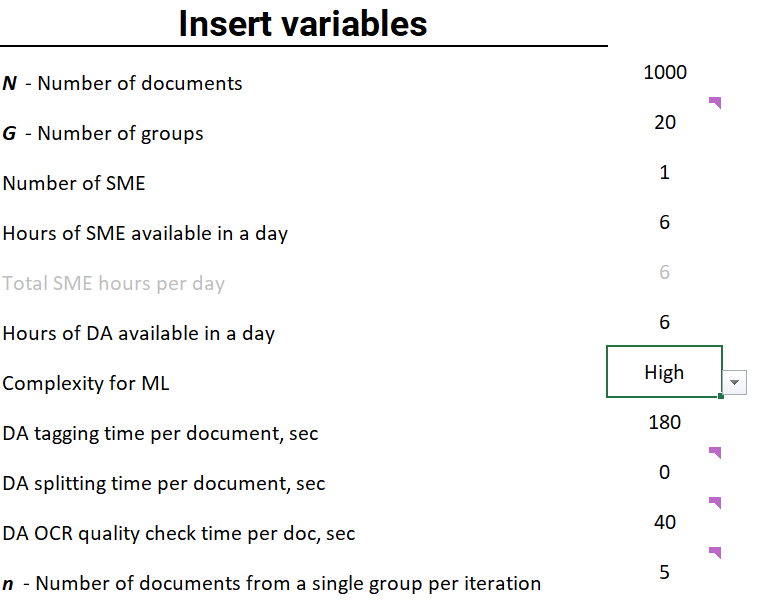
| Parameter Name | Value (Example) | Description |
|---|---|---|
| N - Number of documents | 1000 | This is the number of all available documents |
| G - Number of groups | 20 | Group of documents - documents, which have the same original quality and context surrounding the fields. Usually, it is the same as "Template", also very often one supplier means one group ("Template"), but note, that even across documents of one supplier there can be different groups. You may enter approximate value (e.g. number of suppliers) if you don't know the distribution by groups yet, but DA is expected to identify it in future. If G is too big or cannot be identified at all (i.e. it’s impossible to split documents into real visual groups, because there is a huge variety of templates or no any template at all), set it to be equal to 10 - groups will be formed randomly as 10% of N in each. |
| Number of SME | 1 |
|
| Hours of SME available in a day | 4 |
|
| Total SME hours per day | 4 | Will be calculated automatically as Number of SME * Hours of SME available in a day. It is expected, that number of SME won't affect the speed of tagging nor validation by DA |
| Hours of DA available in a day | 6 | Expected number of DA: 1. |
| Complexity of ML Use Case | High | Select a value from the drop-down list All the dependent variables and complexity description are given on the second sheet of Excel file called "Complexity legend".
C - expected number of OCR quality check iterations based complexity (basically, on documents quality) A - coefficient of acceleration based on complexity. It means, that each new iteration of tagging will be faster than the previous due to C&D BP I - expected number of Tagging Iterations; depending on UC complexity, C&D BP will need 4, 6 or 8 iterations to get Training Set which meets success criteria or tag all documents. |
| DA tagging time per document, sec | 180 | |
| DA splitting time per document, sec | 30 | - Insert 0 if docs are already split |
| DA OCR quality check time per doc, sec | 30 | Insert 30 if time is unknown |
| n - Number of documents from a single group per iteration | 5 | Will be calculated automatically as n = N/G/10 If you change it, recommended to use number, which meets the following: n * G * 10 = N |
Output
The main output is the number of days (DA's and SME's) which are expected to be required for Use Case delivery.
important
That this is not pure effort, this is total days of work.

Also considering the dependency between each iteration, there are some additional estimations:
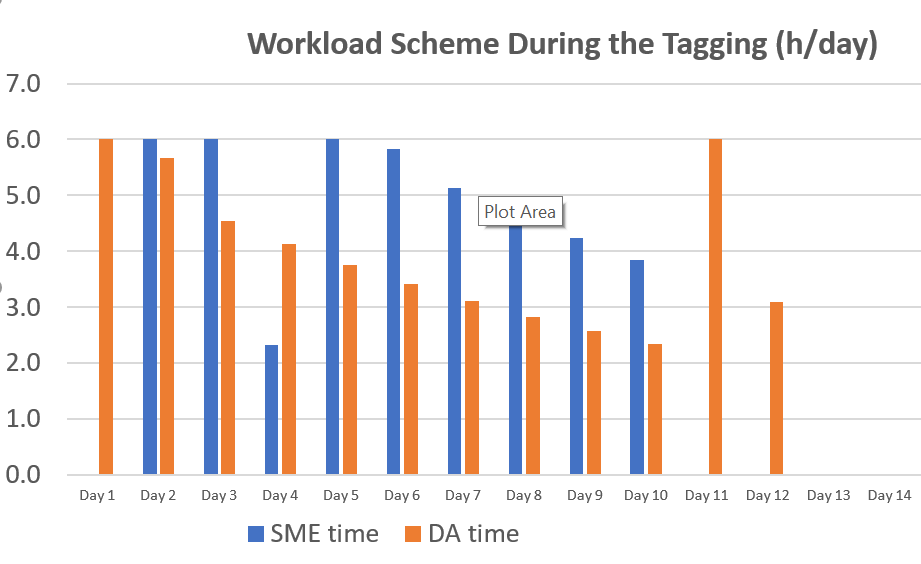
Workload scheme during the tagging, which shows expected productivity per each day for DA and for SME. Note, that if a step is not completed, the next one can't be started. This fact causes delays, which are taken into account.
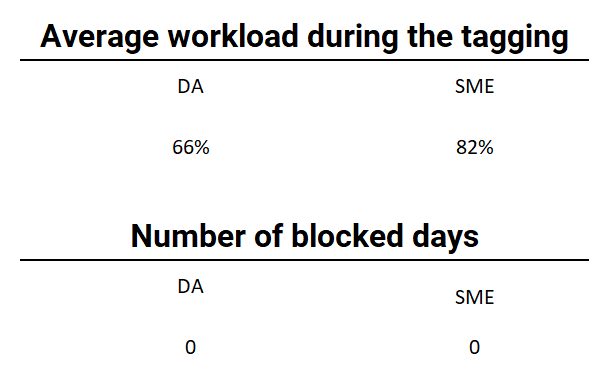
Average workload during the tagging, which is calculated as Useful Work during the tagging / Total timeline of tagging and Number of blocked days, which shows, that DA or SME is blocked because the previous step is not finished. If you change capacity, the workload changes as well.
Effort calculator for Classification Use Case
Enter values of the following variables in the Scope and Resources table:
- The number of documents: number of documents expected to be classified.
- SME's time per document, (min): the time required for classifying one document estimated in minutes.
- The number of SMEs available: the number of SMEs allocated for tagging.
- SMEs' availability, (h/day): hours per day each SME is planned to spend for classifying documents.
- The number of DAs available: the number of DAs involved in the process.
- DAs' availability, (h/day): hours per day each DA will spend for the use case tasks. Leave it blank, if DA is planned to be engaged full time or enter the number of available working hours, if DA is planned to be engaged part time.
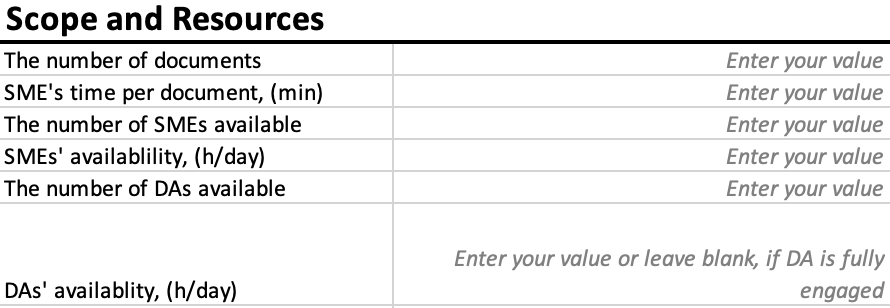
The results of calculations are displayed in the Workload table after entering all the required values into the above table.