Deploy ODF to Control Tower
The guide describes how to deploy your ODF to Control Tower. All examples bellow are based on the local Control Tower installation but can be used for server installation as well.
Prerequisites
- Local Maven is already configured to be able to work with https://repository.workfusion.com/ according to this guide.
- You are logged in https://repository.workfusion.com/ using credentials from the guide above.
Define ODF version to install
ODF related components come with a pre-packaged bundle known as ODF installation bundle or ODF install package. There are two ways to obtain an installation bundle:
- (Preferable): Open ODF releases. Find the required ODF version inside the table and download the ODF installation bundle you need.
- (Additional): Go to https://repository.workfusion.com/ directly and download the
.zipfile from the Releases repository.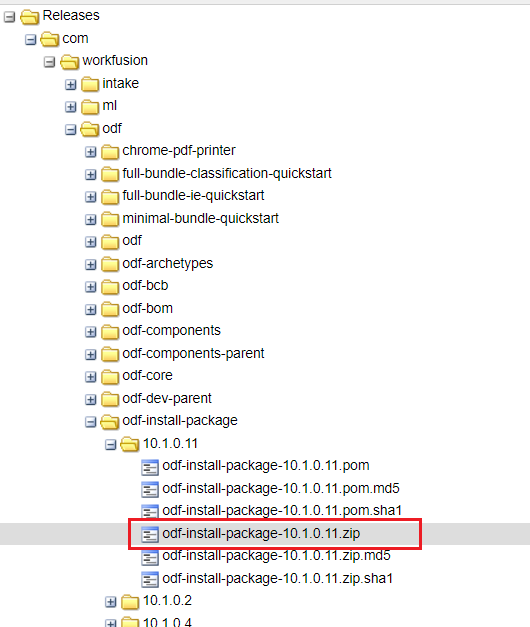
Prepare local environment
To deploy an ODF installation bundle to Control Tower, use bundle-maven-plugin, and therefore the pom.xml file is required. Download a suitable version and put it to a folder of your choice.
v9.2
<?xml version="1.0" encoding="UTF-8"?>
<project xmlns="http://maven.apache.org/POM/4.0.0"
         xmlns:xsi="http://www.w3.org/2001/XMLSchema-instance"
         xsi:schemaLocation="http://maven.apache.org/POM/4.0.0 http://maven.apache.org/xsd/maven-4.0.0.xsd">
    <modelVersion>4.0.0</modelVersion>

    <groupId>com.workfusion.odf</groupId>
    <artifactId>odf-package-install</artifactId>
    <version>1.0.0.0</version>
    <packaging>pom</packaging>

    <properties>
        <workfusion.environment.url>http://localhost:15280/</workfusion.environment.url>
        <bundle.to.import.path>C:\Users\Some_User\Downloads\odf-install-package-9.2.2.6.zip</bundle.to.import.path>
    </properties>

    <repositories>
        <repository>
            <id>wf-dependencies</id>
            <name>WorkFusion Nexus Repository - dependencies</name>
            <url>https://repository.workfusion.com/content/groups/dependencies/</url>
            <releases>
                <enabled>true</enabled>
                <updatePolicy>daily</updatePolicy>
            </releases>
            <snapshots>
                <enabled>true</enabled>
                <updatePolicy>always</updatePolicy>
            </snapshots>
        </repository>
    </repositories>

    <pluginRepositories>
        <pluginRepository>
            <id>wf-dependencies</id>
            <url>https://repository.workfusion.com/content/groups/dependencies/</url>
        </pluginRepository>
    </pluginRepositories>

    <build>
        <plugins>
            <plugin>
                <groupId>com.workfusion.odf</groupId>
                <artifactId>bundle-maven-plugin</artifactId>
                <version>9.2.2.1</version>
                <configuration>
                    <server>
                        <id>control-tower</id>
                        <url>${workfusion.environment.url}</url>
                    </server>
                    <bundle>${bundle.to.import.path}</bundle>
                </configuration>
            </plugin>
        </plugins>
    </build>

</project>
v9.3
<?xml version="1.0" encoding="UTF-8"?>
<project xmlns="http://maven.apache.org/POM/4.0.0"
         xmlns:xsi="http://www.w3.org/2001/XMLSchema-instance"
         xsi:schemaLocation="http://maven.apache.org/POM/4.0.0 http://maven.apache.org/xsd/maven-4.0.0.xsd">
    <modelVersion>4.0.0</modelVersion>

    <groupId>com.workfusion.odf</groupId>
    <artifactId>odf-package-install</artifactId>
    <version>1.0.0.0</version>
    <packaging>pom</packaging>

    <properties>
        <workfusion.environment.url>http://localhost:15280/</workfusion.environment.url>
        <bundle.to.import.path>C:\Users\Some_User\Downloads\odf-install-package-9.3.0.12.zip</bundle.to.import.path>
    </properties>

    <repositories>
        <repository>
            <id>wf-dependencies</id>
            <name>WorkFusion Nexus Repository - dependencies</name>
            <url>https://repository.workfusion.com/content/groups/dependencies/</url>
            <releases>
                <enabled>true</enabled>
                <updatePolicy>daily</updatePolicy>
            </releases>
            <snapshots>
                <enabled>true</enabled>
                <updatePolicy>always</updatePolicy>
            </snapshots>
        </repository>
    </repositories>

    <pluginRepositories>
        <pluginRepository>
            <id>wf-dependencies</id>
            <url>https://repository.workfusion.com/content/groups/dependencies/</url>
        </pluginRepository>
    </pluginRepositories>

    <build>
        <plugins>
            <plugin>
                <groupId>com.workfusion.odf</groupId>
                <artifactId>bundle-maven-plugin</artifactId>
                <version>9.3.0.0</version>
                <configuration>
                    <server>
                        <id>control-tower</id>
                        <url>${workfusion.environment.url}</url>
                    </server>
                    <bundle>${bundle.to.import.path}</bundle>
                </configuration>
            </plugin>
        </plugins>
    </build>

</project>
Deploy ODF installation bundle
If everything is set up correctly, run the following command from the folder in which pom.xml is stored.
mvn bundle:import
Also, you can specify Control Tower and a bundle path from the command line if needed.
mvn bundle:import -Dworkfusion.environment.url=http://localhost:15280 -Dbundle.to.import.path=C:\Users\Some_User\Downloads\odf-install-package-10.1.0.7.zip
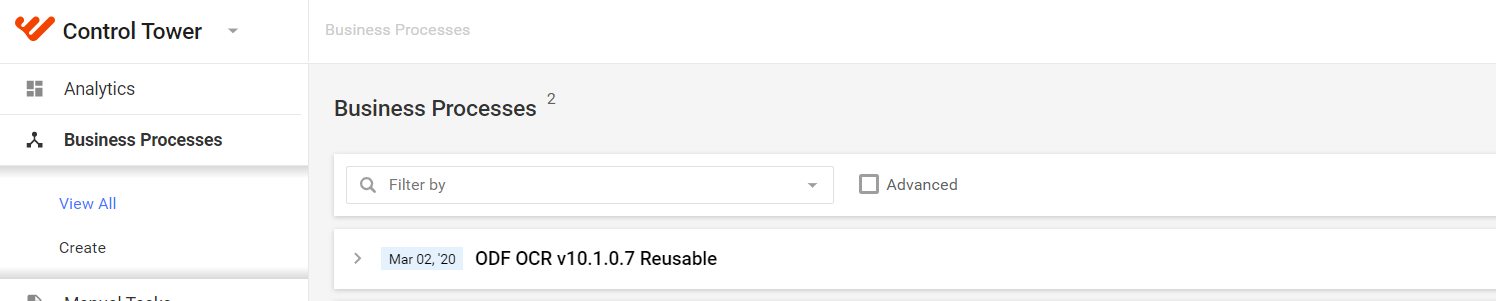
After the process is finished with the BUILD SUCCESS message, you can open Control Tower and observe that an ODF business process is created and all the related ODF components are available.