
Handle iFrames
How to handle IFrame / IFrames with Robotics WebDriver
Iframe is an HTML document embedded inside an HTML document. Iframe is defined by an <iframe></iframe> tag in HTML. With this tag, you can identify an iFrame while inspecting the HTML tree.
Here is a sample HTML code of a HTML page which contains two iFrames:
<tr>
    <td>
        <iframe name="iframe0" id="IF0" src="form.html" width="400" height="800"></iframe>
    </td>
    <td>
        <iframe name="iframe1" id="IF1" src="https://wikipedia.org" width="400" height="800"></iframe>
    </td>
</tr>
tip
Sample Iframe test page - https://rpa-tutorial.s3.amazonaws.com/trainings/iframe/iframe-test.html
We will use this to learn iFrame handling logic. Before starting, we have to understand that to work with different iFrames on a page we need to switch between these iFrames. To Switch between iFrames we have to use the driver’s switchTo().frame command. You can switch to an iframe in the following ways:
switchTo.frame(int frameNumber)– pass the frame index and driver will switch to that frameswitchTo.frame(string frameNameOrId)– pass the frame element Name or ID and driver will switch to that frameswitchTo.frame(WebElement frameElement)– pass the frame web element and driver will switch to that frameswitchTo().parentFrame()– driver will switch to it parent frame if it existsdriver.switchTo().defaultContent()– driver will switch to the main page
Let's see how each of these work but before that we have to know answers to the following questions: – What is an frame index? – How to get total number of frames on a webpage?
How to find total number of iFrames on a webpage
There are two ways to find total number of iFrames in a web page. First by executing a JavaScript and second is by finding total number of web elements with a tag name of iFrame. Here is the code using both these methods:
<?xml version="1.0" encoding="UTF-8"?>
<config xmlns="http://web-harvest.sourceforge.net/schema/1.0/config" scriptlang="groovy">
    <robotics-flow>
        <robot name="ie" driver="internet explorer" close-on-completion="true">
            <script><![CDATA[

                pageLoadTimeout(10000)
                open('https://rpa-tutorial.s3.amazonaws.com/trainings/iframe/iframe-test.html')

                //By executing a java script
                numberOfFrames = Integer.parseInt(executeScript("return window.length").toString())
                println("    Number of iframes on the page are ${numberOfFrames}")

                //By finding all the web elements using iframe tag
                iframeElements = $$(byTagName('iframe'))
                println("    The total number of iframes are ${iframeElements.size()}")

            ]]></script>
        </robot>
    </robotics-flow>
    <export include-original-data="false" />
</config>
This code sample will find only iframes that are on the top-level. Nested iframes will be ignored. To find nested iframes, you need to switch to their child iframes. See the example below:
Recursive iframe search
<?xml version="1.0" encoding="UTF-8"?>
<config xmlns="http://web-harvest.sourceforge.net/schema/1.0/config" scriptlang="groovy">
    <robotics-flow>
        <robot name="ie" driver="internet explorer" close-on-completion="true">
            <script><![CDATA[

                pageLoadTimeout(10000)
                open('https://rpa-tutorial.s3.amazonaws.com/trainings/iframe/iframe-test.html')

                // Find iframes on top level
                def numberOfFrames = Integer.parseInt(executeScript("return window.length").toString())

                // Recursive search for all nested iframes
                def countFrames
                countFrames = {elements ->
                    int size = elements.size()
                    elements.each {
                        switchTo().frame(it)
                        frames = $$(byTagName('iframe'))
                        size += countFrames(frames)
                        switchTo().parentFrame()
                    }
                    return size;
                }

                def iframeElements = $$(byTagName('iframe'))
                int totalFrames = countFrames(iframeElements)

                println("    Number of iframes on the page (top level): ${numberOfFrames}")
                println("    The total number of iframes (all levels): ${totalFrames}")

            ]]></script>
        </robot>
    </robotics-flow>
    <export include-original-data="false" />
</config>
Switch to Frames by Index
Index of an iFrame is the position at which it occurs in the HTML page. In the above example we have found total number of iFrames. In the sample page we have two IFrames on top level, and one nested iframe, index of iFrame starts from 0. Refer to the image below.
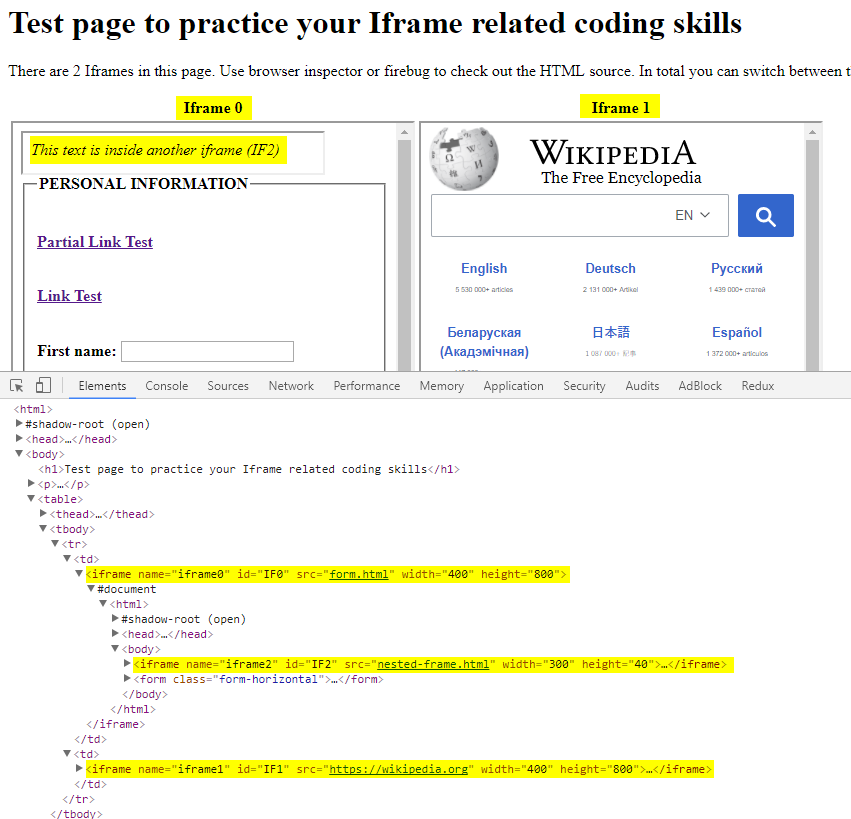
To switch to 0th iframe we can simple write driver.switchTo().frame(0). Here is the sample code:
open('https://rpa-tutorial.s3.amazonaws.com/trainings/iframe/iframe-test.html')
switchTo().frame(0)
Switch to frames by name
Now, if you take a look at the HTMLcode of iFrame you will find that it has a Name attribute. Name attribute has a value iframe0. We can switch to the iFrame using the name by using the switchTo().frame(“iframe0″) command. Here is the sample code:
open('https://rpa-tutorial.s3.amazonaws.com/trainings/iframe/iframe-test.html')
switchTo().frame('frame0')
Switch to frame by ID
Similar to the name attribute in the iFrame tag we also have the ID attribute. We can use that also to switch to the frame. All we have to do is pass the id to the switchTo command like this SwitchTo().frame(“IF1″). Here is the sample code
open('https://rpa-tutorial.s3.amazonaws.com/trainings/iframe/iframe-test.html')
switchTo().frame('IF0')
Switch to frame by WebElement
Now we can switch to an iFrame by simply passing the iFrame WebElement to the switchTo().frame() command. First, find the iFrame element using any of the locator strategies and then passing it to* switchTo* command. Here is the sample code:
open('https://rpa-tutorial.s3.amazonaws.com/trainings/iframe/iframe-test.html')
iframeElement = $(byId('IF0'))
switchTo().frame(iframeElement)
Switching back to main page from Frame
There is one very important command that will help us to get back to the main page. Main page is the page in which two iFrames are embedded. Once you are done with all the task in a particular iFrame you can switch back to the main page using switchTo().defaultContent(). Here is the sample code which switches the driver back to main page.
open('https://rpa-tutorial.s3.amazonaws.com/trainings/iframe/iframe-test.html')
iframeElement = $(byId('IF0'))
switchTo().frame(iframeElement)


// switching to a nested iframe
switchTo().frame(0)


// switching to the main page
switchTo().defaultContent()
How to interact with elements inside an Iframe
Now let's learn how to interact with elements inside an iFrame. Once we have switched to a particular iFrame everything else after that can be done using regular WebDriver command. Lets first create a hypothetical test case, here are the steps that we would take in our test.
- Switch to the first frame. See the image above.
- Find the First Name and Last name elements.
- Fill some value in the First name and Last name fields.
- Switch to the nested frame, get its text.
- Switch to the second frame.
- Find the search field and perform search.
- Try to click elements in another iframe.
Once you switch to the frame, you can access the html elements that are inside the frame. Any attempt to access the elements which are inside iFrame without switching to that ifFrame will result in WebDriver exception. At the end of this script, we will reproduce the exception for learning purpose.
Also, notice that once you have switch to the frame, the find element commands are exactly same as what we would use normally.
Interacting with elements inside iframes
<?xml version="1.0" encoding="UTF-8"?>
<config xmlns="http://web-harvest.sourceforge.net/schema/1.0/config" scriptlang="groovy">
    <robotics-flow>
        <robot name="ie" driver="chrome" close-on-completion="true">
            <script><![CDATA[

                pageLoadTimeout(10000)
                open('https://rpa-tutorial.s3.amazonaws.com/trainings/iframe/iframe-test.html')

                // Step 1: Switching to the 1st frame, frame index 0
                switchTo().frame(0)

                // Step 2: Find the First and Last name fields
                def firstName = $(byXpath("//form/fieldset//input[1]"))
                def lastName = $(byXpath("//form/fieldset/div[11]/input"))

                // Step 3: Fill some value in the fields
                firstName.sendKeys('Sanal')
                lastName.sendKeys('Singh')

                // Step 4: Switching to the nested frame, getting its text
                def nestedFrame = $(byXpath('//iframe'))
                switchTo().frame(nestedFrame)
                nestedFrameText = $('cite').getText()

                // Step 5: Switching to the 2nd frame using its id
                switchTo().defaultContent()
                switchTo().frame('IF1')

                // Step 6: Find the search field and perform search
                $(byId('searchInput')).val('Robotic Process Automation').pressEnter()

                // Trying to click elements in another iframe
                try {
                    firstName.sendKeys("New Name")
                } catch (Exception e) {
                    executeScript("alert('Cannot click on other iframe elements! Switch to that iframe first')")
                    sleep(3000)
                    confirm()
                }

            ]]></script>
        </robot>
    </robotics-flow>
    <export include-original-data="false">
        <single-column name="nestedFrameText" value="${nestedFrameText}"/>
    </export>
</config>