
Advanced
The Advanced tab of the System Preferences allows you to manually launch some batch jobs and gives you a view into the Web Service keys that WorkFusion uses.
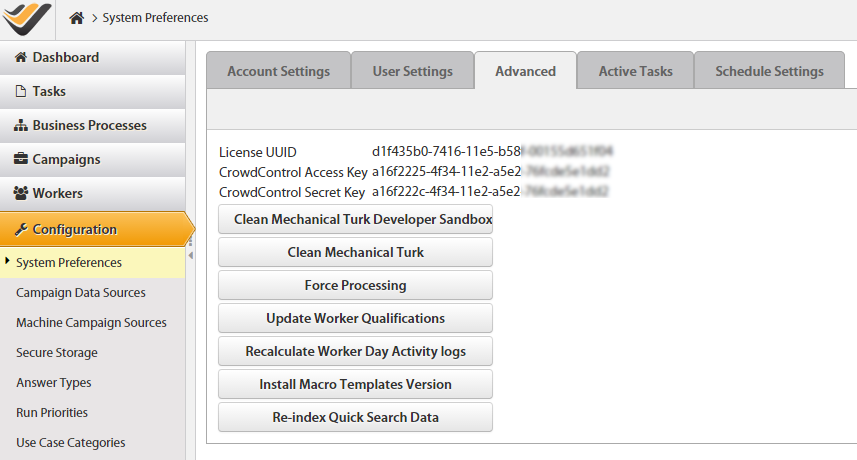
| Button | Description |
|---|---|
| Clean Mechanical Turk Developer Sandbox | Clear all the runs on the Amazon MTurk Sandbox endpoint. So clicking this button will remove any tasks that you currently have running on MTurk Sandbox. |
| Clean Mechanical Turk | Clear all the runs on the Amazon MTurk Production endpoint. So clicking this button will remove any tasks that you currently have running on MTurk Production. |
| Recalculate Worker Day Activity logs | Force the WorkFusion Worker Day Activity Log job to run immediately. |
| Force Processing | Force the WorkFusion batch jobs to run immediately rather than at their scheduled intervals. It is not recommended to use this feature on a daily basis because it could overload the endpoints. So unless there is an emergency, the batch jobs should be allowed to run on their scheduled intervals. |
| Install Macro Templates Version | Refresh the code in the Macro Templates with the latest code from the WorkFusion source repository. |
| Re-Index Quick Search Data | Refresh the Search Engine that WorkFusion uses with the latest indexes. |
| Update Worker Qualifications | WorkFusion platform sends a query to all endpoints to obtain and update Worker Qualifications (System Qualifications). |